 Root Directory formate for Remote Server File System
Added by Bryan Wilson over 14 years ago
Hi
Wonder if someone could please tell me what the Root Directory format is for a File System Repository when configuring for a project. I.e. I want to set up a Repository that uses a filesystem that is on a different server to the Redmine Application Host server. If I try something like \\myfileserver\docs
I get an "Internal Error" when trying to access the repository. A local root directory such as c:\files works 100%. I just can't seem to get it to work for a remote shared folder. There must be some kind of protocol I don't know about.
I've search the redmine site as well as google but can't find anything that outlines this.
Thanks
Replies (9)
RE: Root Directory formate for Remote Server File System
-
Added by Bryan Wilson over 14 years ago
Anyone?
RE: Root Directory format for Remote Server File System
-
Added by Bryan Wilson about 14 years ago
Can someone please help me with this?
Redmine is currently setup on an Ubuntu box on our network but it needs to access files on a windows server.
I just want to be able to access the documents - i.e. no source control needed.
Thanks
Bryan
 RE: Root Directory formate for Remote Server File System
-
Added by Felix Schäfer about 14 years ago
RE: Root Directory formate for Remote Server File System
-
Added by Felix Schäfer about 14 years ago
I'm not sure what you are trying to do, but it seems like you want to tie an already existing folder and the therein documents to a redmine project? That's not possible.
RE: Root Directory formate for Remote Server File System
-
Added by Bryan Wilson about 14 years ago
Thanks Felix
Very simple. All I'm trying to do allow users to access MS Word documents (not a code repository).
See attachment. I've created a file system repository. The one in the attachment works perfectly for local files but I can't seem to create one that accesses documents on another server/pc. How do I do that? I need to know what to put in the "Root Directory *" field when setting it up. I know for local you just specify the folder path e.g. //usr/share/documents but what do I put if I want to access a remote server/pc folder?
Lets assume the remote folder on a WINDOWS machine is: \\myfileserver\public\documents. What do I need to put in the "Root Directory *" field when setting it up?
Thanks
Bryan
| FileSystemSettings.JPG (33.6 KB) FileSystemSettings.JPG | File System Settings | ||
| FileSystemView.JPG (86.6 KB) FileSystemView.JPG | File System View |
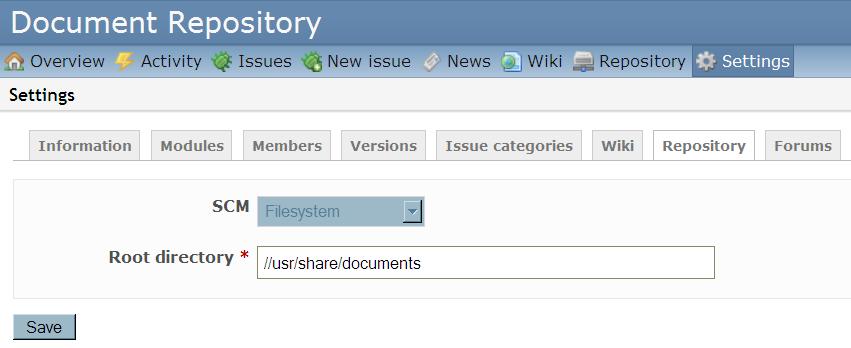

RE: Root Directory formate for Remote Server File System
-
Added by Felix Schäfer about 14 years ago
Ah, you see me dumbstruck, because I wasn't even aware of the "Filesystem" repository type.
Anyway, redmine doesn't have any in-built methods to access network filesystems, so you will have to mount the remote filesystem on your machine, assuming the redmine lies on a linux box, you will have to mount your windows share through samba, google it for your distribution, it should be quite straightforward to set up.
RE: Root Directory formate for Remote Server File System
-
Added by Bryan Wilson about 14 years ago
Excellent. I'm not a linux guy but come to think of it that should work perfectly!
Thanks!
RE: Root Directory formate for Remote Server File System
-
Added by Bryan Wilson about 14 years ago
Just struggling with the syntax. I've created a mounted share in ubuntu canlled "IT Documents on Servername" but not sure how I would access that from Redmine?? What would be the command in the Ubuntu Terminal? I've tried Google but can't find much.
RE: Root Directory formate for Remote Server File System
-
Added by Felix Schäfer about 14 years ago
I'm not familiar enough with Ubuntu to really be able to help you with this, but from what you are telling me, I suppose you have mounted it from the Gnome GUI? It could be that it's mounted somewhere in a virtual thingie and doesn't even have a real path on the machine. Try to google for "ubuntu fstab smbfs" or any combination of those, I think it should get you a little further (fstab is the file where you declare which filesystem should be mounted where, smbfs is the "filesystem" name for windows shares), or ask in a ubuntu forum or IRC channel or something.
RE: Root Directory formate for Remote Server File System
-
Added by Bryan Wilson about 14 years ago
Hi
Can someone help me with this please? I'm new to Ubuntu/Linux and I am able to mount the shared windows folder but I can seem to access it from Redmine. What do I need to put as the "Root Directory *" field when setting up the File System Repository within a project?
Thanks in Advance
Bryan