Defect #5522
closed
"search" form should have "all projects" and "my projects"
0%
Description
default search form located on every redmine page does not have "all projects" and "my projects" items in the drop-down:
the only way I see to search in all projects is to execute the search in 1 project only to get to this form, which does include what I need, then select "all" in the dropdown and repeat the same search:
this looks very confusing, so I mark this as "usability defect" rather than "new feature request".
please, enable cross-project search in the main search form. this can be achieved by adding "all projects" and "my projects" to the form.
Files
Related issues
 Updated by Jean-Baptiste Barth over 13 years ago
- Priority changed from High to Normal
Are you suggesting we add these 2 items in the jump box but they don't lead anywhere if we click on them ? They're just here for searching purposes ? It may be more confusing no ?
Plus, cross-project search are already enabled : as soon as you're not inside a project, "Jump to a project..." is displayed in the jump menu, and the search is performed on all visible projects.
 Updated by Alex Last over 13 years ago
The current interface is confusing. It's not obvious how to search among all projects. I know I need to go "outside" of a project, but this is inconvenient.
one of the options would be to add another "search in projects: all/proj1/proj2/...." drop-down with the projects list to the right of "search field". by default it can have the current project selected.
"Jump to project" dropdown definitely does not belong to its current location. it's shown right next to the "search field" and users assume this is where the search will be performed.
I'd rather have some other UI element for projects navigation. I like how it's done in Jira: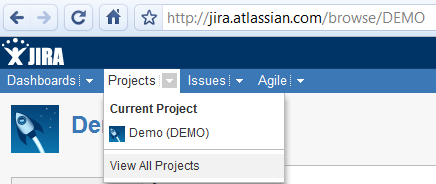
in this design it's obvious that the project navigation selection
- has nothing to do with search
- does not belong to a particular project as it is the top-level element shown outside of the project area
 Updated by Stéphane Gourichon almost 12 years ago
+1
The current interface is confusing. It's not obvious how to search among all projects. I know I need to go "outside" of a project, but this is inconvenient.
I observed exatcly the same.
Plus, every time I show Redmine to someone I have to explain that search is limited depending on the currently displayed project. Else people come to me and say that the search engine is broken somehow because they can't find items they put in.
I second Alexey's comment that current UI mixes two functions, which makes things not clear. If you don't know what these UI elements mean, you won't figure out easily.
 Updated by Etienne Massip almost 12 years ago
- Category set to UI
- Target version set to Candidate for next major release
 Updated by dj jones over 10 years ago
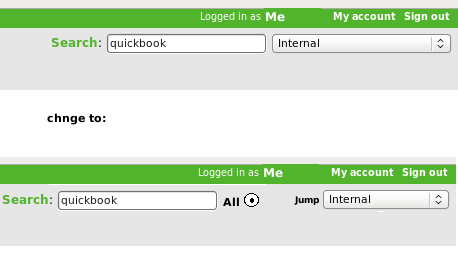
- File search-improvement-3.png search-improvement-3.png added
Is this a quick, sensible solution:
Theory: the difference in the URL called between 'search in this project' and 'search in all projects' is very small
- I just added '&scope=all' to the former: and it searches as the latter!
Proposal:
In the page top right, change the page as per attached before / after screenshot.
Ie seperate the 'search' field and and the 'projects' field: to allow putting 'All' check box between them: if ticked: in JS we add the above URL suffix to the search URL.
Very simple to do, and a big improvement!
 Updated by Daniele Pedroni over 10 years ago
+1, an "all projects" option in "Jump to a project.." drop down menu is just as useful as simple, I think.
I hope it could be released as suggested by dj jones also in the next minor release...
 Updated by
 Updated by Go MAEDA over 7 years ago
- Related to Feature #23310: Improved "jump to project" drop-down added
Updated by Go MAEDA about 7 years ago
- Status changed from New to Closed
- Target version deleted (
Candidate for next major release) - Resolution set to Fixed
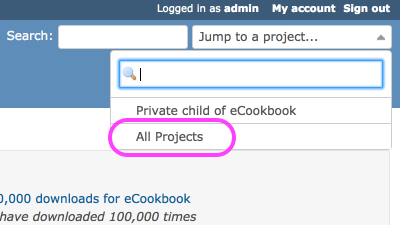
Implemented in r16172.
Redmine 3.4.0 has "All projects" in "Jump to project" drop down.