Feature #588
closed

Move timelog between projects
0%
Description
It'll be nice to have an ability to move or delete your timelog entries between projects (as issue_move). For example
cause of mistake.
Files
Related issues
 Updated by David Petersen about 16 years ago
You can "move" a time entry by editing it and then changing the issue number, time really isn't linked to a project but a issue.
The ability to delete a time entry would be nice.
 Updated by Michael Pirogov about 16 years ago
- File issue_move.png issue_move.png added
time really isn't linked to a project but a issue.
I think, it is. Try to change Issue number to another, which not belongs to the current project and you'll get an error. I'll attach a screenshot. You can see, that error is displayed even if an Issue ID exists and received correctly.
P.S. "Allow cross-project issue relations" is enabled.
 Updated by Jean-Philippe Lang about 16 years ago
Indeed, the time entry can not currently be moved to an issue of another project.
I think I could change this behaviour. What do you think ?
Updated by Michael Pirogov about 16 years ago
In our company we are spending less time to fill in a time entries. We just fill'em in one default 'stuff' project and then, near the end of the week and/or month, sort them. For another example: you have to do a very high priority work and after that you got next one (urgent too). There is no time to fill in all the forms to create a new issue. So you just made a 'timestamp' in 'stuff' (common, garbage, etc) project and at the end of a work day you'll create an issue ticket with all the things inside. After that you have to create a relation with your time entry. Back in time :) It's reverse logic: 1. Time entry 2. Issue. Something like that. Hope it's understandable. Sorry for my english, it's night up here now :)
Updated by David Petersen about 16 years ago
- File destroy.rhtml destroy.rhtml added
- File timelog_controller.rb.patch timelog_controller.rb.patch added
- File details.rhtml.patch details.rhtml.patch added
- File edit.html.patch edit.html.patch added
- File redmine.rb.patch redmine.rb.patch added
- File en.yml.patch en.yml.patch added
Here are the files to add the delete functionality.
destroy.rhtml - should go /app/views/timelog/destroy.rhtml
timelog_controller.rb.patch - patch file for /app/controllers/timelog_controller.rb
details.rhtml.patch - patch file for /app/views/timelog/details.rhtml
edit.rhtml.patch - patch file for /app/views/timelog/edit.rhtml
redmine.rb.patch - patch file for /lib/redmine.rb
en.yml.patch - patch file for /lang/en.yml
Think thats all the changes needed.
Updated by Jean-Philippe Lang about 16 years ago
Thanks. I'll have a look at all these files, even if a single diff would be easier to apply :-)
Updated by David Petersen about 16 years ago
Sorry about that, Still learning about the whole patch thing.
Updated by Michael Pirogov about 16 years ago
- Target version set to 0.7
up. It's really one of major things...
 Updated by Jens Wellmeyer over 12 years ago
The problem with moving spent time from one project to another still exists. We use redmine to track our time spent with over 200 Projects and would love to be able to transfer entries.
Any chance that this will be included in an upcoming version?
 Updated by Paco Alcaide about 11 years ago
- In our company we would like this issue too.
- We use time entries very hardly, and for now to move time entries, first we move it to another issue brother to the first one an inside the project (this is possible), and then we move the issue to another project or we make it daughter to another issue on the second project.
 Updated by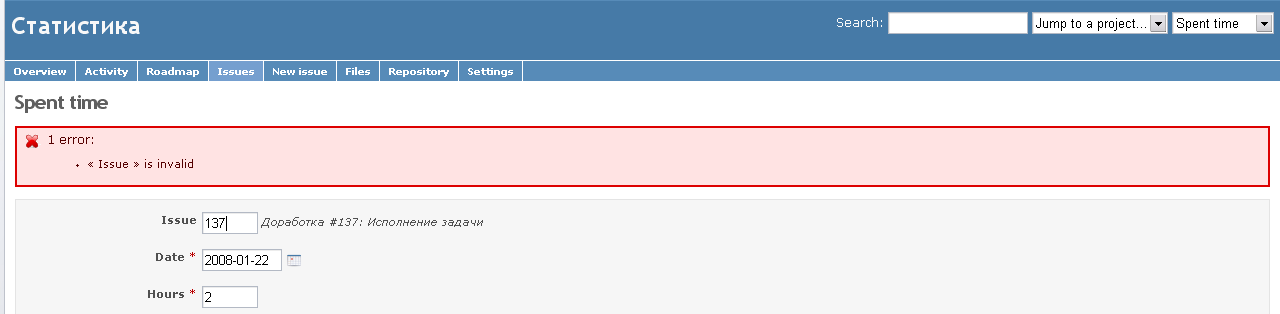
 Updated by Anton Nepomnyaschih about 10 years ago
It would be helpful to add more detailed error message, not only "Invalid issue", but for example "Timelog can't be moved between projects".
 Updated by Adrien Simon about 10 years ago
+1 for this feature from our side too :-)
If we can assist in anyway, drop me a note.
 Updated by Lydia Carley about 9 years ago
+1 from our company, too. For an efficient time logging tool this feature must be available.
 Updated by Simon Deziel over 8 years ago
Having this implemented would be really nice as the current workarounds are quite cumbersome.
Updated by Paco Alcaide over 8 years ago
- We have updated our Redmine from v. 2.2.2.0 to 3.2.0 the past December 16th 2015, and today I have found that this issue is solved, but I could not say from which version, because our jump has been great.
 Updated by Toshi MARUYAMA about 8 years ago
- Subject changed from Timelog move/delete to Timelog move/delete between projects
Updated by Toshi MARUYAMA about 8 years ago
Paco Alcaide wrote:
- We have updated our Redmine from v. 2.2.2.0 to 3.2.0 the past December 16th 2015, and today I have found that this issue is solved, but I could not say from which version, because our jump has been great.
Redmine 3.2 still cannot move timelog without issue.
Updated by Paco Alcaide about 8 years ago
Toshi MARUYAMA wrote:
Paco Alcaide wrote:
- We have updated our Redmine from v. 2.2.2.0 to 3.2.0 the past December 16th 2015, and today I have found that this issue is solved, but I could not say from which version, because our jump has been great.
Redmine 3.2 still cannot move timelog without issue.
If I understood good the issue, in Redmine we could not change the hours between proyects. I insist, we could not, because, due your comment, I promise you that right now, I have repeated the test and I have changed the issues numbers in 2 timelog entries at the same time, inside my Redmine v3.2, moving the hours to other issue, so to other proyect.
¿Maybe could be something about in the setup inside Redmine that let you do it?
Updated by Toshi MARUYAMA about 8 years ago
You can move time log if it links to issue.
But, you cannot if it does not link to issue.
 Updated by Marius BĂLTEANU over 7 years ago
We're very interested too in this feature, but I'm not sure how it should work.
I see 2 possibilities:
1. Allow moving between projects only spent times without issue id. This means that if you want to move a spent time with issue id to another project, first you need to unlink it from the issue and then change the project.
2. Allow moving all. This way seems a little bit more complex because there are multiple scenarios to take into consideration (clear issue when the project is changed, validate issue id and the project on save, etc).
Which is the desired behaviour?
Updated by Marius BĂLTEANU about 7 years ago
The attached patch allows moving timelogs between projects. I chose the second solution from my previous note (the issue_id is removed on project change event) because I think that is easier for the user.
Any feedback is welcomed. I really think that this feature is needed (we have a lot of cases per month where we need to change the timelog project) .
@Jean-Philippe Lang, the issue_id hidden_field_tag from timelog form
<% elsif params[:issue_id] %>
 <%= hidden_field_tag 'issue_id', params[:issue_id] %>
has any purpose? I'm asking because the issue_id text_field is always displayed in the form.
Updated by Marius BĂLTEANU about 7 years ago
Any feedback on this patch? I really think that this feature is needed.
Updated by Jean-Philippe Lang about 7 years ago
- Assignee set to Jean-Philippe Lang
- Target version set to 3.4.0
Updated by Jean-Philippe Lang about 7 years ago
- Subject changed from Timelog move/delete between projects to Move timelog between projects
- Status changed from New to Closed
- Resolution set to Fixed
Patch committed, thanks Marius. I've merged the changes to the bulk edit form as it's not fully working, we should have a way to clear issues (otherwise the update might fail) and the activity list should be updated when changing the project.
@Jean-Philippe Lang, the issue_id hidden_field_tag from timelog form has any purpose? I'm asking because the issue_id text_field is always displayed in the form.
The :issue_id param is used to redirect with the proper params. The form contains a different parma: time_entry[:issue_id].
Updated by Marius BĂLTEANU about 7 years ago
Jean-Philippe Lang wrote:
Patch committed, thanks Marius. I've merged the changes to the bulk edit form as it's not fully working, we should have a way to clear issues (otherwise the update might fail) and the activity list should be updated when changing the project.
Thanks for committing the patch. The changes for bulk edit shouldn't be in the patch from the beginning, they are just a quick solution for us internally. I'll create a new issue when I've the changes ready for the core.
The
:issue_idparam is used to redirect with the proper params. The form contains a different parma:time_entry[:issue_id].
Ah, my bad, sorry for not seeing this.
 Updated by Go MAEDA about 7 years ago
- Has duplicate Feature #22399: Edit project of time entries added
Updated by Toshi MARUYAMA about 7 years ago
- Has duplicate Feature #25381: Allow project selection when editing timelog entries added
Updated by Marius BĂLTEANU over 6 years ago
Marius BALTEANU wrote:
Jean-Philippe Lang wrote:
Patch committed, thanks Marius. I've merged the changes to the bulk edit form as it's not fully working, we should have a way to clear issues (otherwise the update might fail) and the activity list should be updated when changing the project.
Thanks for committing the patch. The changes for bulk edit shouldn't be in the patch from the beginning, they are just a quick solution for us internally. I'll create a new issue when I've the changes ready for the core.
The patch that implements the project bulk edit for time entries was added to #26534.
Updated by Marius BĂLTEANU over 6 years ago
- Related to Patch #26534: Allow project bulk edit of time entries added