Feature #6204
closed

Make the "New issue" menu item optional
0%
Description
I suggest to delete a bookmark "New issue" from the project interface.
It is more logical, if the new problem can be added directly from the task list.
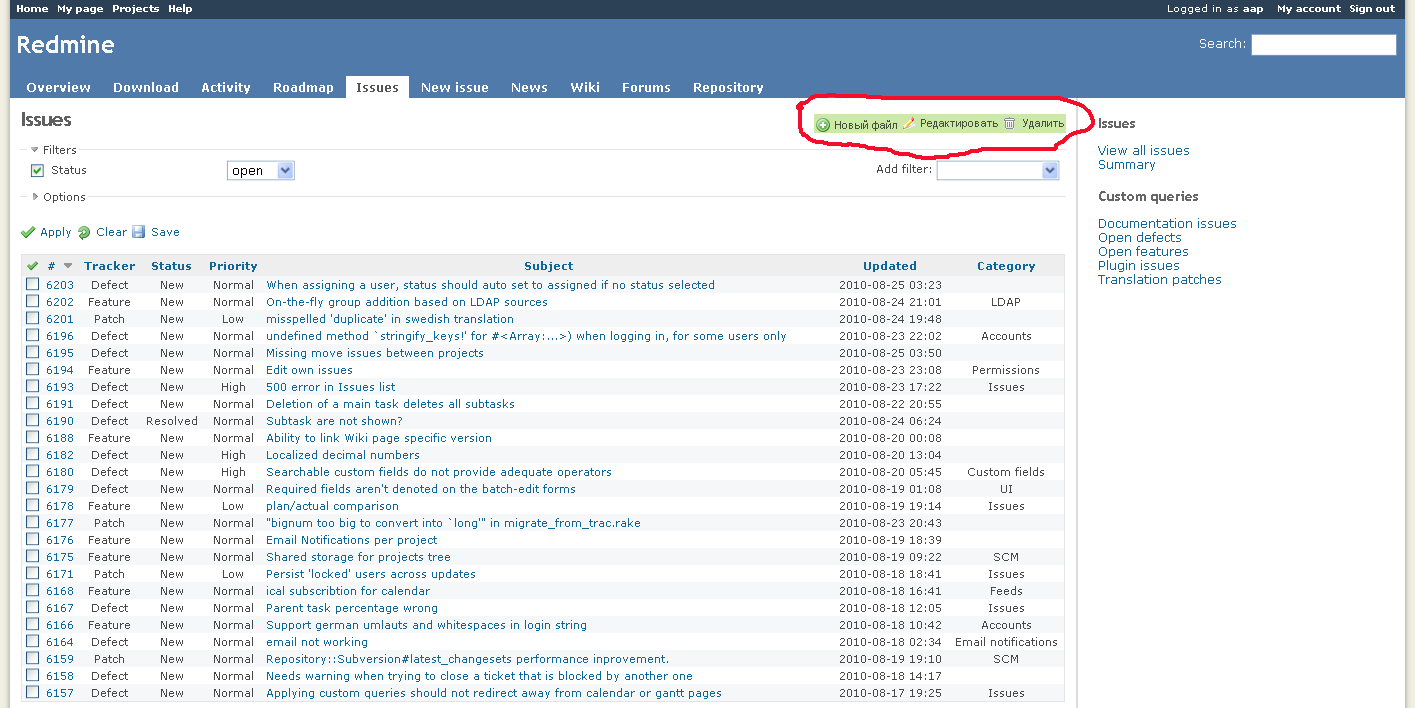
The page "New issue" will appear on a clique on an icon in the task list.
Files
Related issues


 Updated by Jean-Baptiste Barth over 13 years ago
Same request for a client: people don't understand why "new issue" position differs from all other elements. If I remember correctly, Shane&Peter design also put it elsewhere on the page, as a big green "New Issue" button.
Maybe we could simply add the links on issue page, and let theme designer decide where this item should go by hiding it where they want. What do you think ?
 Updated by Alexander A over 13 years ago
Updated by Alexander A over 13 years ago
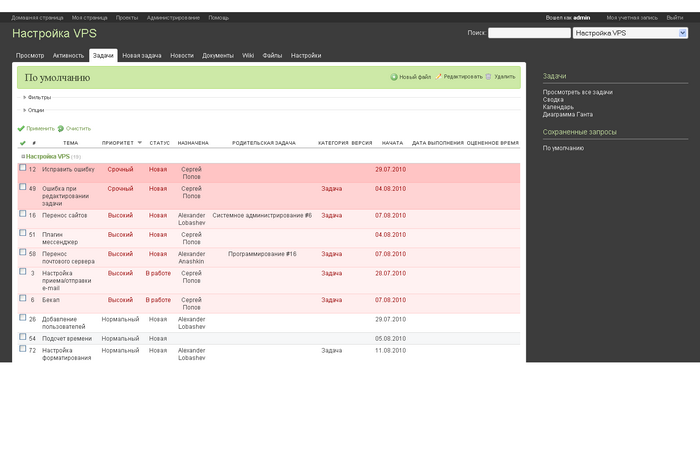
I think what is it the menu for the project: 
It is here again illogical to place a new issue.
Updated by Alexander A over 13 years ago
And the area for issues, files, news UI and others is in a light field on this image:
 Updated by

Updated by Alexander A over 13 years ago
Jean-Philippe Lang wrote:
See #1003 too.
And someone will want the New document or the New file list were always accessible to addition and then the global menu of the project will turn to not clear. And it will break structure and logic of elements of the menu.
The decision can be such:
1. The button to Add a issue to make as here: Feature #6204
2. To make adjusted area "the Adjusted menu" where the user can add menu points at own discretion: the New document, the New file, the New issue and others.
 Updated by Jean-Philippe Lang about 13 years ago
- Subject changed from delete bookmark "New issue" to Remove "New issue" menu item
 Updated by Alejandro Scandroli about 13 years ago
Remove "New issue" menu item
+1
 Updated by Seth Sandler over 12 years ago
What's the status of this? Is there a way to remove the 'new issues' tab and place a button the 'issues' page?
Updated by Seth Sandler over 12 years ago
- File index.rhtml index.rhtml added
This is a hack, but for people without other options you can try this. I'm uploading the index.rhtml file that should be placed in app\views\issues\ folder. This adds the 'new issue' button in the proper place (like other documents page).
Then to hide the 'new issues' button, I just put this in my theme's application.css
a.new-issue {
      visibility: hidden;
      width: 0px;
      margin: 0px;
      position: absolute;
  }
It's not ideal, but it works.
 Updated by Miko Kinski almost 11 years ago
I imagine that some people would argue about one more click. They would have to click on Issues and than creating actually a new issue.
Nice thing would be to have the possibility to create a New Issue from "View all issues" actually. If this would be possible under Issues tab it would be also great to have it on the all issues view. In this case it would be globally and similar to moving issue to different project where you can select the project for the issue.
Updated by Alexander A almost 11 years ago
Updated by Alexander A almost 11 years ago
I think that reducing of the clicks needed another way, without disturbing logic.
For example - to add the ability to sort the tabs modules. Then you can sort the first tab the "issues" and a single click will be less.
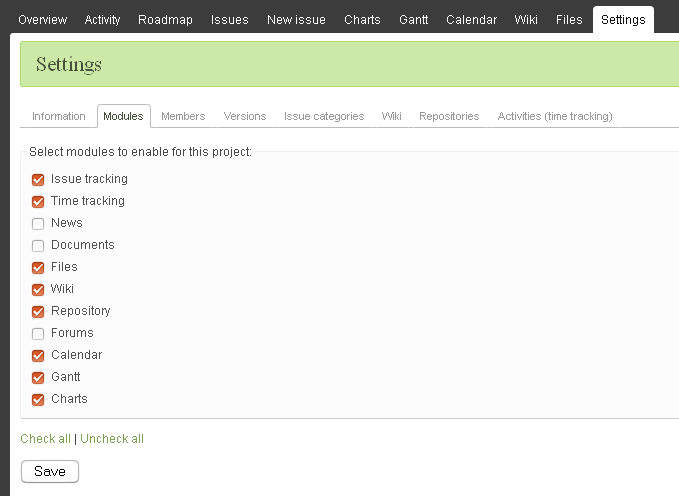
And the fact that the tab "New issue" to remove in the project interface, proves this screenshot:
We see that the "New issue" can not be disabled, so the tab is illogical.
 Updated by Ivan Cenov almost 11 years ago
I think it is appropriate to add new item in the context menu of issues' list: "New issue".
Updated by Alexander A almost 11 years ago
I doubt it - the context menu is the context of the issue. If the issues list is empty, and the menu is not.
Updated by Alexander A almost 11 years ago
Miko Kinski wrote:
Nice thing would be to have the possibility to create a New Issue from "View all issues" actually. If this would be possible under Issues tab it would be also great to have it on the all issues view. In this case it would be globally and similar to moving issue to different project where you can select the project for the issue.
+1
 Updated by Go MAEDA over 8 years ago
- Related to Feature #15880: Consistent, global button/menu to add new content added
Updated by Go MAEDA about 8 years ago
- Has duplicate Feature #12469: Alternate New Issue invocation added
Updated by Jean-Philippe Lang almost 8 years ago
- Status changed from New to Closed
- Assignee set to Jean-Philippe Lang
- Target version set to 3.3.0
- Resolution set to Fixed
Updated by Go MAEDA almost 8 years ago
- Status changed from Closed to Reopened
Since Jean-Philippe Lang decided not to implement global add button (#15880) in Redmine 3.3.0 (#15880#note-33), I think we have to revert the changes in r15344 to recover "New issue" tab. (No need to revert r15345).
In my opinion, "New issue" tab should not be removed without implementing #15880.
Updated by Jean-Philippe Lang almost 8 years ago
- Subject changed from Remove "New issue" menu item to Make the "New issue" menu item optional
- Status changed from Reopened to Closed
Updated by Go MAEDA almost 8 years ago
Jean-Philippe Lang wrote:
The removal of the menu item was intially requested without the need of #15880.
Many would miss it anyway so I've restored it but it's now optional (Settings -> Display -> Display the "New issue" tab)
Great! Thanks a lot.
 Updated by Toshi MARUYAMA over 7 years ago
- Related to Defect #23410: Error if create new issue and there is no project added
 Updated by Felix Wolfsteller about 7 years ago
I see why the "New Issue" tab was removed and the "+" added, but I am unhappy with the choice made regarding configuration of those. I would like to have a third option, "Show both", so that Users will see the "Add New"+ AND the "New Issue" (which is quick and can be found with CTRL-F, which is always an indication for a good solution). Should I open a new issue for that?
Updated by Go MAEDA about 7 years ago
Felix Wolfsteller wrote:
I see why the "New Issue" tab was removed and the "+" added, but I am unhappy with the choice made regarding configuration of those. I would like to have a third option, "Show both", so that Users will see the "Add New"+ AND the "New Issue" (which is quick and can be found with CTRL-F, which is always an indication for a good solution). Should I open a new issue for that?
Yes, could you open a new issue?
This issue cannot be reopened because the feature has already been delivered in Redmine 3.3.0.