Defect #6320
open
Subtasks do not appear under parent task in Issues view
0%
Description
When adding subtasks to issues (from the main issues/xx view using "Add subtask"), the subtasks do appear in the Subtasks view of that issue. Also the subtasks themselves seem to have the parent task number defined as they should.
However, in the main "Issues" view the subtasks appear as individual tasks, not as indented rows under the parent task as they should.
- Database version: MySQL 5.0
- Ruby version: 1.8.7
- Rails version: 2.3.5 (the one that came with Redmine in the vendor/ directory)
I'm using the Backlogs plugin (http://www.redminebacklogs.net/). It required database migration (http://www.redminebacklogs.net/en/installation/) - possibly it could have messed up something? But talso #6251 is some kind of sub-parent-task relation issue in 1.0.1.
Files
Related issues
 Updated by Siu Siu over 13 years ago
Same here, with almost fresh installation.
- Redmine: 1.0.0.stable
- Database: SQLite
- ruby 1.8.7 (2010-06-23 patchlevel 299)
- Redmine Checkout plugin installed (http://dev.holgerjust.de/projects/redmine-checkout).
Updated by Siu Siu over 13 years ago
I've noticed that subtasks are correctly indented when the issue table is ordered by id in ascending mode:
- http://localhost:3000/projects/projectname/issues?sort=id sub-issues are correctly indented
- http://localhost:3000/projects/projectname/issues?sort=id%3Adesc sub-issues are not indented
 Updated by Jeffrey Stone over 13 years ago
I'm also seeing this with a fresh install of 1.0.1
 Updated by
 Updated by Dmitry Nemov over 13 years ago
The same problem, fresh install 1.0.1 (stable)
 Updated by Karel Král over 13 years ago
The same problem, fresh install 1.0.1 (stable)
 Updated by Greg Parker over 13 years ago
If you add "parent task" as a column. You can then sort by parent task and the items are grouped properly. This is the only way I found to get it to work.
 Updated by
 Updated by Damien Couderc over 13 years ago
Same here.
It would be nice if there was a grouping option to get the same result than Greg (#7).
 Updated by Ryan H about 13 years ago
It would appear that it doesn't work in the following situation:
Create Issue #1
Create Issue #2
Create Issue #3 with parent issue #2
It shows the following:
Issue #1
Issue #2
- Issue #3
Now change Issue #1 to have parent Issue #2.
It shows the following:
Issue #1
Issue #2
- Issue #3
The issues view should show it like this:
 Updated by Etienne Massip about 13 years ago
Can't reproduce on trunk :

 Updated by Adam M almost 13 years ago
- File redmine-subtask-grouping-issue-1.png redmine-subtask-grouping-issue-1.png added
- File redmine-subtask-grouping-issue-2.png redmine-subtask-grouping-issue-2.png added
This issue does exist...
Using Redmine 1.1.3 on a Bitnami Stack
I've also used Redmine 1.0.1 on a Cent OS environment.
Please see attached images; for privacy reasons, I've censored some content.
Also there's no way to save a query to sort by ID that I can see in 1.1.3.
Updated by Adam M almost 13 years ago
Adam M wrote:
This issue does exist...
Using Redmine 1.1.3 on a Bitnami Stack
I've also used Redmine 1.0.1 on a Cent OS environment.Please see attached images; for privacy reasons, I've censored some content.
Also there's no way to save a query to sort by ID that I can see in 1.1.3.
I'd like to clarify this issue was occurring on both versions I've used whether it be a clean install or not.
I am not sure if it could maybe be an issue with created and saving a query?
Updated by Etienne Massip almost 13 years ago
Adam M wrote:
This issue does exist...
Using Redmine 1.1.3 on a Bitnami Stack
See Greg Parker's note (note 7), you should not sort on Id but on Parent task column.
 Updated by Pedro C over 12 years ago
I can confirm this bug, the task appears wrong inside parent task details too, when editing parent on children task the id is correct.
Because of this bug I can have a correct report on a important project.
 Updated by Jonathan Chen about 12 years ago
I'm on version 1.3.1 and I am having the same issue where in the issue and on the gantt it is shown correctly, but in the issue view it is shown incorrectly. It mainly happens whenever I create the issue and put in the parent task at the same time of creation.
 Updated by Carsten Weise over 9 years ago
Same here, on redmine 2.6.0-2.
There is a logic behind this: tasks are ordered either ascending or descending
Indention only works, if a subtask has a number greater/less than the parent task, depending on asc/desc
It would be nice if we had a mode that orders asc/desc, but gives precedence to the subtasks of a task
 Updated by Toshi MARUYAMA about 9 years ago
- Related to Defect #12846: sub-issues being rendered under wrong parent issue added
Updated by Toshi MARUYAMA about 9 years ago
- Related to Feature #7907: Display Issues in a hierarchy (tree) added
 Updated by Mateusz Zająkała about 9 years ago
I have the same problem, redmine 2.5.2-stable.
On one project's issue list some issue hierarchies (parent+subtasks) are displayed correctly, while others are not. In both cases children IDs are larger than parent ID (created later), I can't figure out what are the differences between working hierarchies and those displayed separately.
One hint would be that where children are displayed correctly with indentation the parent tracker is "Feature" (children are "Tasks"), while where they are displayed as separate items on the list the parent is also a "Task". But I tried changing its tracker to "Feature" and it does not help. Also tried sorting by any column (asc or desc) - always the same result.
Updated by Toshi MARUYAMA about 8 years ago
- Has duplicate Defect #22306: Bad dispalay of the issues having parent issue added
 Updated by
 Updated by pedro apero over 6 years ago
- File 4-redmine_subtask_bug_sorted_by_start_date_reverse.png 4-redmine_subtask_bug_sorted_by_start_date_reverse.png added
To be deleted.
Updated by pedro apero over 6 years ago
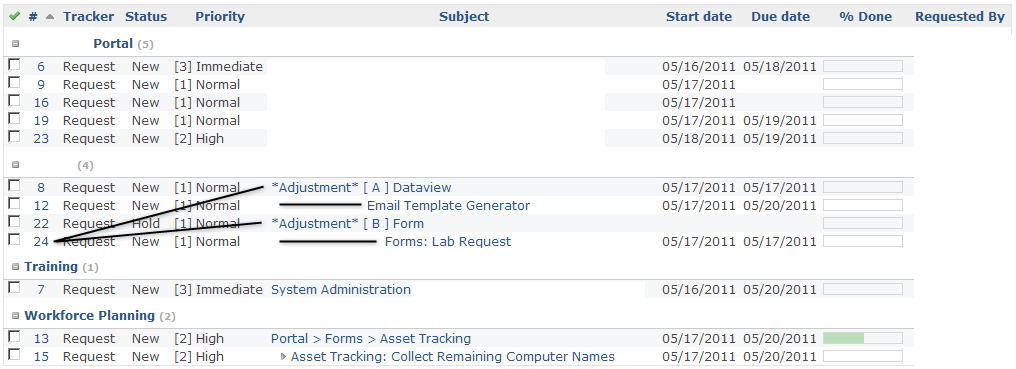
I confirm having the same issue on version 3.3.0.
Sorting by parent issue does not help.
Sorting by start date fix the display issue. Ordering matters.
Unsorted (by priority with same priority for all issue):
Sorted by parent task:
Sorted by starting date:
Sorted by starting date in reverse order:
 Updated by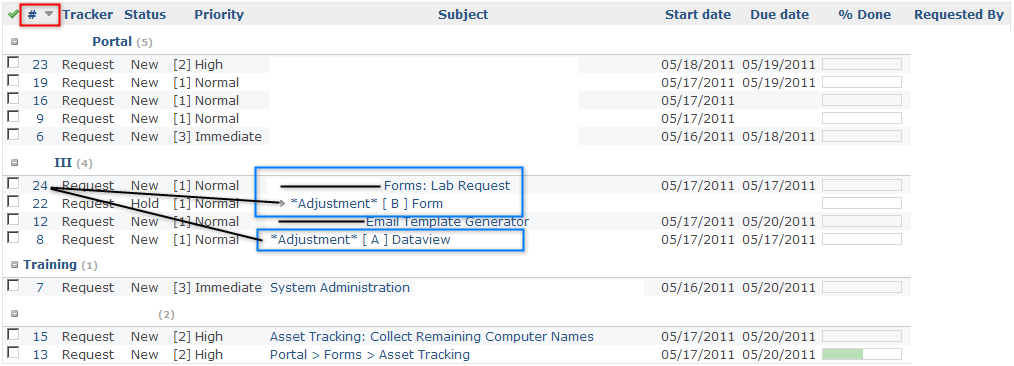

 Updated by Feh Mi almost 5 years ago
+1. I have the same problem.
Strange enough in a )simple) project, I can see the sub taskes listed under parent issue. However in a complex one, I don' t see it.
Environment:
Redmine version 4.0.2.stable
Ruby version 2.3.3-p222 (2016-11-21) [x86_64-linux-gnu]
Rails version 5.2.2
Environment production
Database adapter PostgreSQL
 Updated by Alexander Ryabinovskiy almost 5 years ago
+1
Environment:
Redmine version 3.4.6.stable
Ruby version 2.4.4-p296 (2018-03-28) [x64-mingw32]
Rails version 4.2.8
Environment production
Database adapter SQLServer
In some complex "issue trees" the task is not displayed. For example, for issue #666 parent task = #14. But task #666 is displayed as a single task, and I cant see it in task #14 childs list. Maybe, there is some limit to parents tree list?
#1
  #12
  #13
    #131
    #132
  #14
    #555
    #666! - not displayed
  #15
 Updated by Bernaldo Penas over 4 years ago
Hi:
- Redmine-4.0.4
- Ruby ruby 2.6.3p62 (2019-04-16 revision 67580) [x86_64-linux]
- Rails 5.2.3
- Operating system Debian 10
- PostgreSQL 11.5
- Apache/2.4.38
Same Issue here
 Updated by Philippe Vaucher almost 4 years ago
I found the problem:
irb(main):023:0> i1
=> #<Issue id: 27250, tracker_id: 8, project_id: 5071, subject: "bla2", description: "", due_date: "2020-05-21", category_id: nil, status_id: 1, assigned_to_id: 22, priority_id: 4, fixed_version_id: nil, author_id: 21, lock_version: 17, created_on: "2020-05-14 11:44:41", updated_on: "2020-05-14 11:44:41", start_date: "2020-05-14", done_ratio: 0, estimated_hours: nil, parent_id: nil, root_id: 27250, lft: 1, rgt: 0, is_private: false, closed_on: nil>
irb(main):024:0> i2
=> #<Issue id: 27258, tracker_id: 24, project_id: 5071, subject: "bla", description: "", due_date: nil, category_id: nil, status_id: 1, assigned_to_id: nil, priority_id: 4, fixed_version_id: nil, author_id: 21, lock_version: 0, created_on: "2020-05-14 11:49:55", updated_on: "2020-05-14 11:49:55", start_date: "2020-05-14", done_ratio: 0, estimated_hours: nil, parent_id: nil, root_id: 27258, lft: 1, rgt: 4, is_private: false, closed_on: nil>
irb(main):025:0> Issue.rebuild_single_tree!(i1.id)
=> [#<Issue id: 27257, tracker_id: 8, project_id: 5071, subject: "test", description: "", due_date: nil, category_id: nil, status_id: 1, assigned_to_id: nil, priority_id: 4, fixed_version_id: nil, author_id: 21, lock_version: 3, created_on: "2020-05-14 11:47:18", updated_on: "2020-05-14 11:49:35", start_date: "2020-05-14", done_ratio: 0, estimated_hours: nil, parent_id: 27250, root_id: 27250, lft: 2, rgt: 3, is_private: false, closed_on: nil>]
The nested set got out of sync for an unknown reason. Both i1 and i2 are issues with subtasks, but i1 has invalid `rgt` value and thus listing fails. Rebuilding the tree for that node fixes the problem.
To fix it for all issues, run `Issue.rebuild_tree!`.
 Updated by Ewan Makepeace almost 4 years ago
I just hit this exact problem - no idea why as we have changed nothing recently afaik. Thanks for the tip.
 Updated by Erwan Jolivet over 3 years ago
Have exactly same problem when i copy a issue with one sub task
The copied parent issue does not have the right rgt value
 Updated by JB Potokar about 3 years ago
Philippe Vaucher wrote:
I found the problem:
[...]
The nested set got out of sync for an unknown reason. Both i1 and i2 are issues with subtasks, but i1 has invalid `rgt` value and thus listing fails. Rebuilding the tree for that node fixes the problem.
To fix it for all issues, run `Issue.rebuild_tree!`.
Hello
I have got the same problem exactly here, running 4.0.6.stable. Could you explain how to run `Issue.rebuild_tree!` ?
Thx,
 Updated by Mischa The Evil about 3 years ago
JB Potokar wrote:
[...] Could you explain how to run `Issue.rebuild_tree!` ?
There are two ways to do that for this and any other calls, either interactively (using bin/rails console) or non-interactively (using bin/rails runner). These commands must be run from the Redmine root directory, just like DB- & plugin-migration tasks.
Though, make sure you have proper (DB) backups prior to running these and/or subsequent commands in case anything goes wrong.
Updated by Alexander Ryabinovskiy over 2 years ago
Thank you for advice!
I run this in redmine root directory:
rails runner "Issue.rebuild_tree!" -e production
and "lft", "rgt" fields in issues table was recalculated, my view of issue tree is correct now.
I think, I will make some regular night task with this command.
But I hope, you fix the original error with this fields.