Actions
Feature #8505
open

Log Time for Multiple Users
Start date:
2011-06-02
Due date:
% Done:
0%
Estimated time:
Resolution:
Description
I am looking for a very basic feature expanding on the built-in "log time" functionality. We currently use time tracking, but often a manager will need to track hours for some employees or one person will need to log hours for multiple people who are present in a meeting.
- The feature would simply add a 'multi-select' user drop down into the existing "Log Time" page
- When selecting multiple users, the number of hours tracked for each user would simply be the value in the 'hours' field.
- For example (a 1 hour meeting between myself and our graphic designer):
- I click "Log Time"
- From the user dropdown/multi-select, I select both myself and our designer
- I enter "1" in the Hours field
- Submit
- Now two time entries are entered, 1 hour for myself, and 1 hour for our graphic designer
- One optional additional piece of functionality (not entirely necessary) would be to limit this functionality to a certain privilege or group. For example, only admins or managers could see the users field on the log time page
Files
Related issues
 Updated by Siegfried Vogel almost 13 years ago
+1: Very much needed functionality in cases of absences, too.
 Updated by
 Updated by Brian Kjelin Olsen over 12 years ago
+1
This feature would help a lot.
 Updated by Doug Twyman about 12 years ago
+1 definitely would be a welcomed feature
 Updated by Toshi MARUYAMA
  Updated by
 Updated by Alexander Ryabinovskiy over 8 years ago
We need this functionality too :)
 Updated by Marius BĂLTEANU almost 6 years ago
- Assignee set to Marius BĂLTEANU
I've added a new patch to #3848 which adds the possibility to log time for another user. I'm assigning this ticket to me because I want to work on this feature in the near future (based on that patch).
 Updated by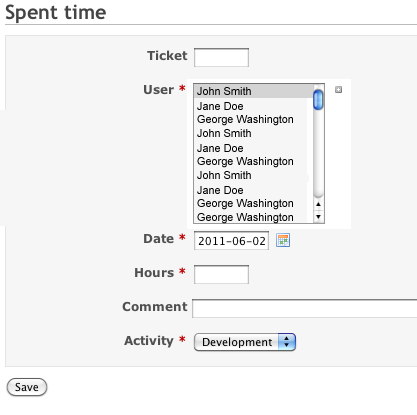
Actions