 How to backup redmine?
Added by ying chen about 18 years ago
- Database
/usr/bin/mysqldump -u <username> -p <password> <redmine_database> | gzip > /path/to/backup/db/redmine_`date +%y_%m_%d`.gz
- Attachments
rsync -a /path/to/redmine/files /path/to/backup/files
I have no idea how to use the instructions,can anyone teach me how to do it?
Replies (24)

 RE: How to backup redmine?
-
Added by David P almost 18 years ago
RE: How to backup redmine?
-
Added by David P almost 18 years ago
ying, do you still need help with this? if so, let me know.
 RE: How to backup redmine?
-
Added by Michael Aye almost 18 years ago
RE: How to backup redmine?
-
Added by Michael Aye almost 18 years ago
I think more than these 2 backup script lines would be very useful.
Something like general export/backup - import/restore instructions for Redmine.
Could someone type this together please? Shouldn't be too much work for the professionals...
 RE: How to backup redmine?
-
Added by Amit Aggarwal over 17 years ago
RE: How to backup redmine?
-
Added by Amit Aggarwal over 17 years ago
Hi,
Is there a backup script for windows ? Otherwise, please tell how to use these scripts...!
I have installed redmine using BITNAMI installer.
 RE: How to backup redmine?
-
Added by Tomás Rinke about 17 years ago
RE: How to backup redmine?
-
Added by Tomás Rinke about 17 years ago
hi, for ubuntu server you can do:
First: check those two command lines are working for your environment, watch out user/groups and file permissions
Second: create a script under /usr/local/bin with the working commands. (you can create one script per command) for example:
db_redmine_backup and files_redmine_backup
then test it by running the scripts
Third: once working, edit with a sudo user the file /etc/crontab by adding one or two lines at the end, you should understand what to put when you see the file, for example:
0 7 * * * adminuser /usr/bin/db_redmine_backup -> for a daily backup at 7 am
Fourth: you can edit the script to make an ftp o rpc to another machine
 RE: How to backup redmine?
-
Added by Lawrence Ferreira almost 17 years ago
RE: How to backup redmine?
-
Added by Lawrence Ferreira almost 17 years ago
ying chen wrote:
- Database
/usr/bin/mysqldump -u <username> -p <password> <redmine_database> | gzip > /path/to/backup/db/redmine_`date +%y_%m_%d`.gz
- Attachments
rsync -a /path/to/redmine/files /path/to/backup/filesI have no idea how to use the instructions,can anyone teach me how to do it?
Remember there is no space between -p and the password...
Should be something like that:
-ppassword
 RE: How to backup redmine?
-
Added by Peter Theill almost 16 years ago
RE: How to backup redmine?
-
Added by Peter Theill almost 16 years ago
I wrote a script for backing up Redmine on Google Storage. It might be of interest for some of you. Read article from my blog at:
http://commanigy.com/blog/2010/10/27/how-to-backup-redmine-on-google-storage
 RE: How to backup redmine?
-
Added by Robert Klajko over 13 years ago
RE: How to backup redmine?
-
Added by Robert Klajko over 13 years ago
Hi,
I wrote a short backup script for TurnKey Redmine Appliance (Debian Squeezy 6.0.5) based on Peter Theill script. Thanks Peter for the ideas!
It makes daily full backup of 'redmine_production' DB and ./files subdirectory, then sends to a windows file server, which has daily tape backup.
Please find attached script.
| redmine-backup.sh (1.37 KB) redmine-backup.sh |
 RE: How to backup redmine?
-
Added by Keith Pawson over 13 years ago
RE: How to backup redmine?
-
Added by Keith Pawson over 13 years ago
Thanks to both Robert and Peter for the information and scripts, I've based my backup script on Robert's and added a email function, so that I get an email every morning to know that it's backedup fine.
Here is what I added to the end of the script:cat /home/keith/utils/redminebu.rpt | mail -s "Redmine Backup Job & Log Report" someone@example.com
So my cron job looks like this:30 4 * * * sh /home/keith/utils/redminebu.sh > /home/keith/utils/redminebu.rpt
Here is what I get emailed:
2013.06.13 04:30:02 Start
2013.06.13 04:30:02 Setting up directories
2013.06.13 04:30:02 Backing up database
2013.06.13 04:30:02 Backing up attachments
2013.06.13 04:30:02 Packing into single archive
2013.06.13 04:30:02 rsync to Backup server
sending incremental file list
./
redmine_full_backup_20130613.tar.gz

sent 95916 bytes  received 40 bytes  191912.00 bytes/sec
total size is 286358  speedup is 2.98
2013.06.13 04:30:02 Backup Finished
Maybe this might be handy for some.
Cheers
 how to run backup script in tunkey redmine please send steps
-
Added by Paresh Patel about 13 years ago
how to run backup script in tunkey redmine please send steps
-
Added by Paresh Patel about 13 years ago
Robert Klajko wrote:
Hi,
I wrote a short backup script for TurnKey Redmine Appliance (Debian Squeezy 6.0.5) based on Peter Theill script. Thanks Peter for the ideas!
It makes daily full backup of 'redmine_production' DB and ./files subdirectory, then sends to a windows file server, which has daily tape backup.
Please find attached script.
hi robert thanks for this backup script but some problem occure such as
how to run this script in turnkey redmine
please send step : follow run this script
RE: How to backup redmine?
-
Added by Robert Klajko about 13 years ago
Hi Paresh,
I simply put this line to root's crontab:
50 19 * * * root /usr/local/sbin/redmine-backup.sh
So everyday, at 19:50 this script backups Redmine data.
I hope I helped you, but if you have further questions don't hesitate to contact me again.
Regards,
Robert
RE: How to backup redmine?
-
Added by Michael Aye about 13 years ago
Could somebody maybe close the loop on this and use the files created by the back-up script for a reinstall of the Redmine? What commands have to be used to put a backup completey back into place?
RE: How to backup redmine?
-
Added by Paresh Patel about 13 years ago
hi robert
have script run but not backup automatically generate plz step send...
i have used turnkey redmine step send turnkey redmine administrator follow how to backup script run ....
thnks for help
RE: How to backup redmine?
-
Added by Paresh Patel about 13 years ago
Michael Aye wrote:
Could somebody maybe close the loop on this and use the files created by the back-up script for a reinstall of the Redmine? What commands have to be used to put a backup completey back into place?
hello michael
i have used turnkey redmine then i run script then error occus plz find attechment file
this file is error image plz show then how to resolve this error suggests me
| redmine-backup script run then this error.PNG (111 KB) redmine-backup script run then this error.PNG | error redmine backup script run |
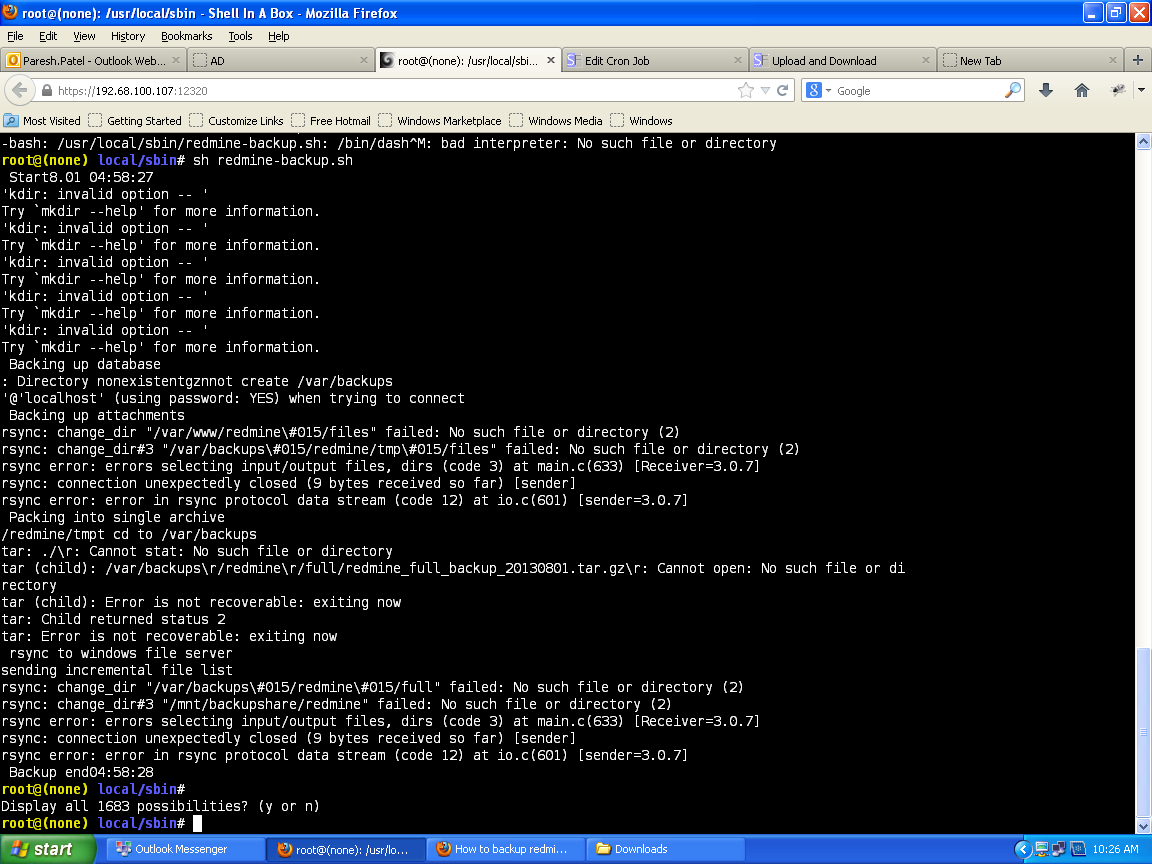
script run then this error plz attechment file show
-
Added by Paresh Patel about 13 years ago
hi robert
i have used turnkey redmine then i run script then error occus plz find attechment file
this file is error image plz show then how to resolve this error suggests me
| redmine-backup script run then this error.PNG (111 KB) redmine-backup script run then this error.PNG | error redmine backup script run |
 RE: How to backup redmine?
-
Added by Mindaugas Kairys about 13 years ago
RE: How to backup redmine?
-
Added by Mindaugas Kairys about 13 years ago
I'm attaching my version of backup script for mysql db and redmine files.
It was tested on debian squeeze, however restore test was not performed, so use it at your own risk.
| backup_redmine.sh (656 Bytes) backup_redmine.sh |
RE: script run then this error plz attechment file show
-
Added by Robert Klajko about 13 years ago
Paresh Patel wrote:
hi robert
i have used turnkey redmine then i run script then error occus plz find attechment file
this file is error image plz show then how to resolve this error suggests me
Hi Paresh,
A bit strange error messages...
Do you have dash installed?
Please check it with this command: apt-cache search dash
You should see a similar row in the output:
dash - POSIX-compliant shell
If you don't see, please install it as root: apt-get install dash
I hope this will help you.
Regards,
Robert
RE: How to backup redmine?
-
Added by Robert Klajko about 13 years ago
Michael Aye wrote:
Could somebody maybe close the loop on this and use the files created by the back-up script for a reinstall of the Redmine? What commands have to be used to put a backup completey back into place?
Hi Michael,
The restoration process should consist of these steps, assuming that you have a working Redmine system, and currently nobody logged in:- Copy backup file to Redmine subdir, eg: cp redmine_full_backup_20130914.tar.gz /var/www/redmine
- Go to the Redmine subdir: cd /var/www/redmine
- Uncompress and untar: tar xvfz redmine_full_backup_20130914.tar.gz
- Now the files are restored in the right subdir, /var/www/redmine/files
- Uncompress backup dump: gzip -d ./db/mysql_20130914.sql.gz
- Restore the database: mysql --user=root --password=rootpassword redmine_production < ./db/mysql_20130914.sql
I hope this will help you.
Regards,
Robert
 RE: How to backup redmine?
-
Added by Cedric mosnier almost 13 years ago
RE: How to backup redmine?
-
Added by Cedric mosnier almost 13 years ago
Hi all,
how to backup with redmine version :
Redmine 1.3.2.stable (SQLite)
i use Robert Klajko script but i have a
mysqldump: Got error: 1049: Unknown database 'redmine_production' when selecting the database
i think it is because redmine use sqlite but how to backup with it ?
RE: How to backup redmine?
-
Added by Robert Klajko almost 13 years ago
In my environment, the redmine database has got the 'redmine_production' name during the installation process, but it was automatic.
I use MySQL db server.
You may check your db server for db name. Maybe it has got a different name, for example 'redmine' or something similar.
Regards,
Robert
 RE: How to backup redmine?
-
Added by Alex Stout over 12 years ago
RE: How to backup redmine?
-
Added by Alex Stout over 12 years ago
Does anyone else see an issue with this type of a database backup and scalability?
I am currently trying to update my Redmine instance to the newest version (from 2.3.3) and I am trying to do it all in a new clean install. But taking my sql dump from my old Redmine instance and placing it in the new Redmine instance breaks the Redmine site completely. The latest Redmine version has new columns in a few of the database tables. The two databases are incompatible. I'm currently going into each table, one-by-one, and copying data from each old Redmine table to the new Redmine table ensuring that I'm only updating on the common columns. It's quite the tedious task. Especially since my old install also had new tables and columns from plugins.
Does anyone have a way of backing up the data while keeping updates in mind?
I will put the work into this in the near future and post my findings, but I think this is something worth documenting.
RE: How to backup redmine?
-
Added by Michael Aye over 12 years ago
I also think that this issue is much under-documented and taken care of. This should be made far easier, users want new futures without these kind of problems.
 RE: How to backup redmine?
-
Added by Jean-Baptiste Barth over 12 years ago
RE: How to backup redmine?
-
Added by Jean-Baptiste Barth over 12 years ago
Alex Stout wrote:
The databases structures vary, that's expected. The correct way of doing this is the following :I am currently trying to update my Redmine instance to the newest version (from 2.3.3) and I am trying to do it all in a new clean install. But taking my sql dump from my old Redmine instance and placing it in the new Redmine instance breaks the Redmine site completely. The latest Redmine version has new columns in a few of the database tables. The two databases are incompatible. I'm currently going into each table, one-by-one, and copying data from each old Redmine table to the new Redmine table ensuring that I'm only updating on the common columns. It's quite the tedious task. Especially since my old install also had new tables and columns from plugins.
- backup your redmine 2.3.3 database
- restore it on a new fresh database, structure included ; do NOT create the new structure from 0 with redmine rake tasks
- then run "rake db:migrate" so that the new database gets updated from 2.3.3 to 2.5.0 schema, data included
That's basically what's described in RedmineUpgrade except it assumes your upgrading "in-place" on the same database.
 RE: How to backup redmine?
-
Added by Jordan Jambazov about 12 years ago
RE: How to backup redmine?
-
Added by Jordan Jambazov about 12 years ago
Lately I have started working on a Python micro-framework for backups. I prepared a small script that does a backup of the whole Redmine installation and the database: https://github.com/jordanjambazov/paranoik-backups/blob/master/examples/redmine-backup.py