Feature #43023
open

IMAP email retrieval via OAuth2
Description
This patch adds IMAP email retrieval via OAuth2.
Example - Office 365 email retrieval via OAuth2:- Register an application in Azure and grant "IMAP.AccessAsUser.All" permission. Note the tenant ID, client ID and client secret.
- Initialize the OAuth token:
rake redmine:email:o365_oauth2_init token_file=config/email_oauth2 client=YOUR_CLIENT_ID secret=YOUR_CLIENT_SECRET tenant=YOUR_TENANT_ID
- Fetch messages using the token:
rake redmine:email:receive_imap_oauth2 token_file=config/email_oauth2 host=outlook.office365.com port=993 ssl=1 username=YOUR_ACCOUNT
Files
Related issues
 Updated by Marius BĂLTEANU over 1 year ago
- Target version set to Candidate for next major release
 Updated by Jan Catrysse over 1 year ago
- File Feature__move_to_modern_authentication(OAuth_2_0)_from_IMAP_version2.patch Feature__move_to_modern_authentication(OAuth_2_0)_from_IMAP_version2.patch added
I have completely refactored and reworked the code. It now includes support for Google, includes documentation, and has extra tests.
For me it all works for both o365 and Google, but please don't hesitate to do some extra testing for different use cases.
Updated by Jan Catrysse about 1 year ago
- File Feature__move_to_modern_authentication(OAuth_2_0)_from_IMAP_version3.patch Feature__move_to_modern_authentication(OAuth_2_0)_from_IMAP_version3.patch added
- Added an intuitive help mechanism
- Translated Dutch comments to English
 Updated by Omega Code about 1 year ago
nice job with incoming mails support.
is there any working solution for outcoming emails? (replacing basic auth with ouauth)
Updated by Jan Catrysse about 1 year ago
Thank you, it's not all my work. I will check for smtp, but give me some time.
Updated by Marius BĂLTEANU about 1 year ago
- Target version changed from Candidate for next major release to 7.0.0
Updated by Marius BĂLTEANU 4 months ago
- Target version changed from 7.0.0 to 7.1.0
Updated by Marius BĂLTEANU about 1 month ago
- Related to Patch #40325: Redmine Email Notification Issue - Help Needed for Modern Authentication added
Updated by Marius BĂLTEANU about 1 month ago
- Related to Defect #37688: Move to modern authentication(OAuth 2.0) from IMAP for receiving email in Redmine. added
Updated by Marius BĂLTEANU about 1 month ago
- Related to Defect #37705: Move to modern authentication(OAuth 2.0) from IMAP for receiving email in Redmine. added
Updated by Marius BĂLTEANU about 1 month ago
- Related to deleted (Defect #37705: Move to modern authentication(OAuth 2.0) from IMAP for receiving email in Redmine.)
Updated by Marius BĂLTEANU 17 days ago
- File 0001-Implement-OAuth-2.0-XOAUTH2-support-for-incoming-IMA.patch added
The attached patch adds native OAuth 2.0 support for incoming email fetching in Redmine without external gem dependencies or complex build steps.
Features implemented:- Web-based authorization flow in the Administration area to authorize email accounts with providers like Google and Microsoft.
- Background auto-refresh of access tokens using stored refresh tokens prior to IMAP fetching.
- Existing rake tasks (e.g. redmine:email:receive_imap) automatically use the authorized OAuth token when the username matches an authorized email account.
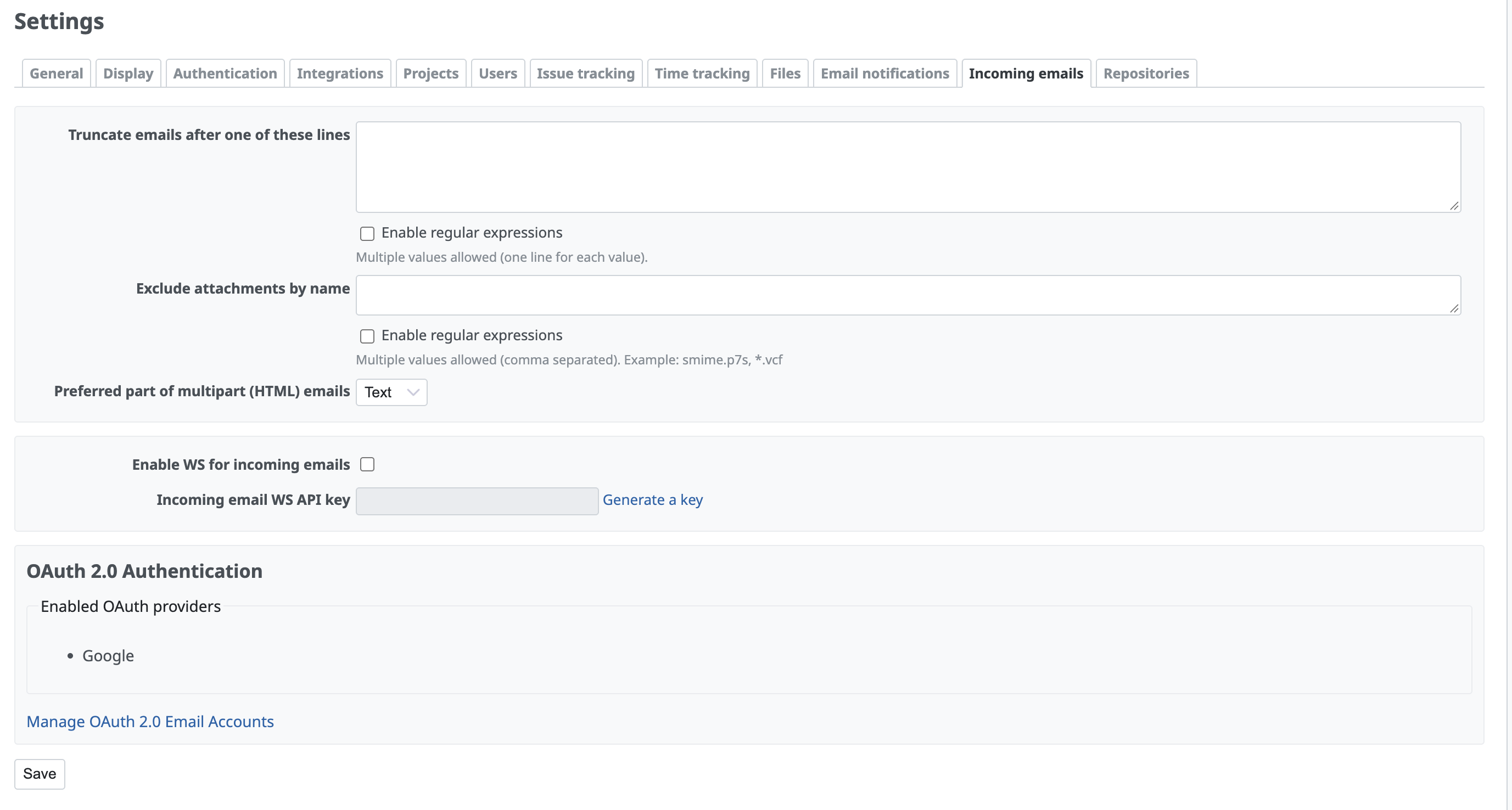
- Status, token validity, and enabled providers are visible directly under Administration → Settings → Incoming emails.
Instructions to Test
1. Register an OAuth 2.0 application in your provider’s console (Google Cloud Console or Microsoft Entra ID / Azure Portal):
- Redirect URI: http://<your-redmine-host>/admin/mail_handler/oauth/callback
- Required Scopes:
- Google: https://mail.google.com/ (or IMAP scope), offline_access
- Microsoft 365: https://outlook.office.com/IMAP.AccessAsUser.All, offline_access
2. Configure config/configuration.yml
Add the provider credentials to config/configuration.yml and restart Redmine:
default:
  email_oauth:
    providers:
      google:
        client_id: "YOUR_GOOGLE_CLIENT_ID"
        client_secret: "YOUR_GOOGLE_CLIENT_SECRET"
      microsoft:
        client_id: "YOUR_MICROSOFT_CLIENT_ID"
        client_secret: "YOUR_MICROSOFT_CLIENT_SECRET"
        tenant_id: "common" # or your Azure Tenant ID
- Go to Administration → Settings → Incoming emails.
- Verify that your configured providers appear under the Enabled OAuth providers section.
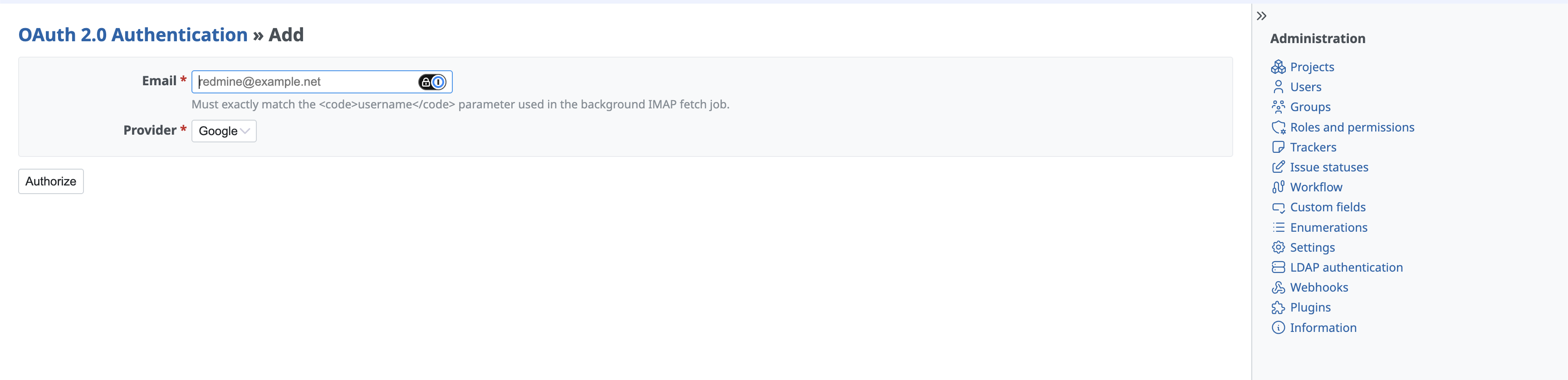
- Click Manage OAuth 2.0 Accounts (or Add).
- Enter the email address you want to fetch emails from and select the provider.
- Click Authorize → complete the sign-in and consent flow on the provider’s page.
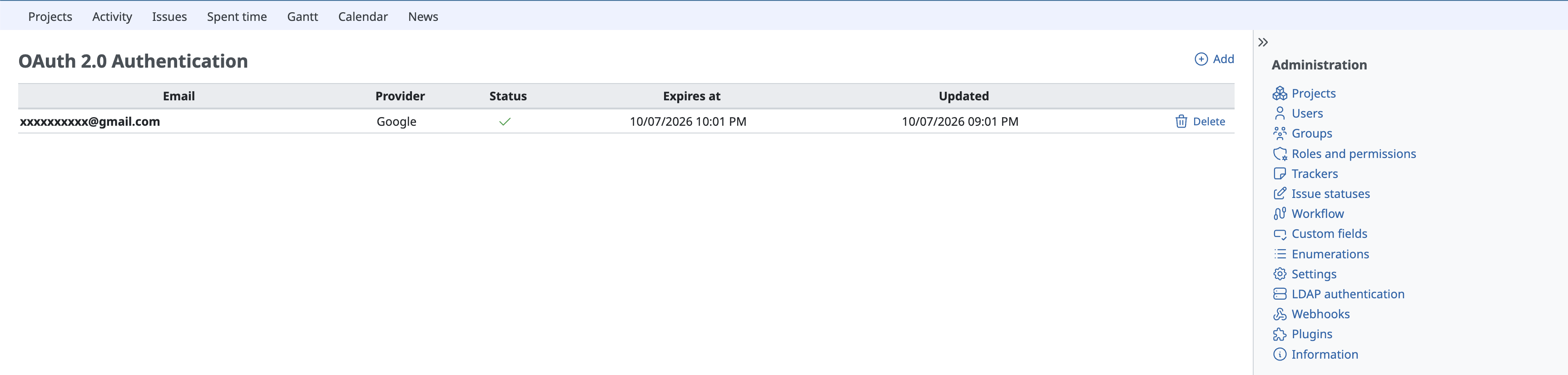
- Upon return, verify that the email account appears in the list with a green checkmark.
4. Test Fetching Emails via Rake Task
Run the standard IMAP receive task using the authorized email as username (password is no longer needed):
bin/rake redmine:email:receive_imap \
  host='imap.gmail.com' \
  port=993 \
  ssl=1 \
  username='authorized_email@example.com' \
  project='my-project' \
  tracker='Bug' \
  RAILS_ENV=production
(For Microsoft 365, use host='outlook.office365.com')
5. Verify Token Refresh & Revocation- Auto-refresh: When the access token expires (typically after 1 hour), running the rake task should automatically refresh the access token and succeed.
- Deletion: In Administration -> Settings -> Incoming emails -> Manage OAuth 2.0 Accounts, clicking the delete button on a token mapping should delete the stored tokens.
The patch still needs some minor improvements in the admin UI, but it's good enough to test the functionality.
Updated by Marius BĂLTEANU 17 days ago
- File deleted (
0001-Implement-OAuth-2.0-XOAUTH2-support-for-incoming-IMA.patch)
Updated by Marius BĂLTEANU 17 days ago
- File 0001-Implement-OAuth-2.0-XOAUTH2-support-for-incoming-IMA.patch 0001-Implement-OAuth-2.0-XOAUTH2-support-for-incoming-IMA.patch added
Removed some debug code from the initial patch.
Updated by Marius BĂLTEANU 17 days ago
- File OAuth 2.0 - Add.png OAuth 2.0 - Add.png added
- File OAuth 2.0 - List accounts.png added
- File Oauth 2.0 - Incoming.png Oauth 2.0 - Incoming.png added
Jan Catrysse wrote in #note-4:
- Added an intuitive help mechanism
- Translated Dutch comments to English
Thanks for working on this.
I've tried a different approach for the following reasons:
- Web-based Authorization: Authorize email accounts directly from the browser in the Administration area without running interactive CLI rake tasks on the server.
- Database-backed Tokens: Tokens are stored in the database instead of local filesystem files, ensuring full compatibility with Docker, Kubernetes, and multi-server setups.
- Multi-Provider & Multi-Account Support: Standardized support for both Microsoft 365 and Google Workspace in
configuration.yml, with the ability to manage multiple email accounts. - Backward-Compatible Rake Tasks: Keeps the existing redmine:email:receive_imap task. If an email has an authorized token, Redmine automatically uses OAuth 2.0 (XOAUTH2) and transparently handles token refreshes without requiring crontab changes.
I have tested this implementation with Gmail / Google Workspace, but I would really appreciate any help in testing it with Microsoft 365 or other environments to ensure everything works smoothly. Feedback is very welcome!
Attached some screenshots.
Updated by Marius BĂLTEANU 17 days ago
- File deleted (
OAuth 2.0 - List accounts.png)
Updated by Marius BĂLTEANU 17 days ago
- File OAuth 2.0 - List.png OAuth 2.0 - List.png added