Actions
Defect #43358
closed

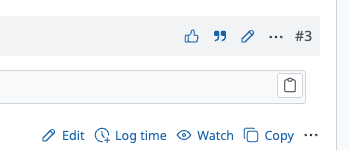
Code block copy button icon appears gray instead of blue
Resolution:
Fixed
Affected version:
Files
Related issues
 Updated by Katsuya HIDAKA about 1 year ago
- File after-fix.png after-fix.png added
- File 0001-Improve-formatting-of-multiple-icon-button-selectors-for-readability.patch 0001-Improve-formatting-of-multiple-icon-button-selectors-for-readability.patch added
- File 0002-Fix-the-issue-where-code-block-copy-button-icon-appears-gray-instaed-of-blue.patch 0002-Fix-the-issue-where-code-block-copy-button-icon-appears-gray-instaed-of-blue.patch added
I'm attaching the fix patch. In patch 0002, the selectors that receive --oc-blue-9 are switched from a.icon:link / a.icon:visited to plain a.icon.
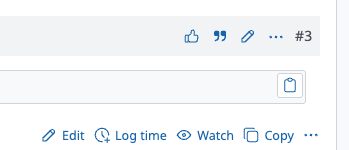
If that change raises concerns, the issue can also be resolved by simply adding href="#" to the code block copy button as shown below.
diff --git a/app/assets/javascripts/application-legacy.js b/app/assets/javascripts/application-legacy.js
index 6bd315721..7bfddd1e1 100644
--- a/app/assets/javascripts/application-legacy.js
+++ b/app/assets/javascripts/application-legacy.js
@@ -689,6 +689,7 @@ function setupCopyButtonsToPreElements() {

     const copyButton = document.createElement("a");
     copyButton.title = rm.I18n.buttonCopy;
+    copyButton.href = "#";
     copyButton.classList.add("copy-pre-content-link", "icon-only");
     copyButton.append(createSVGIcon("copy-pre-content"));
Patch 0001 is just the commit that improves the CSS readability.
Updated by Katsuya HIDAKA about 1 year ago
The icon doesn't appear blue because the copy button lacks an href attribute, so the a.icon:link selector never matches.
 Updated by Go MAEDA about 1 year ago
- Related to Feature #43280: Improve visual distinction of link presence in SVG icons added
Updated by Go MAEDA about 1 year ago
- Status changed from New to Confirmed
- Assignee set to Go MAEDA
Actions