Plugins Directory » Redmine chart reporting
|
|
Author: | Ákos Szabó |
|---|---|---|
| Website: | https://github.com/WhitehawkTailor/redmine_chart_reporting | |
| Code repository: | https://github.com/WhitehawkTailor/redmine_chart_reporting.git | |
| Registered on: | 2025-12-29 (9 months ago) | |
| Current version: | 1.0.1 | |
| Compatible with: | Redmine 6.1.x, 6.0.x, 5.1.x, 5.0.x | |
| User ratings: |
It is a simple chart reporting plugin for Redmine. It is placed on all the issue list pages that has a filter on the top. Currently there are two kind of charts available. These are displayed under the filters on a tabbed are.
- Issue list statistic based on a selected field
- Open vs Closed chart. This can handle all the issue from the list (open vs closed), or only the issues were created in the given date period (created vs closed).
Find more details see the documentation of the code repository: https://github.com/WhitehawkTailor/redmine_chart_reporting
Statistics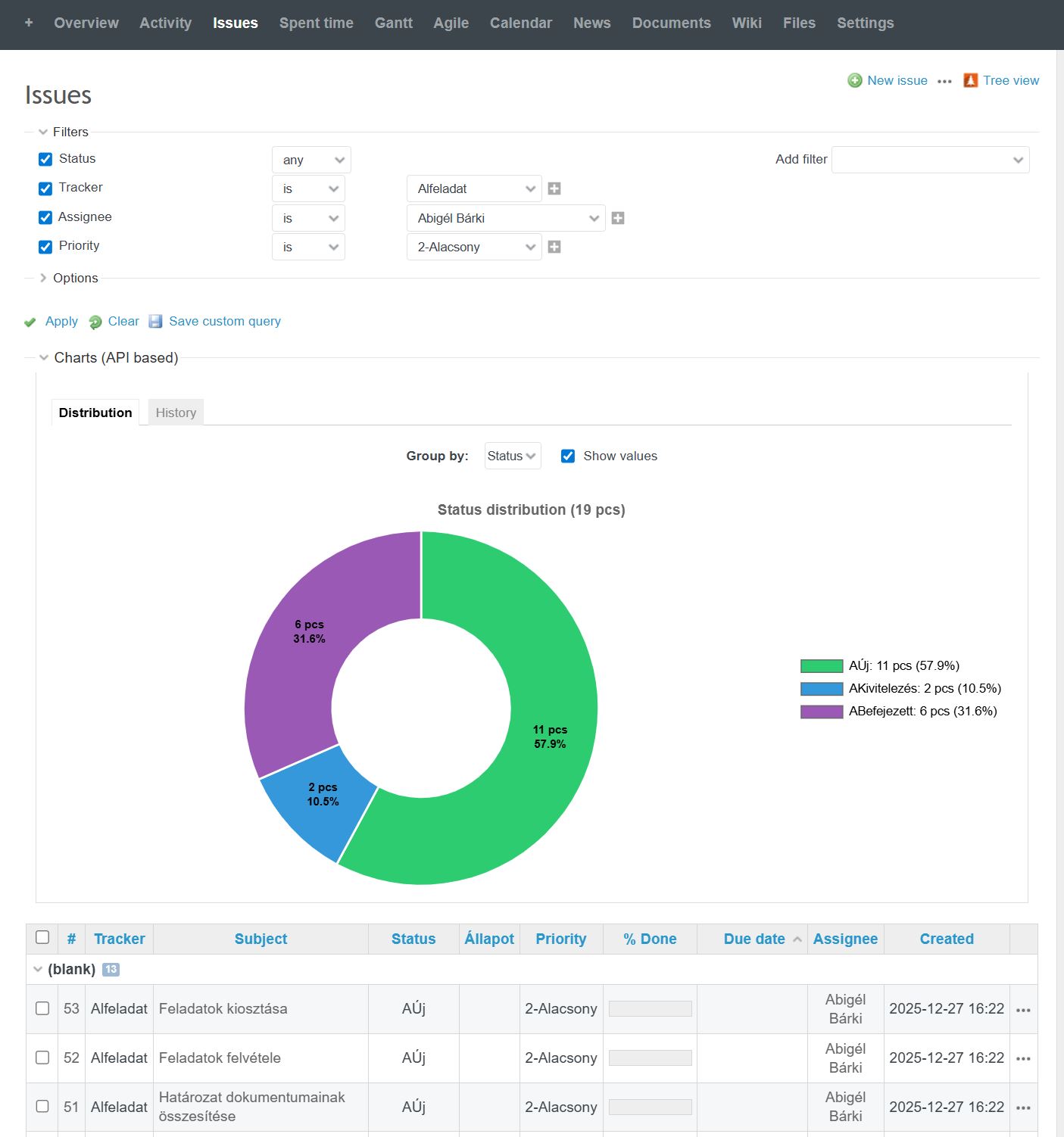 |
|---|
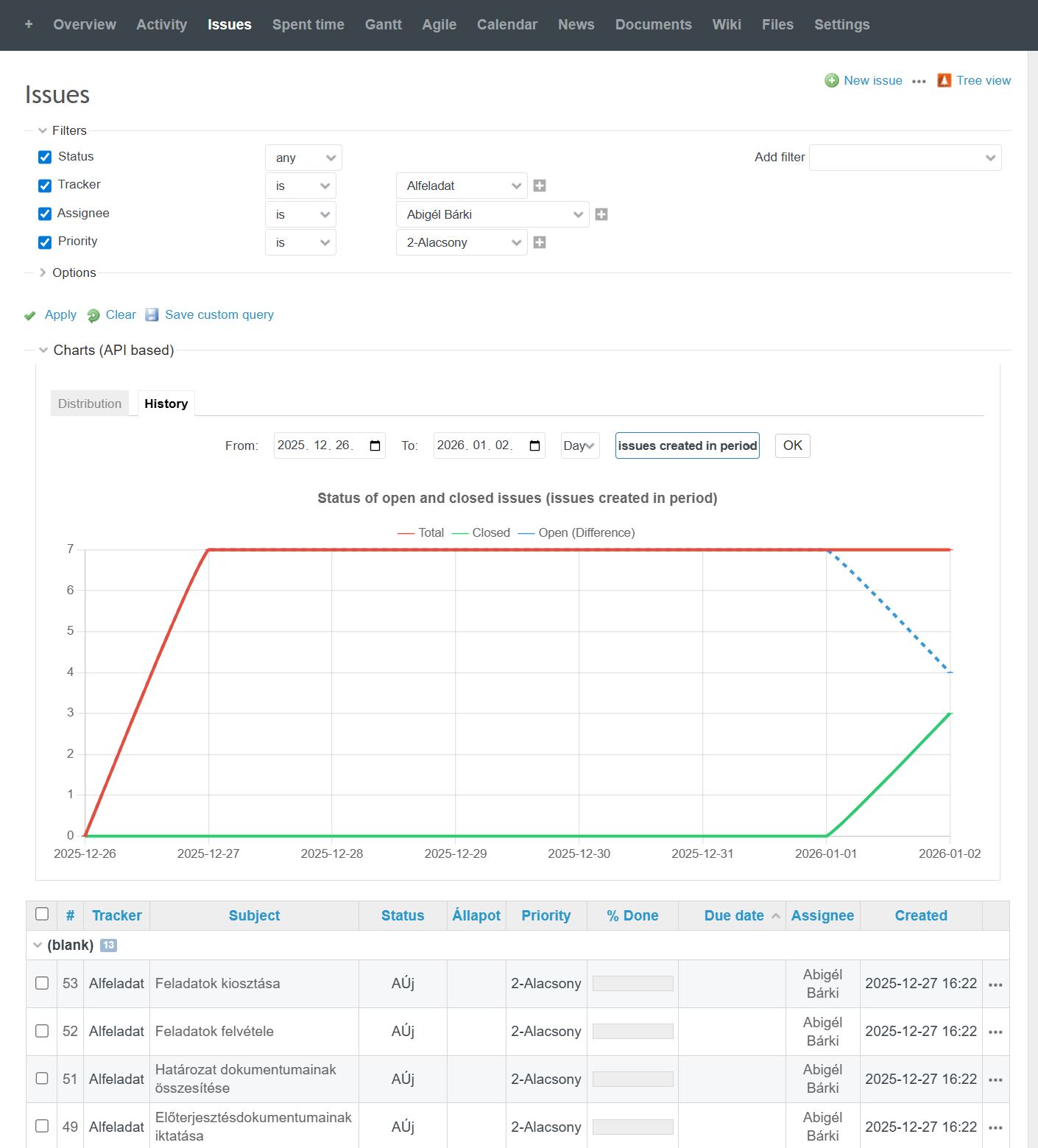 |
|---|
Installation notes
Nothing special. For more details see the documentation: https://github.com/WhitehawkTailor/redmine_chart_reporting
Install
$ cd redmine/plugins
$ git clone https://github.com/WhitehawkTailor/redmine_chart_reporting.git
$ rake redmine:plugins:assetse  RAILS_ENV=production
- In case Redmine operates in a container ( podman, or docker) then run this (redmine is the name of the container):
$ podman exec -it redmine bundle exec rake redmine:plugins:assets RAILS_ENV=production
- restart Redmine
Uninstall
$ cd redmine/plugins
$ rm redmine_chart_reporting
$ rake redmine:plugins:migrate NAME=redmine_chart_reporting VERSION=0
- In case Redmine operates in a container ( podman, or docker) then run this (redmine is the name of the container):
$ podman exec -it redmine bundle exec rake redmine:plugins:migrate NAME=redmine_chart_reporting VERSION=0
- restart Redmine
Dependencies
The plugin includes chart.umd.min.js from https://www.chartjs.org. It is a one file version of chart.js that embeds all the functions and assets that is required to draw a chart. You can replace it to a newer version, but compatibility is not granted. Find the chart file here: redmine/plugins/redmine_chart_reporting/assets/javascripts/
Localization
The plugin initially supports two languages (English, Hungarian). The language is selected based on the parent page language settings in HTML. It is the language that the user uses in Redmine.
Localization can be extended, just add your language to the localization dictionary in the reporting_logic.js file.
The location of the file: redmine/plugins/redmine_chart_reporting/assets/javascripts/
const l10n = {
        hu: {
            chart_title: "Kimutatások (API alapú)",
            loading: "Adatok lekérése az API-n keresztül...",
            auth: "Hitelesítés folyamatban...",
            grouping: "Csoportosítás:",
            show_values: "Értékek mutatása",
            auth_error: "A kimutatásokhoz API kulcs szükséges. Kérlek, generáld le a 'Saját fiókom' oldalon a 'Megjelenítés' linkre kattintva!",
            api_error: "Hiba az adatok lekérésekor (Status: ",
            no_data: "Nincs megjeleníthető adat (0/0)",
            total_tasks: "feladat",
            distribution: "szerinti megoszlás",
            db: "db"
        },
        en: {
            chart_title: "Charts (API based)",
            loading: "Fetching data via API...",
            auth: "Authenticating...",
            grouping: "Group by:",
            show_values: "Show values",
            auth_error: "API key required. Please generate it on 'My account' page by clicking 'Show'!",
            api_error: "Error fetching data (Status: ",
            no_data: "No data to display (0/0)",
            total_tasks: "tasks",
            distribution: "distribution",
            db: "pcs"
        }
    };
Changelog
1.0.1 (2026-01-02)
Compatible with Redmine 6.1.x, 6.0.x, 5.1.x, 5.0.x.
The chart now has two tabs for the two kind of charts.
The new chart displays a open vs closed history of the filtered issues.
The chart can deal with all the issues from the filter, or just the issues were created in the given time period.
The new version extended the localization data with a few words and label title.
Install and uninstall remained the same, so nothing special just copy it over and restart the redmine.
 |
|---|

1.0.0 (2025-12-30)
Compatible with Redmine 6.1.x, 6.0.x, 5.1.x, 5.0.x.
