 [SOLVED] Problem with ProxyPass
Added by Pascal Baumgartner almost 15 years ago
I need to setup Redmine and integrate the content of this server on another server with ProxyPass directive. On both hosts we have an apache2 webserver.
Redmine Host (CentOS 6 with Phusion Passenger):
from httpd.conf:
<VirtualHost redmine.internalhost:80>
    ServerAdmin webmaster@company.com
    DocumentRoot /var/www/redmine/public
    ServerName redmine.internalhost
    ErrorLog logs/redmine_error_log
    <Directory /var/www/redmine/public>
        Options Indexes ExecCGI FollowSymLinks -MultiViews
        Order allow,deny
        Allow from all
        AllowOverride all
    </Directory>
</VirtualHost>
When I connect to the redmine.internalhost on Port 80 directly without the proxy in the middle, I get the redmine page as expected, I can login and everything works fine.
So I tried to map redmine into some other page on a proxyhost with Location /redmine:
httpd.conf from the proxyhost (CentOS 5.5):
ProxyPass               /redmine http://redmine.internalhost     # of course this is not the real URL, but the one that works
ProxyPassReverse        /redmine http://redmine.internalhost

<Location /redmine>
        Options Indexes ExecCGI FollowSymLinks -MultiViews
        Order Allow,Deny
        Allow from all
</Location>
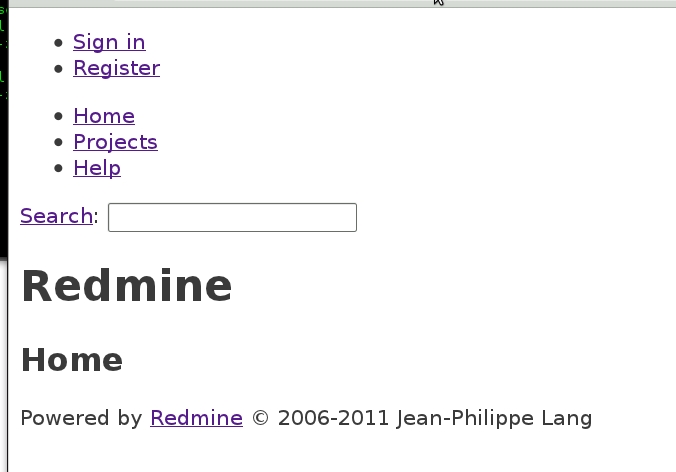
So when I try to access redmine via the proxyhost (tested both over https and https, even though the page needs to be accessible over https in the final configuration like https://somehost.com/redmine), the page shows up without CSS loaded and with all the links broken. Following a link leads to a "THE PAGE YOU REQUESTED CANNOT BE FOUND"-error.
Help appreciated. Any ideas are welcome.
Thanks
bgartner
| redmine_no_css.jpg (46.7 KB) redmine_no_css.jpg | Redmine without CSS and broken links |
Replies (1)
[SOLVED] RE: Problem with ProxyPass
-
Added by Pascal Baumgartner almost 15 years ago
see http://www.redmine.org/boards/2/topics/27570 for the configuration that solved my issue.