 Role Authorizations
Added by İlker Turhan almost 2 years ago
Hello,
I want some users to see only their own cases within the projects I have defined. However, they see all cases opened within the projects I have defined. How can I change this situation?
Thank you.
Replies (6)
 RE: Role Authorizations
-
Added by Holger Just almost 2 years ago
RE: Role Authorizations
-
Added by Holger Just almost 2 years ago
You can restrict roles so that project members with this role only see issues they created or which are assigned to them. You can configure this in the upper area of the edit screen of a role. Make sure that the role has enabled the "View issues" permission.
Note that of a user has multiple roles in a project, the most open permission is applied. Thus, if a user has a role in a project which allows them to see all issues and another one which only allows them to see their own issues, they will still be able to see all issues in the project.
RE: Role Authorizations
-
Added by Holger Just almost 2 years ago
See RedmineRoles for more details.
RE: Role Authorizations
-
Added by İlker Turhan about 2 months ago
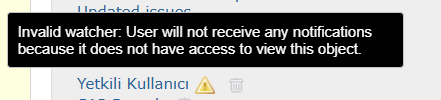
Bilgilendirmeniz için çok teşekkür ederim. Belirttiğiniz alanda ilgili düzenlemeyi sağladım. İstediğim sonuca ulaştım. Fakat bu seferde takipçi olarak kişi eklemesi yapamıyorum. Bu durumu nasıl çözebilirim?
 RE: Role Authorizations
-
Added by Florian Walchshofer 1 day ago
RE: Role Authorizations
-
Added by Florian Walchshofer 1 day ago
Hi İlker,
this is expected behaviour of Redmine core. Since Redmine 4.2, only users who are already allowed to see the issue can be added as watchers. With the role setting "Issues created by or assigned to the user", the other members simply can't see the issue, so they don't show up in the watcher list.
Redmine core only grants visibility to the author and the assignee, not to watchers.
If you also want watchers to be able to see the issue, you need a plugin. We use redmine_extended_watchers in production for exactly this purpose.
After installing it, go to Administration -> Plugins -> Redmine Extended Watchers -> Configure and select Protected mode. With that setting, "issues created by or assigned to the user" effectively becomes "issues created by, assigned to or watched by the user":
- the user must be a project member with a role that has at least the "View issues" permission (your restricted role is fine)
- the user who adds the watcher needs the "Add watchers" permission
- once added as a watcher, the user can see that issue and receives notifications for it
We'd advise against Extended mode unless you really need it: it lets you add any user in the system as a watcher (even non-members) and shows the full user list in the autocomplete, ignoring the user visibility settings of the role.
Make sure to use the plugin branch/version matching your Redmine version (the plugin version corresponds to the minimum Redmine version required).
RE: Role Authorizations
-
Added by İlker Turhan 1 day ago
Hello,
Thank you for the detailed information.
I have one additional question. After installing this plugin, will a user also receive an email notification when they are added as a follower to an issue?
Thank you for your assistance.
Best regards,
RE: Role Authorizations
-
Added by Florian Walchshofer 1 day ago
Hi,
yes. With the plugin installed (in Protected mode), watchers are treated like author and assignee: as soon as the issue is updated (status change, new note, field change etc.), all watchers who have the required permission through their role receive an email notification.
Without the plugin, a watcher whose role is limited to "Issues created by or assigned to the user" can't see the issue and therefore gets no email. With the plugin, watching grants visibility of that issue, so the watcher is included in the notification recipients.
Please note:
- No email is sent at the moment someone is added as a watcher. The first email arrives with the next update of the issue. If you want to inform the user right away, simply add a short note after adding them.
- Administration -> Settings -> Email notifications: "Issue updated" must be enabled.
- In the user's My account, the email notification option must not be set to "No events" (e.g. "Only for things I watch or I'm involved in").