Feature #44400
closed

Make the Download button save PDF files instead of displaying them inline in the browser
Description
Currently, the Download button downloads most attachments, but PDF and PDF-compatible files such as Illustrator files are displayed inline in the browser.
This patch makes the Download button always download the file, for two reasons:
- The label does not match the behavior. A button labeled "Download" should download the file regardless of its type. Users cannot predict the result before clicking, and saving a PDF currently requires first opening it in the browser's PDF viewer and then clicking the viewer's download button.
- The inline behavior is no longer necessary. Sending PDFs inline used to be the only way to view a PDF in the browser. However, Redmine 7.0 introduced an attachment preview page for PDFs (#22483), which includes an "Open in full view" link, so PDFs can be viewed there without special handling in the download action.
The change to the Download button does not affect PDF previews. With this patch, the preview page requests the file with an explicit disposition=inline parameter. This parameter is honored only for PDF-compatible files, so other content types such as HTML and SVG cannot be sent inline through this action.
Note: In Firefox, when "Open in Firefox" is configured for PDF files, downloading a PDF also opens the saved file in a new tab. The patch leaves this behavior unchanged because it is controlled by the user's Firefox settings. This could be avoided by sending PDFs as `application/octet-stream`, but I think Redmine should preserve the correct content type, `application/pdf`.
Before: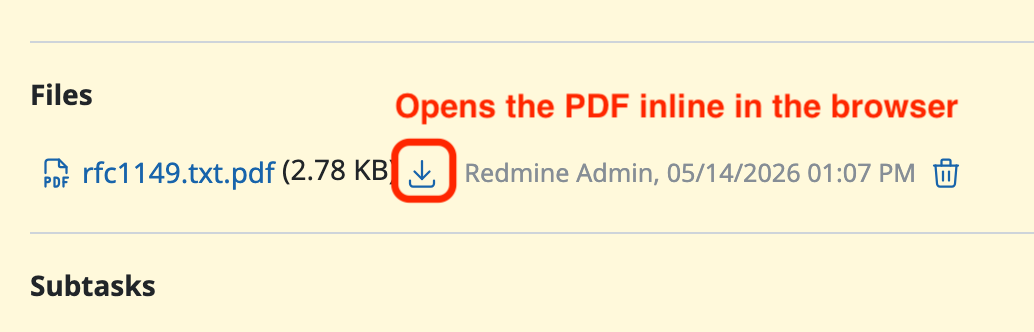
After: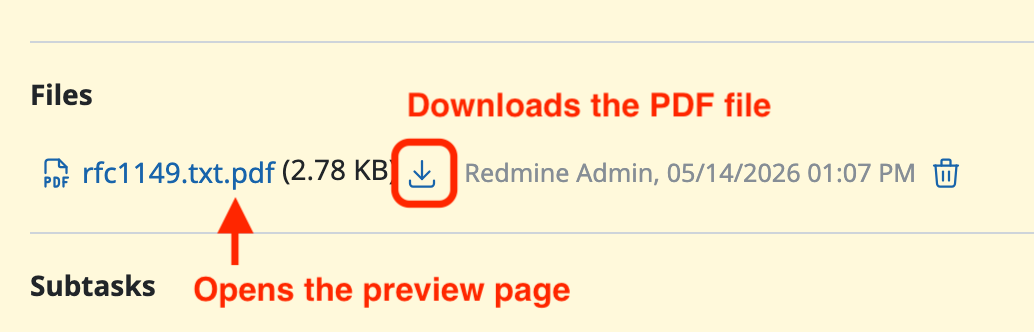
Files
Related issues
 Updated by Go MAEDA 2 months ago
- Related to Feature #22483: Show PDF attachments and repo entries instead of downloading them added
- Related to Feature #44362: Preview PDF compatible Adobe Illustrator files added
Updated by Go MAEDA about 2 months ago
- Target version set to 7.1.0
Setting the target version to 7.1.0.
Updated by Go MAEDA about 2 months ago
Here is some historical context on how the Download button has behaved for PDF files.
- Originally, the Download button always downloaded the file (only images were sent inline).
- r15409 (#22483, Redmine 3.3.0): PDF files started being sent inline. At the time, this was the only way to view a PDF in the browser without saving it first, so using the download URL for inline viewing was a reasonable compromise.
- r16285 (#24199, Redmine 3.3.3): images were switched to
Content-Disposition: attachmentfor security reasons. This left PDF as the only file type for which the Download button does not download the file. - r24460 (#22483 again, Redmine 7.0.0): the attachment page gained a proper PDF preview with an "Open in full view" link. There is no longer any need for special Download button behavior just to view PDFs in the browser.
In other words, #22483 was ultimately about viewing PDFs in the browser. Sending PDFs inline from the download URL was the best available way to meet that need at the time, and it served users well for many years. Now that Redmine 7.0 provides a dedicated preview page, that behavior has fulfilled its role, and the Download button can return to doing exactly what its label says for every file type.
Updated by Go MAEDA about 2 months ago
- Status changed from New to Closed
- Assignee set to Go MAEDA
- Resolution set to Fixed
Committed the patch in r25082.
Updated by Go MAEDA 30 days ago
- File 0001-Send-PDF-compatible-Illustrator-files-as-application.patch 0001-Send-PDF-compatible-Illustrator-files-as-application.patch added
- Status changed from Closed to Reopened
When a PDF compatible Adobe Illustrator file is downloaded with Firefox, it is saved with a .pdf extension instead of .ai.
Since #44362, such files have always been sent with the content type application/pdf so that browsers can display them inline in the PDF preview. This was not a problem while they were always displayed inline. However, the change made in this issue (r25082) makes the Download button always save the file, and as a result Firefox now changes the extension according to the content type.
The attached patch fixes this by sending those files as application/pdf only when the disposition=inline parameter is given, that is, only for the PDF preview. This parameter was also introduced in this issue. Regular downloads are sent with the original content type, application/illustrator.