Defect #44432
open
Follower Notification Emails Are Not Sent After Role and Permission Changes
Description
Hello,
We are experiencing an issue with email notifications in our Redmine application.
After making some changes to the roles and permissions, we noticed that when a user is added as a follower to an issue, the user does not receive the expected notification email.
Before the role and permission changes, adding a follower to an issue was working as expected, and the user received an email notification.
Current Situation
A user is added to the Followers section of an issue.
The user is successfully added as a follower in Redmine.
However, no notification email is sent to the added follower.
The issue appears to be related to the role/permission changes we recently made.
Other Redmine email notifications may still be working normally.
Expected Behavior
When a user is added as a follower to an issue, Redmine should send the appropriate email notification to that user according to the project's notification settings and the user's role/permissions.
Actual Behavior
The user is added successfully as a follower, but no email notification is generated or received.
Request
Could you please help us identify which role, permission, notification setting, or Redmine configuration could prevent follower notification emails from being sent?
We would also appreciate it if you could provide the relevant permissions/settings that should be enabled for a user to receive notifications when they are added as a follower.
Thank you for your support.
Best regards,
IT Support Team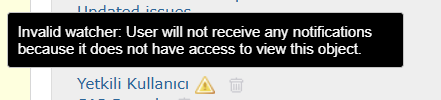
Files
 Updated by Go MAEDA 18 days ago
As the tooltip in your screenshot says, the user you added as a watcher doesn't have permission to view this issue. That's why they don't get any email notifications about it.
Please make sure the user can view the issue. Check their project membership and the permissions of their roles. Also check the role's "Issues visibility" setting, whether the role can view issues for this tracker, and whether the issue is marked as private.
Also, please don't use the issue tracker to ask for help. For questions, please use the forums instead: https://www.redmine.org/projects/redmine/boards