Feature #44460
closed

Show the content type of attachments on the attachment preview page
Description
This patch shows the content type of an attachment on the attachment preview page. It appears after the author and the date, for example "(application/pdf)".
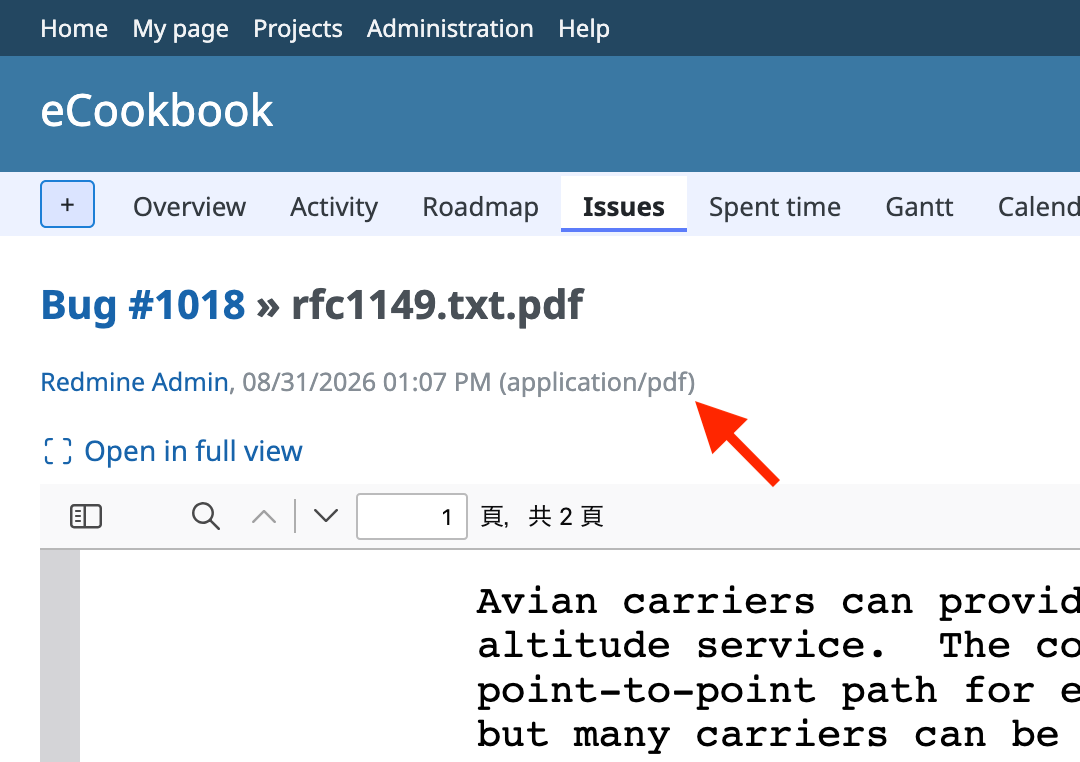
Besides the file name, the content type helps users understand what kind of file an attachment is, especially when the extension is generic or unfamiliar. For example, a .dat file that is actually an SQLite database is shown as application/x-sqlite3, and a .xdw file is shown as application/vnd.fujixerox.docuworks.
The content type helps users notice when a file's extension does not match its contents. Before #43484, Redmine saved the content type sent by the browser, which is usually based on the extension. Now Redmine detects the content type mainly from the file contents. For example, an image saved from a website as photo.jpg is sometimes a WebP image, and is shown as image/webp.
The content type also helps find out why some Illustrator files are previewed and others are not. #44362 added a preview for Illustrator files, but only for files whose content type is application/illustrator. Illustrator files saved without PDF compatibility are detected as application/postscript, so they are not previewed. Illustrator files uploaded before #43484 are not previewed either, even if they are PDF compatible, because many browsers send application/postscript for all .ai files. Although this patch does not change which files are previewed, the displayed content type helps identify the cause.
Files
Related issues
 Updated by Go MAEDA about 1 month ago
- Related to Feature #43484: Detect attachment content type from file contents instead of trusting client-provided values added
- Related to Feature #44362: Preview PDF compatible Adobe Illustrator files added
Updated by Go MAEDA about 1 month ago
- Target version changed from Candidate for next major release to 7.1.0
Setting the target version to 7.1.0.
Updated by Go MAEDA about 1 month ago
- File 0001-Display-the-attachment-description-on-its-own-line-o.patch 0001-Display-the-attachment-description-on-its-own-line-o.patch added
- File 0002-Display-the-MIME-type-on-the-attachment-preview-page.patch 0002-Display-the-MIME-type-on-the-attachment-preview-page.patch added
- File 0003-Display-the-name-of-the-type-instead-of-the-MIME-typ.patch 0003-Display-the-name-of-the-type-instead-of-the-MIME-typ.patch added
I have updated the patch. The changes from the original patch are as follows.
- The MIME type is now separated from the date and time by a comma instead of being enclosed in parentheses, for example "Redmine Admin, 08/31/2026 01:07 PM, application/pdf". A value in parentheses placed right after the time could be read as a supplement to the time, especially by users who are not familiar with MIME types.
- The description of the attachment is now displayed on its own line instead of being joined to the author and the date with " - ". Previously, the author and the date started at a different position depending on the presence and the length of the description. This matters more now that the MIME type is added to the same line.
- For Microsoft Office (Office Open XML) and OpenDocument files, the name of the type such as "Microsoft Word Document" or "OpenDocument Spreadsheet" is now displayed instead of the MIME type. This is because their MIME types are among the longest and the hardest to understand, despite the fact that these files are the most likely to be attached. For example, it is difficult to tell that "application/vnd.openxmlformats-officedocument.wordprocessingml.document" is a Word document. Users can still see the original MIME type in a tooltip by hovering the mouse pointer over the name.
All other MIME types are still displayed as they are. Most MIME types, such as application/pdf, image/jpeg and application/zip, are short and tell what the file is at a glance, so there is no need to replace them with names.
The MIME types that are displayed as names are as follows.
| MIME type | Displayed name |
|---|---|
| application/vnd.openxmlformats-officedocument.wordprocessingml.document | Microsoft Word Document |
| application/vnd.openxmlformats-officedocument.wordprocessingml.template | Microsoft Word Document Template |
| application/vnd.ms-word.document.macroenabled.12 | Microsoft Word Document (+macro) |
| application/vnd.ms-word.template.macroenabled.12 | Microsoft Word Document Template (+macro) |
| application/vnd.openxmlformats-officedocument.spreadsheetml.sheet | Microsoft Excel Workbook |
| application/vnd.openxmlformats-officedocument.spreadsheetml.template | Microsoft Excel Workbook Template |
| application/vnd.ms-excel.sheet.macroenabled.12 | Microsoft Excel Workbook (+macro) |
| application/vnd.ms-excel.template.macroenabled.12 | Microsoft Excel Workbook Template (+macro) |
| application/vnd.openxmlformats-officedocument.presentationml.presentation | Microsoft PowerPoint Presentation |
| application/vnd.openxmlformats-officedocument.presentationml.template | Microsoft PowerPoint Presentation Template |
| application/vnd.openxmlformats-officedocument.presentationml.slideshow | Microsoft PowerPoint Slide Show |
| application/vnd.ms-powerpoint.presentation.macroenabled.12 | Microsoft PowerPoint Presentation (+macro) |
| application/vnd.ms-powerpoint.template.macroenabled.12 | Microsoft PowerPoint Presentation Template (+macro) |
| application/vnd.ms-powerpoint.slideshow.macroenabled.12 | Microsoft PowerPoint Slide Show (+macro) |
| application/vnd.oasis.opendocument.text | OpenDocument Text |
| application/vnd.oasis.opendocument.text-template | OpenDocument Text Template |
| application/vnd.oasis.opendocument.spreadsheet | OpenDocument Spreadsheet |
| application/vnd.oasis.opendocument.spreadsheet-template | OpenDocument Spreadsheet Template |
| application/vnd.oasis.opendocument.presentation | OpenDocument Presentation |
| application/vnd.oasis.opendocument.presentation-template | OpenDocument Presentation Template |
| application/vnd.oasis.opendocument.graphics | OpenDocument Graphics |
| application/vnd.oasis.opendocument.graphics-template | OpenDocument Graphics Template |
Updated by Go MAEDA about 1 month ago
- File clipboard-202609231840-zzbwj.png clipboard-202609231840-zzbwj.png added
- File clipboard-202609231843-yymp8.png clipboard-202609231843-yymp8.png added
- Status changed from New to Closed
- Assignee set to Go MAEDA
- Resolution set to Fixed
Committed the patches in r25128, r25129 and r25130.
The attachment preview page now displays the MIME type of the attachment on the line that shows the author and the creation date.
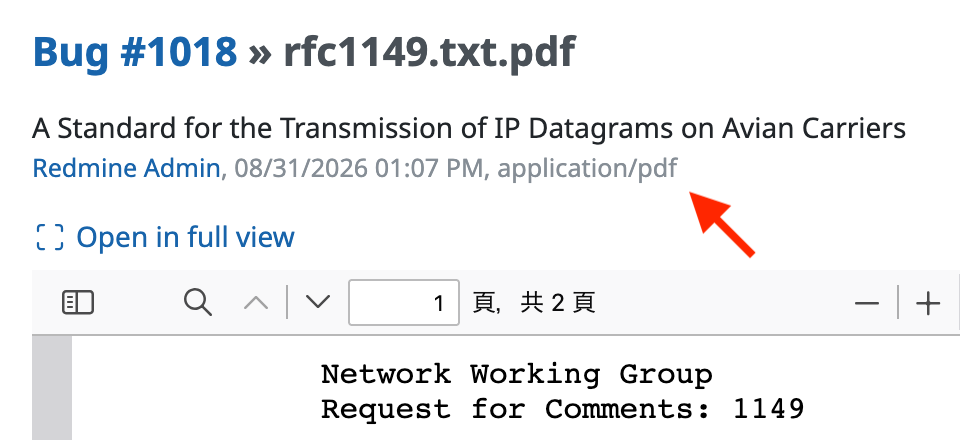
For Microsoft Office and OpenDocument (LibreOffice) files, a friendly name such as "Microsoft Word Document" is displayed instead of the MIME type, because their MIME types such as "application/vnd.openxmlformats-officedocument.wordprocessingml.document" are long and do not convey the kind of file to most users, although these files are attached frequently. The MIME type of such a file is available as a tooltip on the friendly name. The MIME types for which a friendly name is displayed, and their friendly names, are defined in the constant Redmine::MimeType::FRIENDLY_NAMES in source:trunk/lib/redmine/mime_type.rb@25130#L60.
