Feature #44552
closed

Add a link from each issue attachment to the note in which it was added
Description
This patch adds a small icon link to each file in the attachments list of an issue. Clicking the icon takes you to the note in which the file was added.
When you look at a file in the attachments list, you often want to read the note in which it was added, because the note usually explains what the file is and why it was attached. However, the attachments list does not show which note each file was added in. To find the note, you have to search the history for the file name, which takes time when an issue has many notes or attachments.
With this patch, the icon is displayed next to the author and date of each file that was added in a note. You can move from a file to its note with a single click, and the tooltip of the icon shows the target, such as #note-5.
Additional information:
- Files that were attached when the issue was created do not have the icon, because there is no corresponding note.
- The icon is not displayed for notes that the user is not allowed to see, such as private notes.
- The attachments lists of other objects, such as wiki pages and forum messages, are not changed.
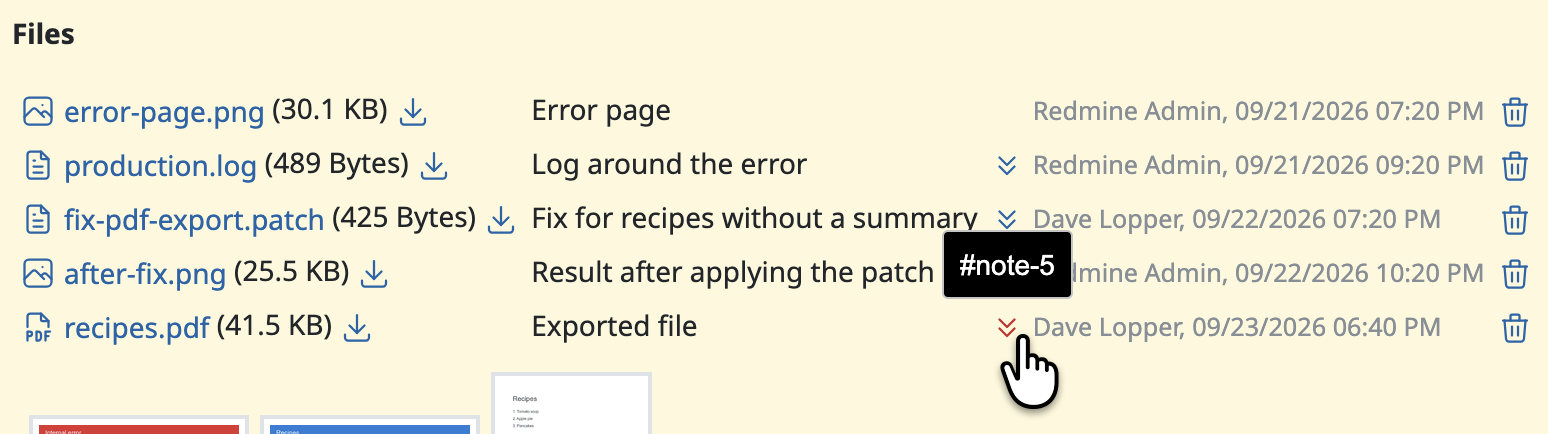
Files
 Updated by Go MAEDA 22 days ago
- File 0002-Show-the-history-tab-when-the-journal-linked-from-an.patch 0002-Show-the-history-tab-when-the-journal-linked-from-an.patch added
The patch has one case that it does not handle: the link does not work when the target journal is hidden by the selected tab.
For example, when the "Notes" tab is selected, journals without notes are not displayed. If a file was added without notes, clicking its link does nothing, because the journal it points to is hidden. The same happens when a tab that does not display the history, such as "Spent time" or "Associated revisions", is selected.
The attached patch handles this case. When the target journal is hidden, clicking the link switches to the "History" tab and then jumps to the journal. When the journal is already visible, the selected tab is not changed.
This patch should be applied on top of the previous one.