Plugins Directory » Redmine Agile / Kanban Board
|
|
Author: | redminekit support |
|---|---|---|
| Website: | https://redminekit.com/redmine/plugins/redmine-agile-kanban | |
| Code repository: | - | |
| Registered on: | 2026-10-24 (1 day ago) | |
| Current version: | 1.0.0 | |
| Compatible with: | Redmine 7.1.x, 7.0.x, 6.1.x, 6.0.x, 5.1.x, 5.0.x, 4.2.x, 4.1.x, 4.0.x | |
| User ratings: |
Redmine Agile / Kanban Board
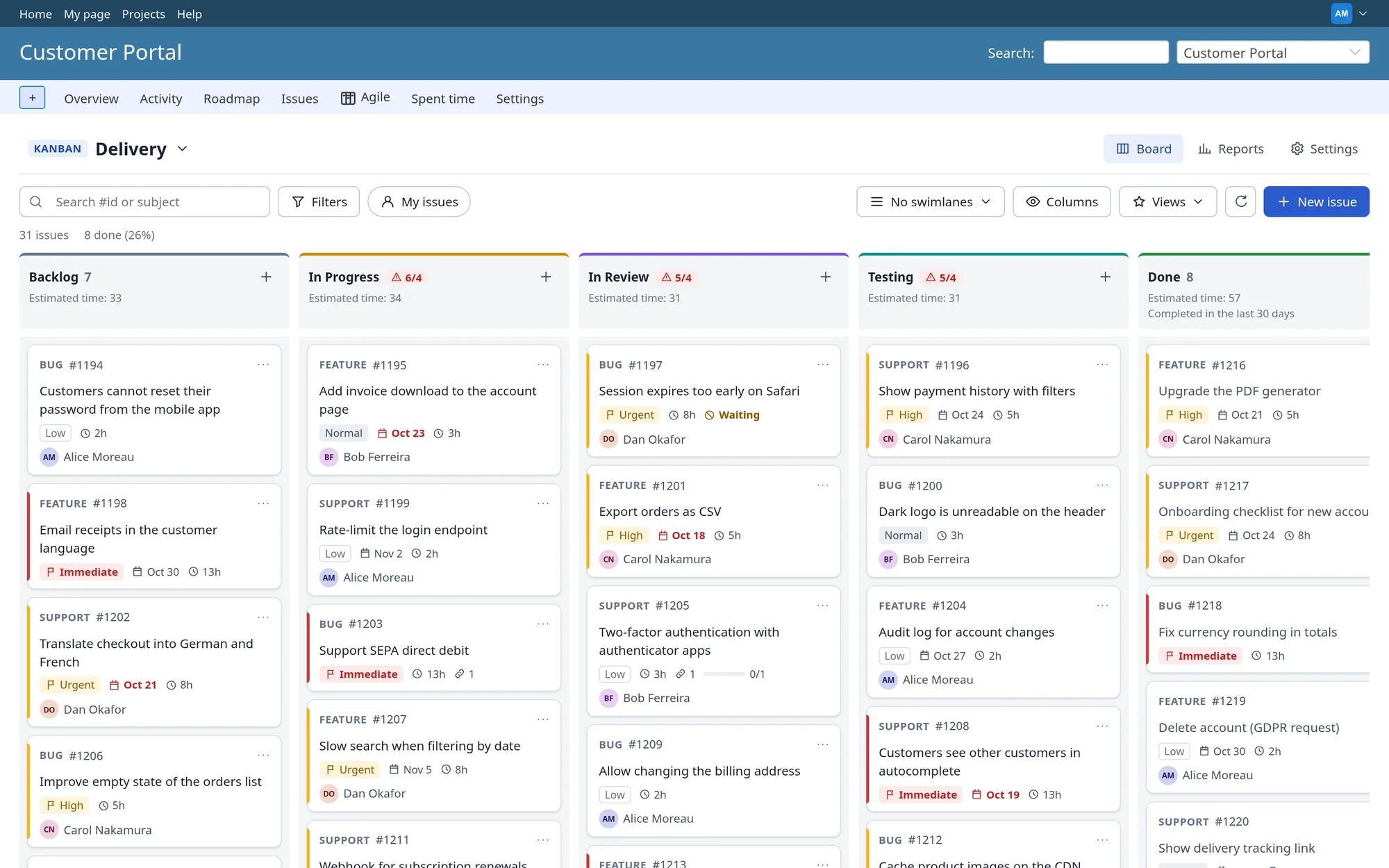
Agile boards that play by your Redmine rules. Turn your Redmine issues into Kanban and Scrum boards: the columns come from your own statuses, every move follows your workflow and permissions, and the reports show how work really flows.
- Website: https://redminekit.com/redmine/plugins/redmine-agile-kanban
- Redmine: 4.x, 5.x, 6.x and 7.x (4.0 minimum)
- Databases: MySQL, MariaDB, PostgreSQL and SQLite
- Languages: 50, every language Redmine ships
- Extra gems / Node.js: none
- Core files changed: none
- Version: 1.0.0 (October 2026)
- Licence: commercial, per server: Single server $249, Multiple servers $499
Video tutorial (5:48)
A narrated walkthrough: turn the plugin on, create a board, move work, find things, run a sprint and read the reports. English captions included.
Watch the tutorial · Download the MP4
| Time | Chapter |
|---|---|
| 0:00 | Welcome |
| 0:19 | Turn it on |
| 0:49 | Your first board |
| 1:43 | Working on the board |
| 3:05 | Find and focus |
| 3:44 | Sprints with Scrum |
| 5:01 | Reports |
| 5:34 | Wrap-up |
Your workflow decides
Built for teams who already live in Redmine. Nothing to import, nothing to sync. The board is a new way to look at, and move, the issues you already have.
- No core changes. A standard Redmine plugin. No extra gems, and no Node.js on the server.
- Redmine's own rules. Every move goes through Redmine's own rules, as the signed-in user: workflow transitions, required and read-only fields, and permissions.
- 50 languages. Every language Redmine ships, using Redmine's own terms for issues, trackers and statuses.
Features
- Kanban boards. Columns built from your statuses in one click. Rename, reorder, recolour, hide, and map several statuses to one column.
- Workflow-safe drag and drop. Mouse, touch and keyboard. Forbidden columns are greyed out; refused moves roll back with the reason.
- WIP limits. Per column, set to warn or to block. Managers can override, and every breach is counted in the reports.
- Swimlanes and views. Group by assignee, priority, tracker, version, category, parent or custom field. Save private or shared views.
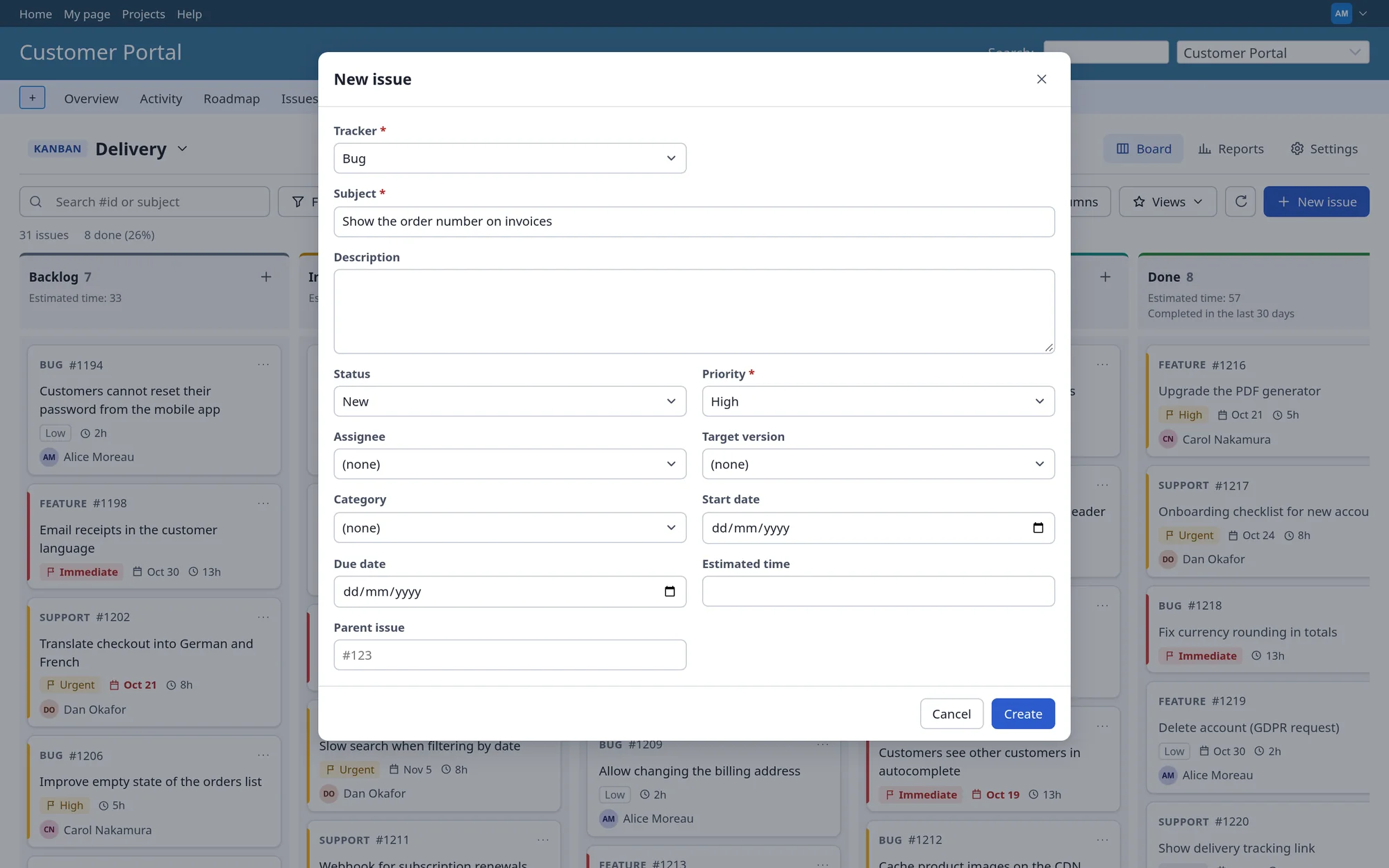
- Work without leaving the board. Quick issue creation, inline editing, comments and time logging, with Redmine's validation and required fields.
- Scrum, when you want it. Ranked backlog, sprint planning by drag and drop, goals, start and complete with carry-over, story points.
- Flow reports. Throughput, cycle and lead time, cumulative flow, burndown and velocity. Table view and CSV export for every chart.
- Private stays private. Redmine visibility everywhere: private issues, hidden custom fields and other projects never leak into a board.
- Any screen, any user. Phone and tablet layouts, full keyboard support, screen-reader announcements, and no colour-only signals.
Screenshots
Real screens from Redmine 7 with the plugin installed.
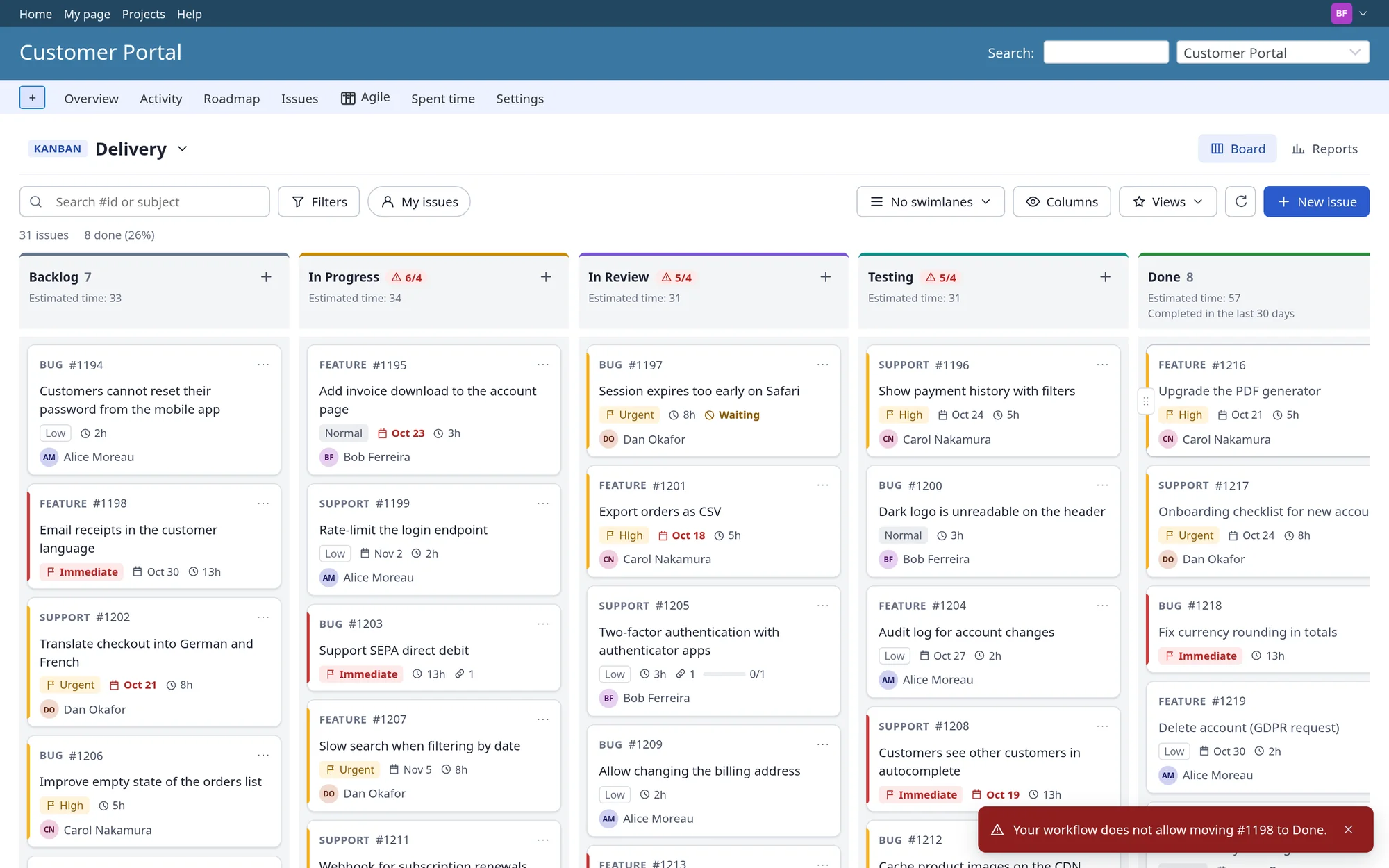
Drag a card. Redmine does the rest.
Moving a card to another column changes the issue's status, exactly as if you had used the issue form. The change is in the issue history and Redmine sends its usual notifications.
Drag and drop. A conflicting edit by a colleague is detected, never overwritten.
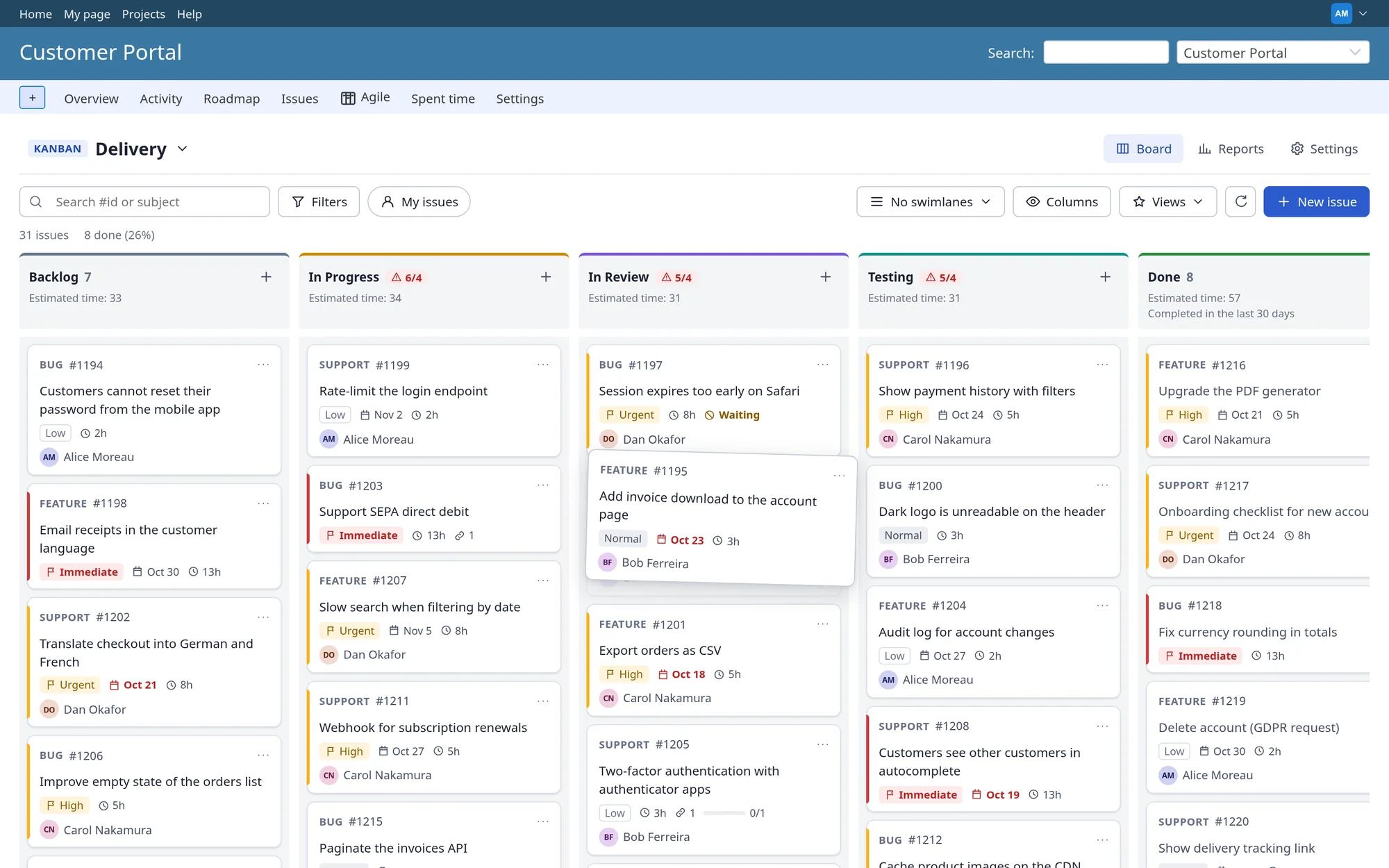
Workflow-aware targets. Columns your role may not use are greyed out while you drag. Required fields, read-only fields and permissions apply.
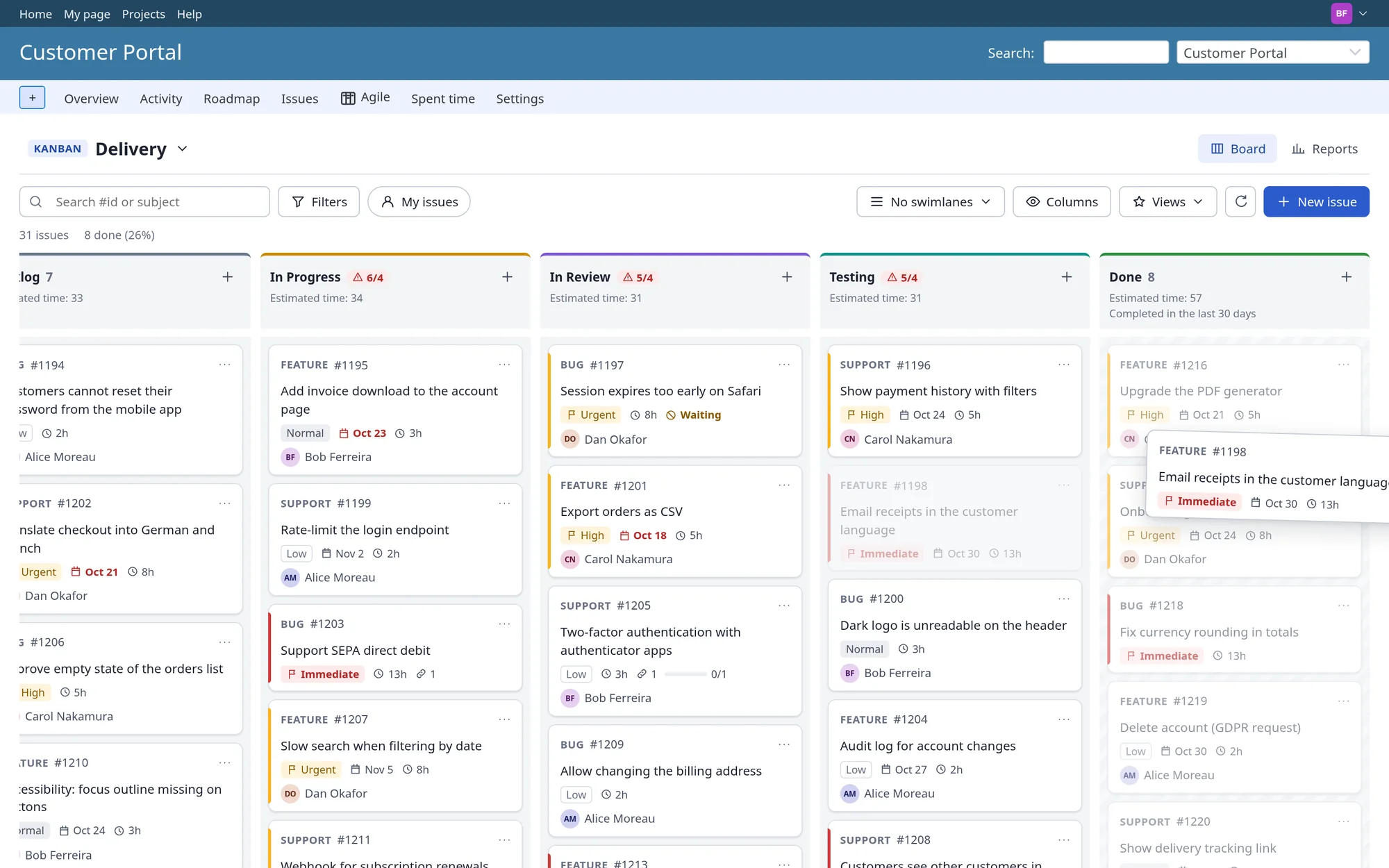
Refused moves explained. If Redmine refuses a change, the card goes back and the board shows the reason.
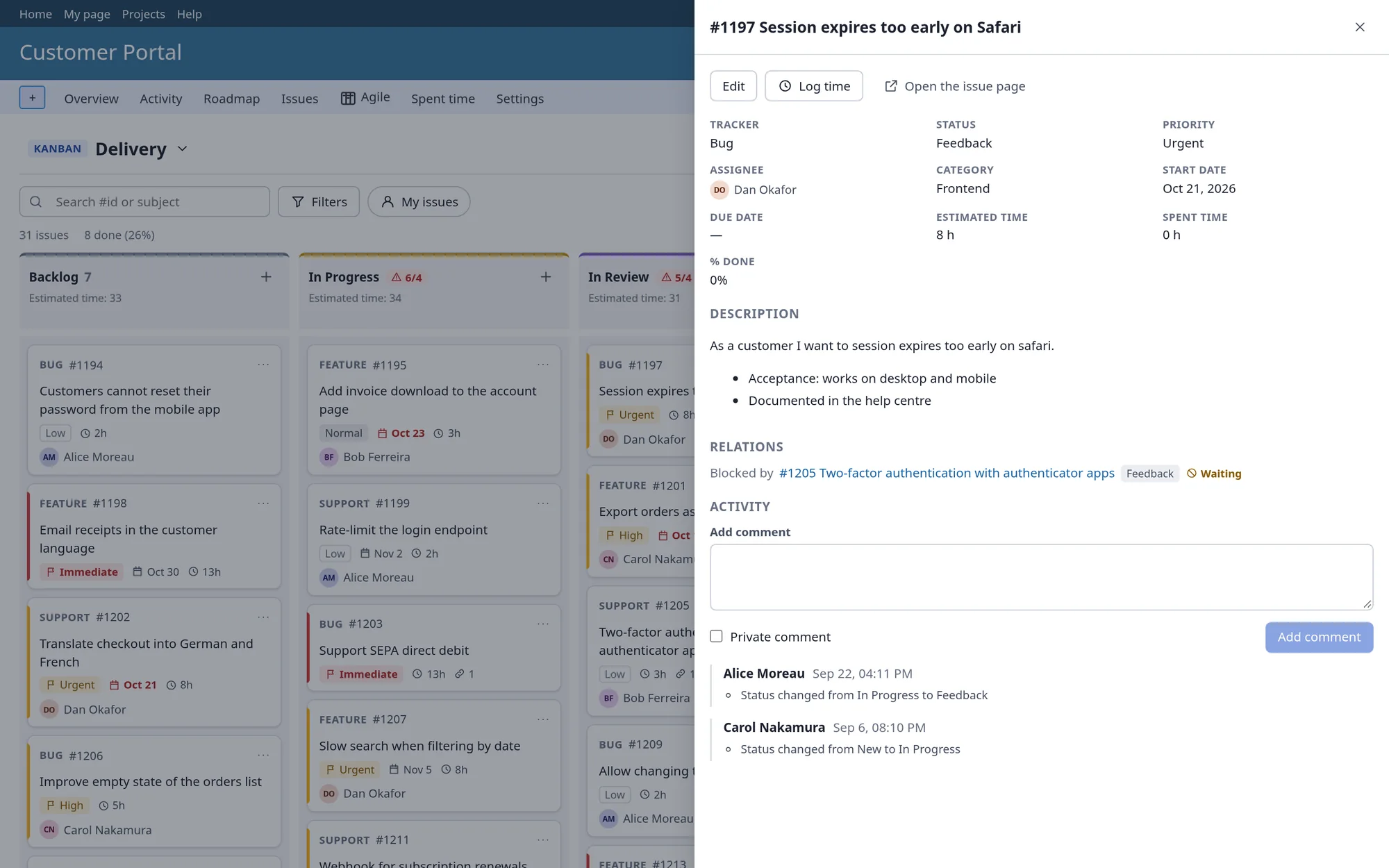
Every detail, one click away
Open a card to see the description, relations, subtasks, attachments and history. Edit fields, add a comment or log time without leaving the board, with only the options your role may use.
Issue details panel. Blocked and overdue work stands out, in words as well as colour. Story points, estimates and spent time are on the card.
Quick issue creation. Create an issue from any column, with Redmine's validation.
See the board the way you need it
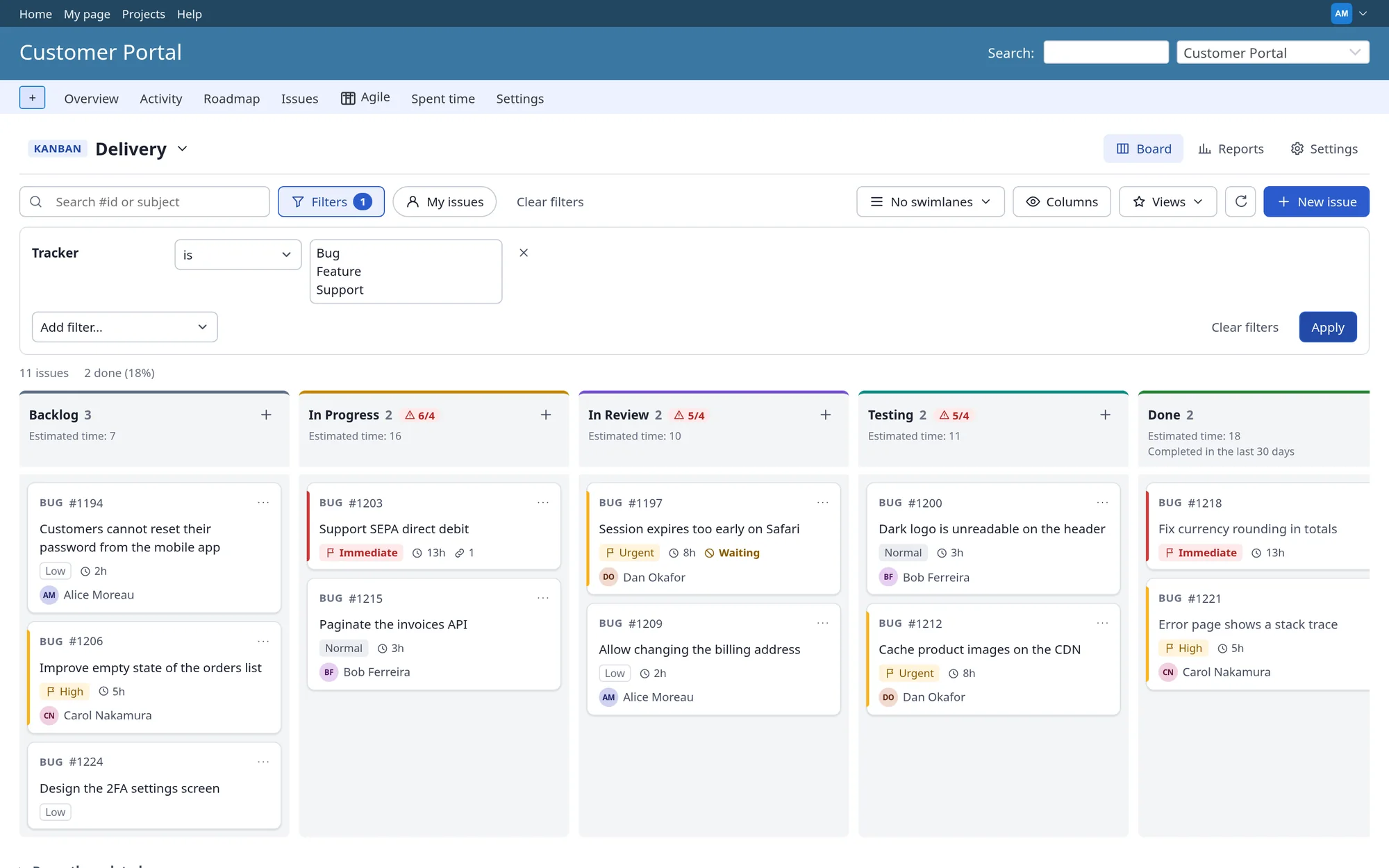
Swimlanes group cards by assignee, priority, tracker, version, category, parent issue or a custom field; dragging a card to another lane changes that field. Filters are Redmine's own issue filters, custom fields included.
Swimlanes. Search by issue number or subject, and a one-click "My issues".
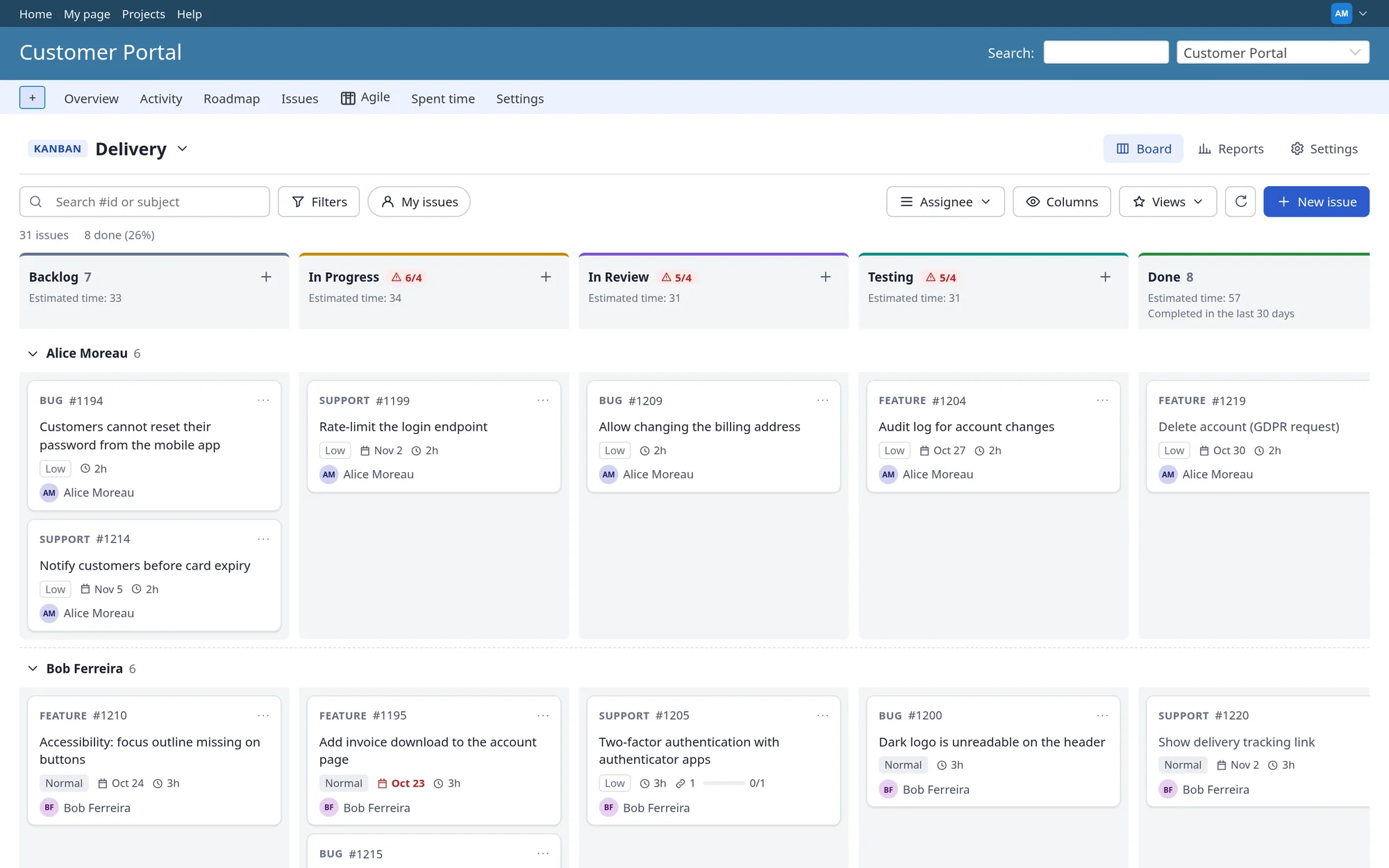
Redmine's filters. Save private views, or share one as the team default. Your filters are remembered for next time.
Sprints without the ceremony
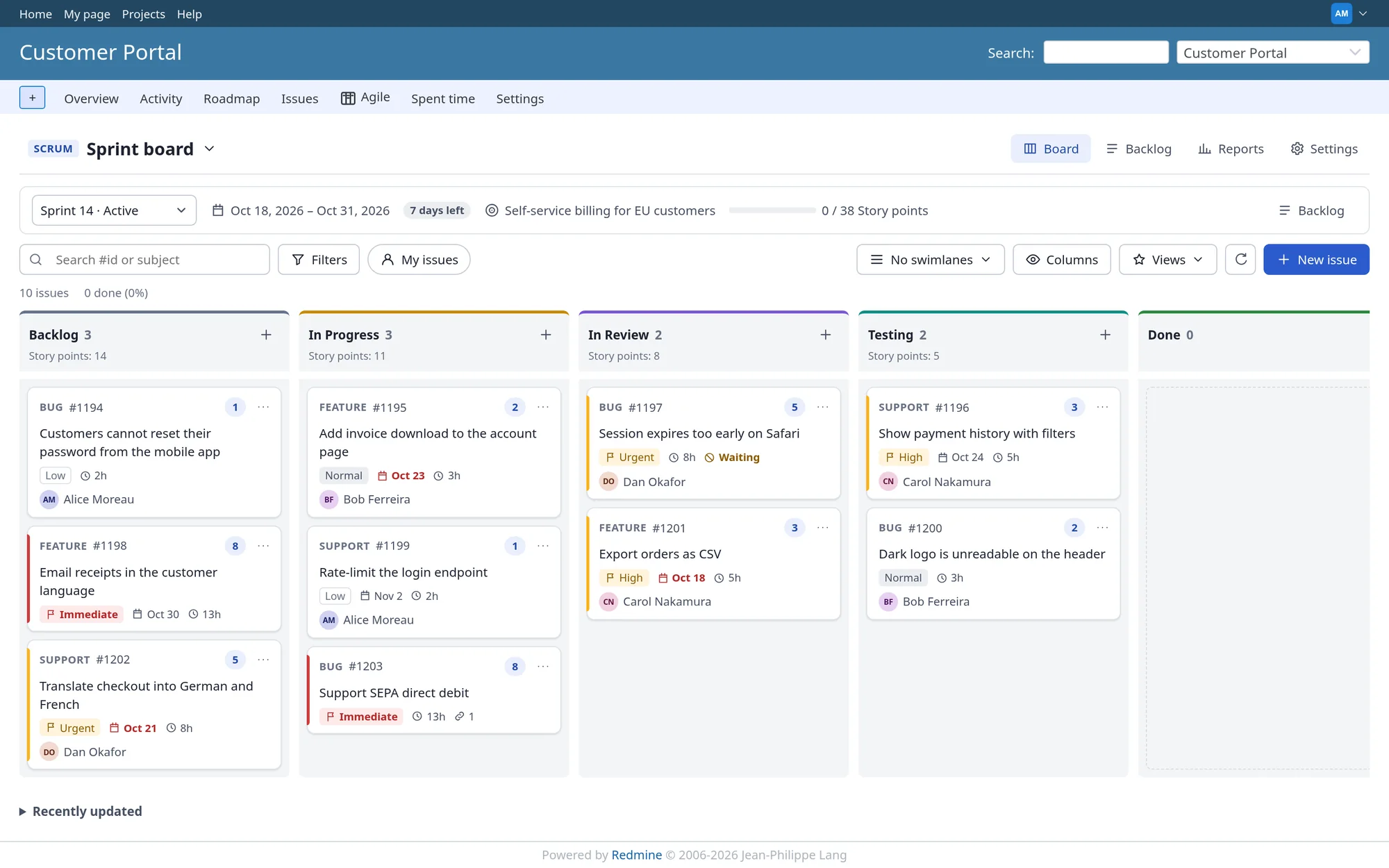
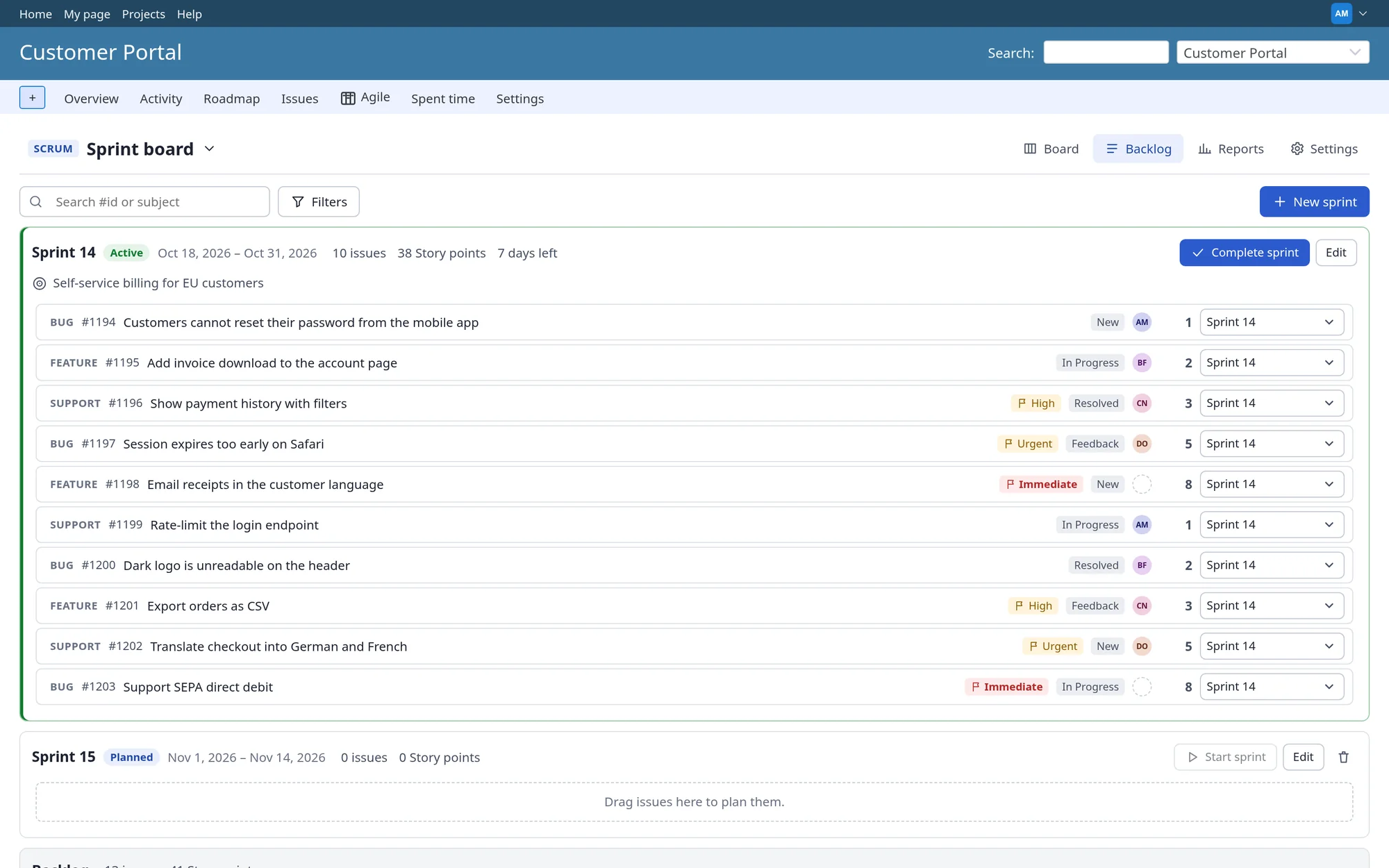
Rank the product backlog, drag issues into a sprint, and start it. The sprint board shows dates, days left, the goal and progress. When you complete a sprint, unfinished work moves on and the sprint's figures are frozen for the reports.
Sprint board. Estimate in story points, estimated hours, issue count or a numeric custom field. One active sprint per board, with warnings for unfinished work.
Backlog planning. Scrum can be switched off for the whole installation if you only need Kanban.
Reports that answer real questions
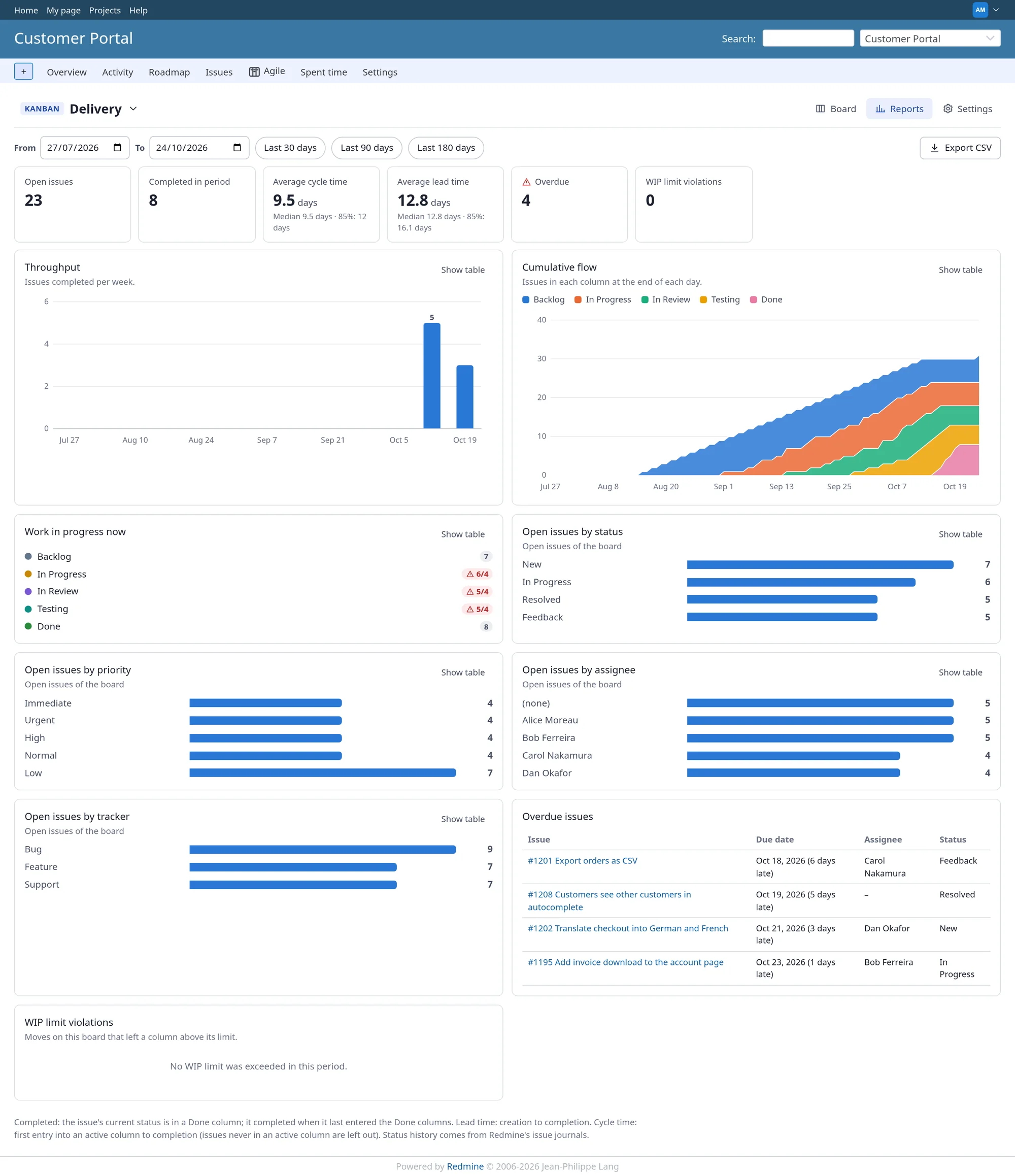
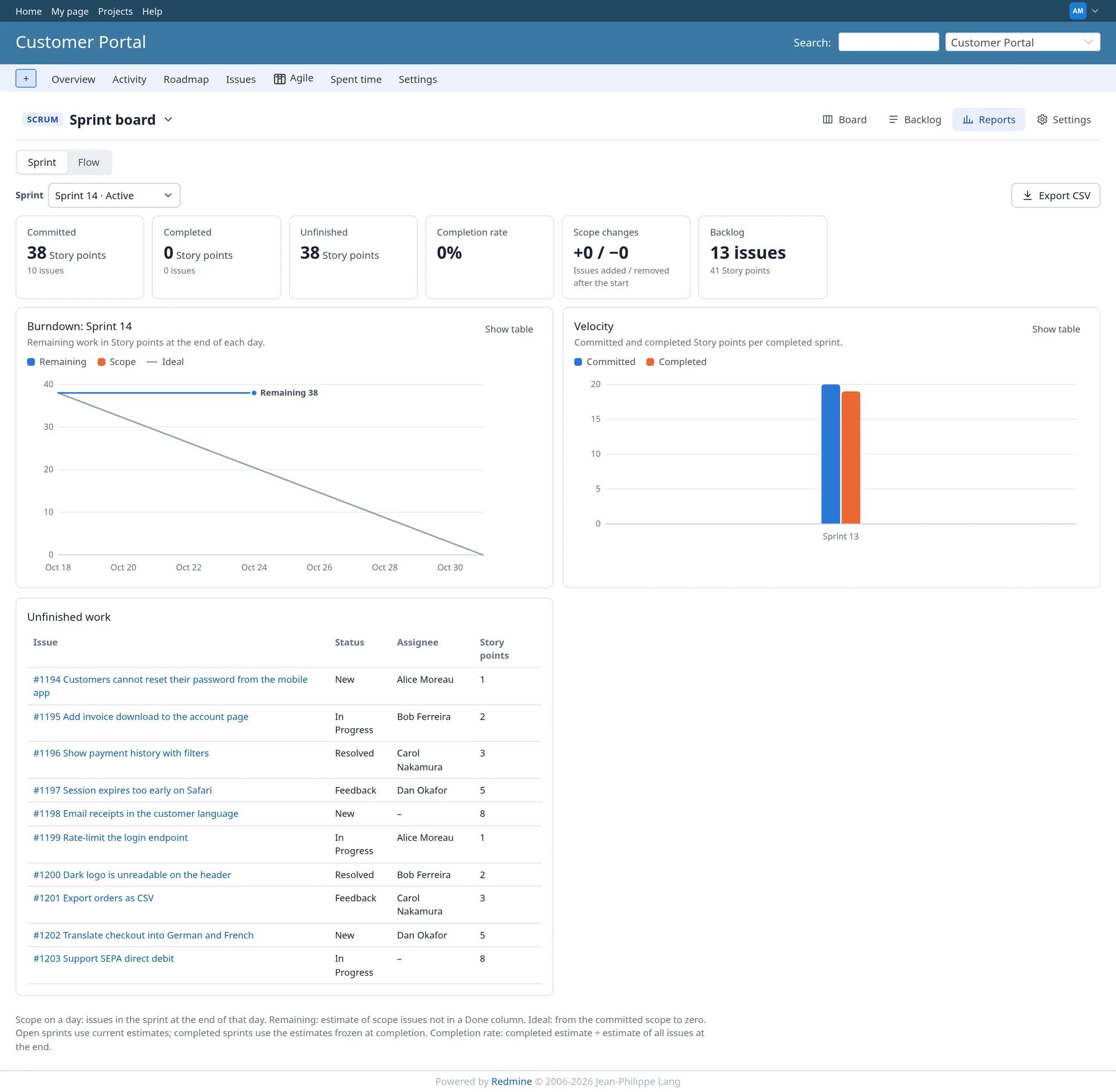
How much do we finish each week? How long does work take once started? Where does it pile up? The reports use your issue history, so they work from day one, even for work done before the plugin was installed.
Flow report. Throughput, cycle and lead time, cumulative flow, WIP and overdue work.
Sprint report. Burndown, velocity, completion rate and unfinished work, with a table view, CSV export and documented formulas.
Set up in minutes, on any screen
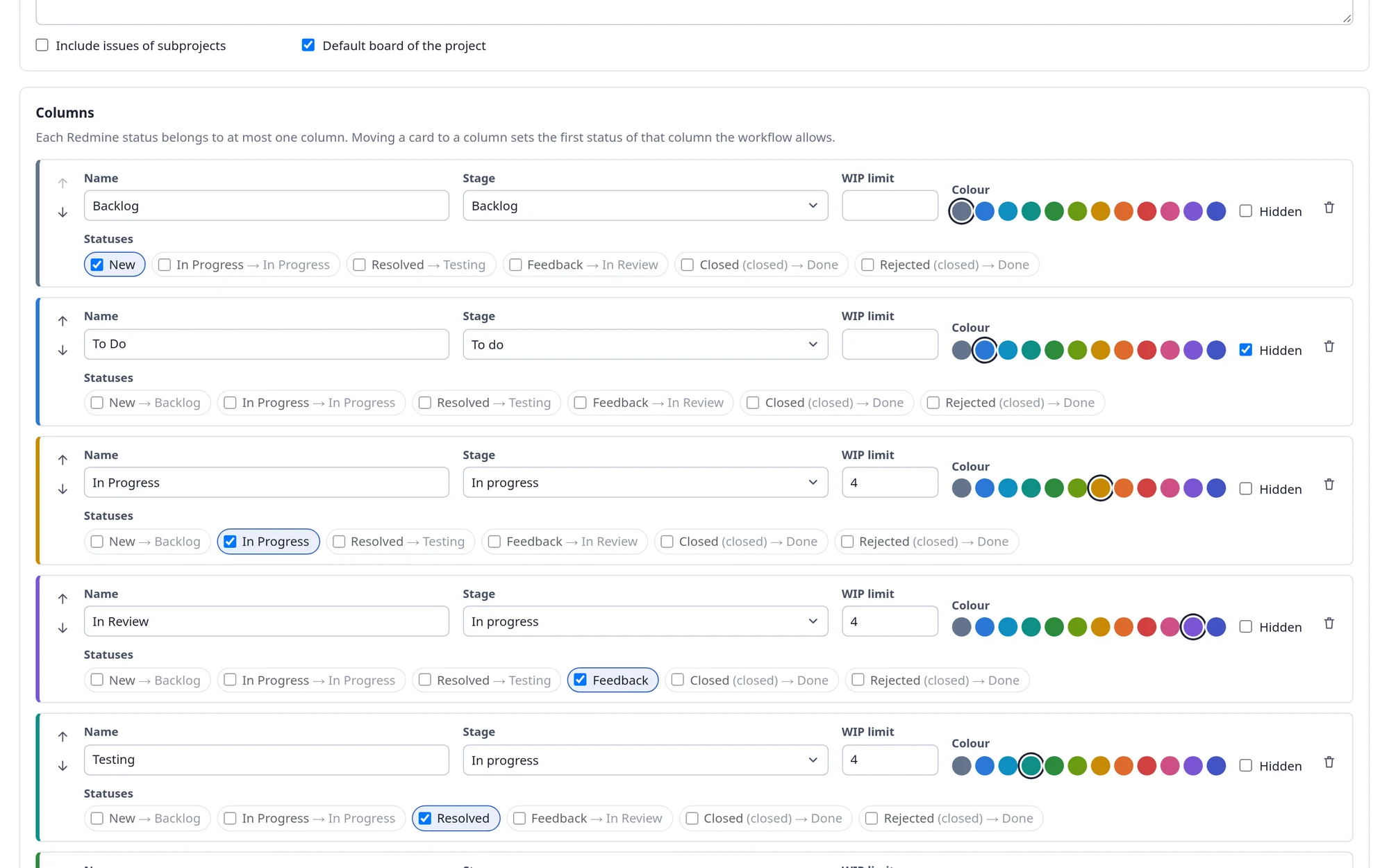
A new board maps your statuses to columns automatically. Adjust columns, WIP limits, card fields, swimlanes and who may see the board on one settings page.
Board settings. Several boards per project, optionally with subprojects. Boards can be limited to roles.
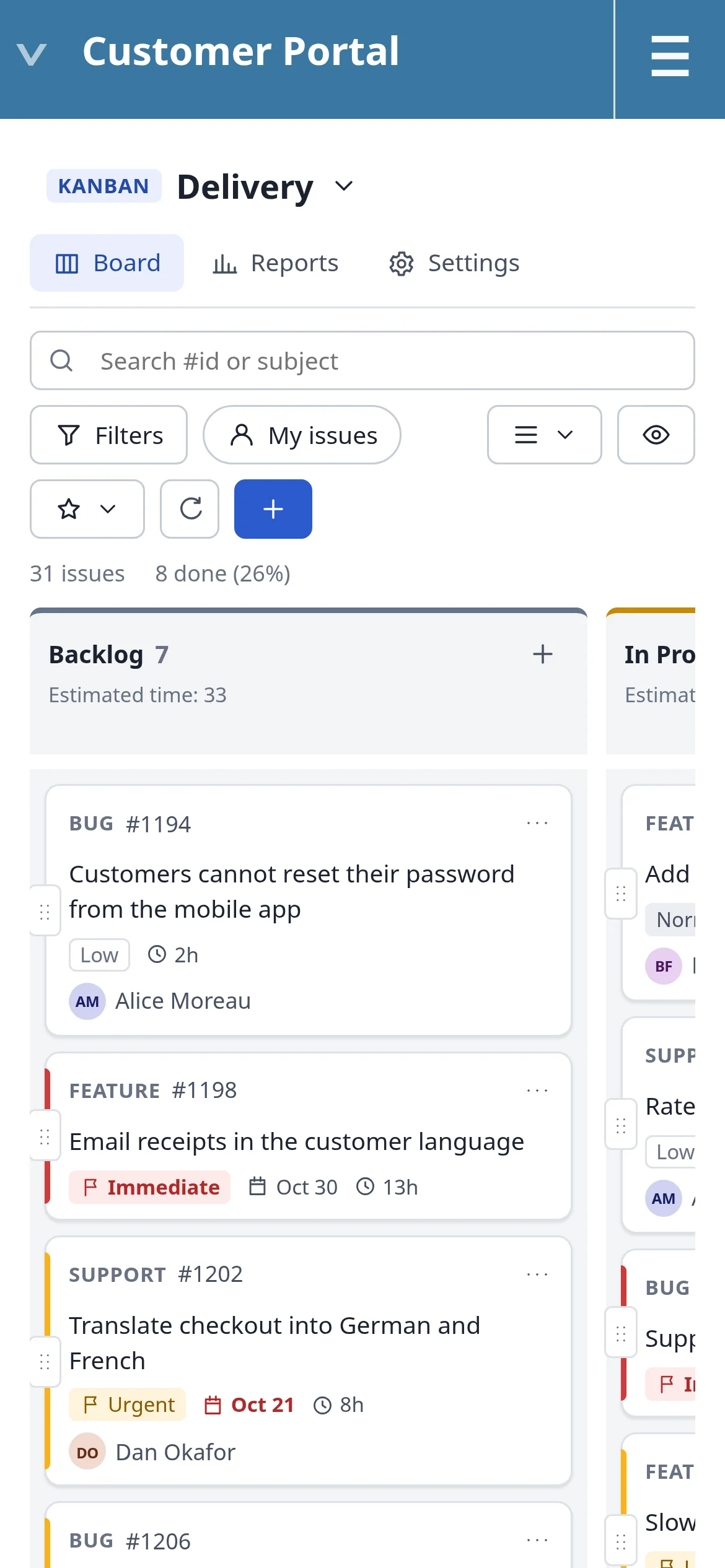
On a phone. The board scrolls one column at a time.
Built to be trusted
- Permissions on the server. Every endpoint checks Redmine permissions on the server, not only in the browser.
- Session sign-in. CSRF protection and Redmine's own session sign-in. No API keys.
- Nothing leaks. Private issues, hidden fields and other projects never appear on a board.
- Safe to uninstall. Uninstalling never deletes issues, journals or time entries; only the plugin's own boards, sprints, views, ranks and story points are removed.
Permissions
Agile board is a standard Redmine project module, with six permissions you grant per role.
| Permission | What it allows |
|---|---|
view_agile_boards |
View agile boards |
manage_agile_boards |
Create and configure boards |
rank_agile_issues |
Rank issues on agile boards |
manage_agile_sprints |
Manage sprints |
share_agile_views |
Share board views with the team |
view_agile_reports |
View agile reports |
Compatibility
| Environment | Status | Notes |
|---|---|---|
| Redmine 7.x | Supported | |
| Redmine 6.x | Supported | Precompile assets after installing |
| Redmine 5.x | Supported | |
| Redmine 4.x | Supported | 4.0 is the minimum version |
| Databases | Supported | MySQL, MariaDB, PostgreSQL and SQLite |
| Browsers | Supported | Current Chrome, Edge and Firefox; Safari 15 or newer |
| Extra software | None | No Node.js, no extra gems, no external service |
| Redmine core | Untouched | A standard plugin that only adds its own database tables |
Installation
cd /path/to/redmine
# the package arrives by email, or from your download link
# the folder must be named plugins/redminekit_agile
unzip redminekit_agile-1.0.0.zip -d plugins/

bundle exec rake redmine:plugins:migrate NAME=redminekit_agile RAILS_ENV=production

# Redmine 6.0 and later only
bin/rails assets:precompile RAILS_ENV=production

touch tmp/restart.txt   # or restart your Redmine service
Then, in Redmine:
- Administration → Roles and permissions: grant the six agile permissions.
- Project → Settings → Modules: tick Agile board in each project that needs a board.
FAQ
Does the plugin change Redmine core files?
No. It is a standard Redmine plugin that uses Redmine's plugin API, permissions, routes and hooks, and only adds its own database tables.
Can a drag and drop bypass our workflow?
No. Every change goes through the same model methods as Redmine's issue form, as the signed-in user. Workflow transitions, required and read-only fields and permissions apply. If Redmine refuses a change, the card goes back and the board shows the reason.
Our statuses are not called "To Do" and "In Progress". Does that matter?
No. A new board maps your own statuses to columns by name and by whether they are closed; you can remap anything in the board settings. A column can hold several statuses.
Do we have to use Scrum?
No. Kanban works on its own, and an administrator can switch the Scrum features off for the whole installation.
Will the reports show anything on day one?
Yes. The flow reports use Redmine's issue history, so work completed before installing the plugin is included.
What happens to our data if we uninstall it?
Your issues, journals and time entries are never deleted. Only the plugin's own data is removed: boards, sprints, saved views, ranks and story points.
Changelog
1.0.0 (October 24, 2026)
- First release
- Kanban boards with columns mapped to Redmine statuses, WIP limits and swimlanes
- Workflow-aware drag and drop, quick creation and inline editing
- Scrum: ranked backlog, sprint planning, story points
- Flow and sprint reports with CSV export
Licence and support
Commercial software © 2026 RedmineKit, licensed per server (single server or multiple servers). Redistribution or resale is not permitted. RedmineKit is an independent vendor; Redmine is a trademark of Jean-Philippe Lang.
- Buy: https://redminekit.com/redmine/plugins/redmine-agile-kanban#pricing
- Support: https://redminekit.com/support
- Custom development: https://redminekit.com/custom-redmine-development
- Already using another agile plugin? We'll help you migrate: https://redminekit.com/contact
Changelog
1.0.0 (2026-01-01)
Compatible with Redmine 7.1.x, 7.0.x, 6.1.x, 6.0.x, 5.1.x, 5.0.x, 4.2.x, 4.1.x, 4.0.x.