Plugins Directory » Redmine Banner
|
|
Author: | K Seraph3000 |
|---|---|---|
| Website: | https://github.com/seraph3000/redmine_banner | |
| Code repository: | https://github.com/seraph3000/redmine_banner | |
| Registered on: | 2026-01-31 (9 months ago) | |
| Current version: | 0.5.4 | |
| Compatible with: | Redmine 7.0.x, 6.1.x, 6.0.x, 5.1.x, 5.0.x | |
| User ratings: |
- Key Features Added in This Fork
- Redmine 5 / 6 / 7 support
- Role-based project banners
(configure different messages per role) - Forced display option
(always show the banner under certain conditions) - Role label colorization
(show role labels with colors per role) - Banner macro feature
- Countdown (deadlines, maintenance windows, etc.)
- Date / time
- Environment info (PROD / STG / DEV, etc.)
- User info (last login, login rank, etc.)
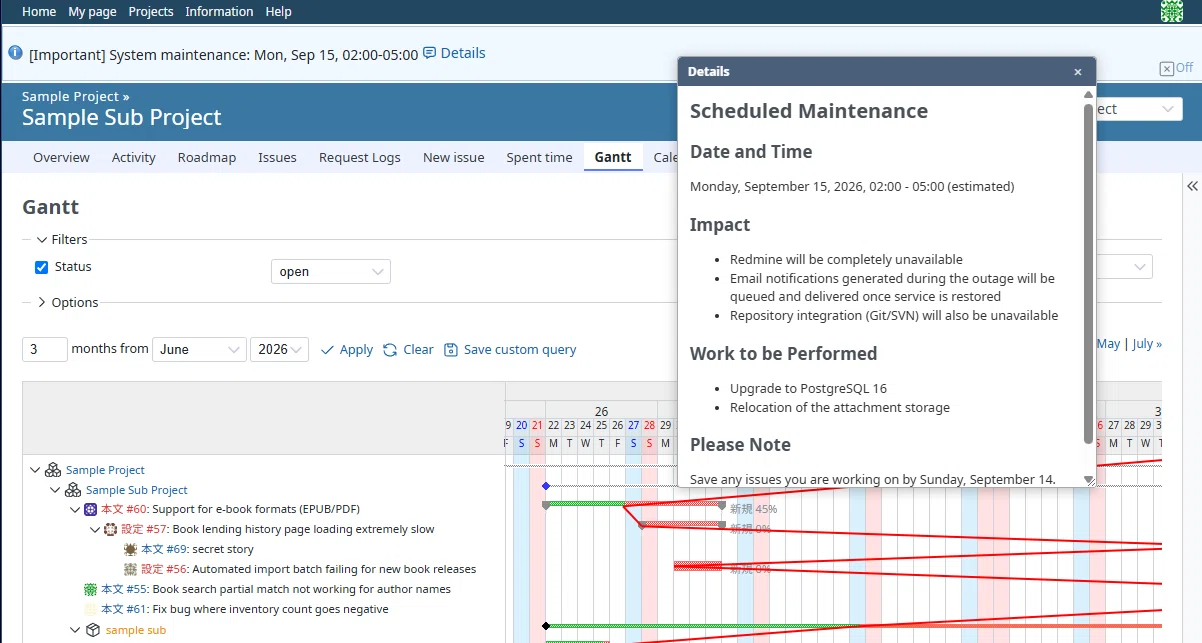
- Popup window (show content that does not fit in the banner itself)
- Localization fixes and small UI improvements
- Visual Examples
- Role-based Project Banners
Display different messages to different roles within the same project.
- Role-based Project Banners

- Banner Macros
Add dynamic content to your banners using macros.
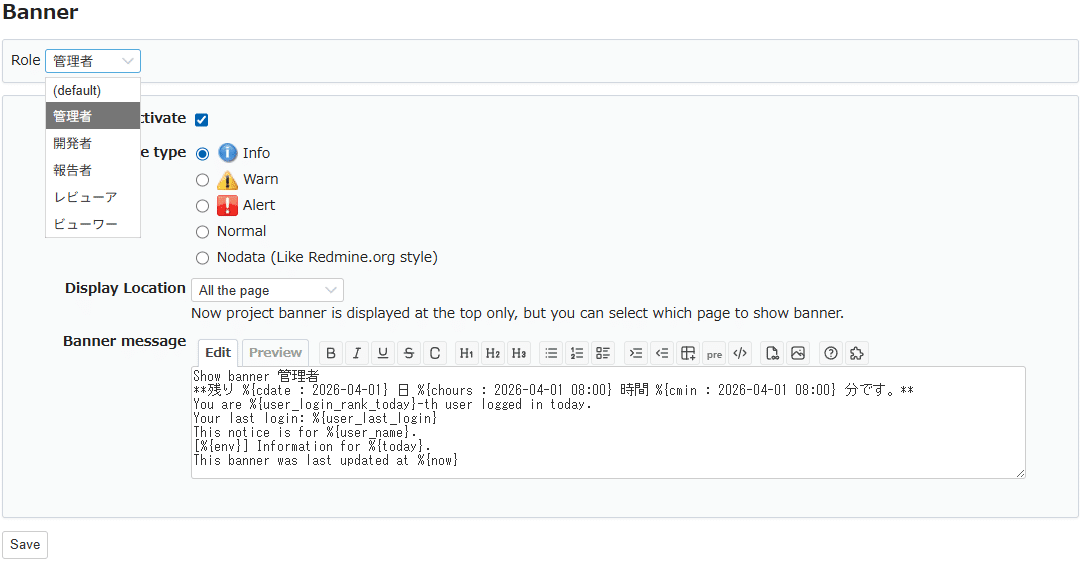
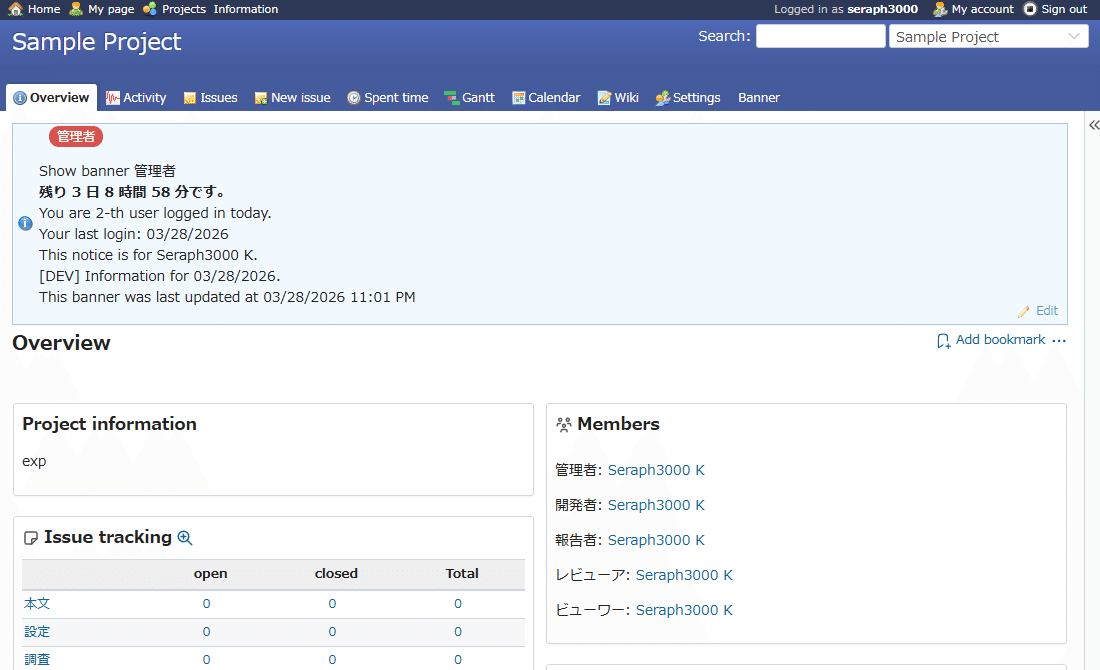
- Popup window
A movable, resizable window opens from a link in the banner.
- Detailed articles (Japanese, auto-translated into English):
- [Role-based banners and macros](https://note.com/taba_muichi/n/ncf2c00d2c54b?hl=en)
- [Adding a popup window to Redmine Banner](https://note.com/taba_muichi/n/n9ddeb0663758?hl=en)
Changelog
0.5.4 (2026-10-12)
Compatible with Redmine 7.0.x, 6.1.x, 6.0.x, 5.1.x, 5.0.x.
- Updated banner edit and hide links to use main_app route helpers for compatibility with views rendered inside Rails engines.
0.5.3 (2026-09-25)
Compatible with Redmine 7.0.x, 6.1.x, 6.0.x, 5.1.x, 5.0.x.
- Fixed an issue where popup links were not displayed correctly when using Textile formatting.
- Increased the text limit for banner and popup content to 30,000 characters.
0.5.2 (2026-08-03)
Compatible with Redmine 7.0.x, 6.1.x, 6.0.x, 5.1.x, 5.0.x.
- Added
- Popup window macro (`%{popup:TEXT}`) for both global and project banners
- Clicking the expanded link opens a floating window that can be moved and resized while continuing to use Redmine
- Popup content supports Textile / Markdown and banner macros
(except `%{popup:...}` itself — popups cannot be nested) - Window position, height and open state are kept across page transitions
(per browser tab) - On narrow screens (899px or less), the content is expanded inline in the banner instead
- Project banners can have a different popup per role
- Fixed (inherited from upstream)
- The global banner "Off" link passed `remote: true` in the URL options hash instead of the HTML options hash, so it was sent as a query parameter
(`?moderate=yes&remote=true`) rather than becoming an Ajax request. Clicking it navigated to the raw JavaScript response. Replaced with an explicit `$.ajax` call. (Present in upstream 0.3.4 and in agileware-jp/redmine_banner.)
- The global banner "Off" link passed `remote: true` in the URL options hash instead of the HTML options hash, so it was sent as a query parameter
- Fixed (inherited from upstream / security)
- The "more info" link on the global banner did not validate the URL scheme, so values such as `javascript:` were emitted directly into `href`. A user with global banner management rights could place a script-executing link on every page. Only `http` and `https` are accepted now.
- Removed
- CI / Docker / test files inherited from upstream
- `.circleci` (contained deployment settings for external services),
`Dockerfile`, `docker-compose.yml`, `Gemfile.local`, `script/`, `test/` - All were built for Redmine 4.x and no longer work
0.5.1 (2026-07-11)
Compatible with Redmine 7.0.x, 6.1.x, 6.0.x, 5.1.x, 5.0.x.
- Macro preview: macros can now be previewed (expanded) in the "Preview" tab of the banner settings screen before applying.
- Redmine 7.0 support, following the SVG icon change on Redmine 6.x and later (admin / project menu, edit / off actions).
- Verified on Redmine 7.0 / 6.1 / 6.0.
- Also works on Redmine 5.x, but icons are simplified (text only).
- Supported versions changed: dropped Redmine 4.x; now targets Redmine 5.0 or higher.
- For Redmine 4.x or earlier, use 0.4.2.
- Fix: project banner "Off" now hides the banner per session instead of permanently disabling it (previously one click disabled the banner).
- Other minor bug fixes.
- Security fixes (thanks to @mael-chouteau)
0.4.2 (2026-02-10)
Compatible with Redmine 6.1.x, 6.0.x, 5.1.x, 5.0.x, 4.2.x, 4.1.x, 4.0.x.
Fix: global banner could not be saved when edited from a project page as an admin (routing error to /global_banner/).
The global banner now always posts correctly to global_banner#update.
修正: adminがプロジェクトページからグローバルバナーを編集すると保存できない問題を修正
(/global_banner/ に飛ぶルーティング不具合)。
0.4.1 (2026-02-01)
Compatible with Redmine 6.1.x, 6.0.x, 5.1.x, 5.0.x, 4.2.x, 4.1.x, 4.0.x.