Plugins Directory » Redmine Pinned Issues
|
|
Author: | K Seraph3000 |
|---|---|---|
| Website: | https://github.com/seraph3000/redmine_pinned_issues | |
| Code repository: | https://github.com/seraph3000/redmine_pinned_issues | |
| Registered on: | 2026-04-19 (6 months ago) | |
| Current version: | 0.4.2 | |
| Compatible with: | Redmine 7.0.x, 6.1.x, 6.0.x | |
| User ratings: |
Pinning issues
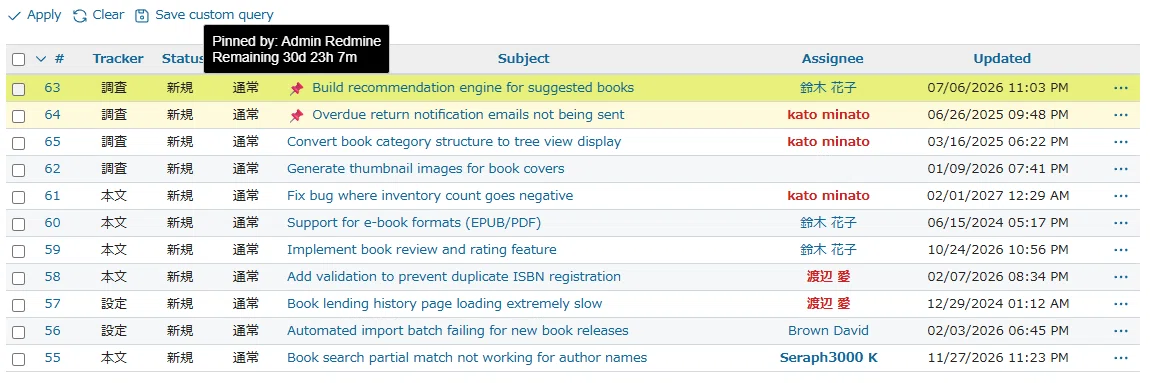
- Pin/Unpin issues : Pin specific issues to the top of the list or unpin them.
- Priority display : Pinned issues always appear at the top regardless of the sort order chosen by the user.
- Expiration periods : Set pin duration with 9 presets (30 minutes, 1/4/8 hours, 1/3 days, 1 week, 1 month, no expiration). Pins are automatically hidden once expired.
- Smart sort order for pinned issues : Among pinned issues, those with no expiration appear first, followed by those with longer remaining time.
- Permission control : Grant "Pin issues" permission to specific roles only.
- Project module : Enable or disable the pinning feature per project.
- Visual indicators :
- Pinned issue rows are highlighted with a customizable background color (separate colors for odd/even rows).
- A pin icon is displayed before the issue title on both the issue list and detail pages.
- Hovering the icon shows who pinned the issue and how much time remains.
- Context menu UI : All operations are accessible via right-click context menu with a submenu for expiration selection. No page reloads or modal dialogs — everything happens inline via Ajax.
Note (how expiration is calculated):
Durations such as "1 week" and "1 month" are calculated on a calendar basis (Ruby on Rails).
In particular, "1 month" is not a fixed 30 days but the same day of the next month, so the remaining time varies between 28–31 days depending on when the issue was pinned (e.g., ~31 days if pinned in May, ~28 days in February).
The tooltip displays this actual remaining time as-is.
Important notes
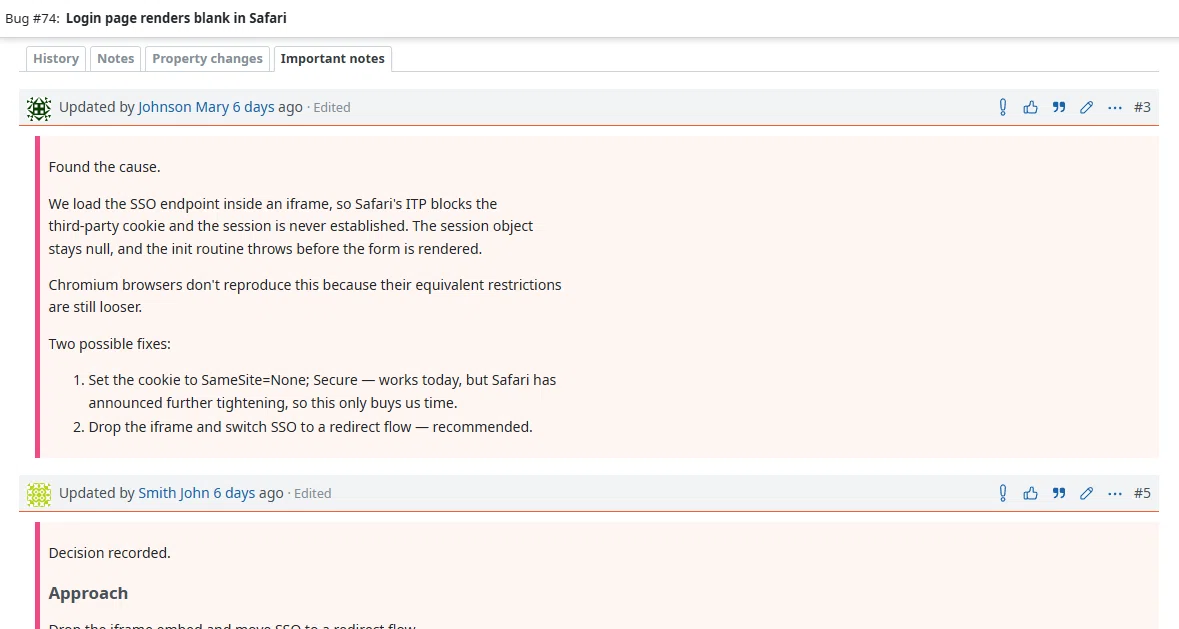
- Mark comments as important : A star button on each comment toggles its "important" state via Ajax.
- Highlighted display : Important comments get a colored underline on the header, a tinted background and a left accent border.
- Dedicated tab : An "Important notes" tab appears on the issue history and filters it down to the marked comments. The tab only shows up when at least one comment is marked.
- Audit trail : Marking and unmarking is recorded in the issue history with a link to the note.
- Permission control : Grant "Pin comments as important" permission to specific roles only. No separate project module is required — the permission belongs to the core issue tracking module.
Detailed explanation :
https://note.com/taba_muichi/n/nfeaf50234003?hl=en
https://note.com/taba_muichi/n/n3d1eaec391c9?hl=en
Installation notes
Requirements
- Redmine 6.0 or later (also tested on 6.1/7.0). Redmine 5.x and earlier are not supported -- the plugin raises an error on load if the Redmine version is below 6.0.0.
- PostgreSQL 16 (other databases may work but are not officially tested)
Install
Clone into Redmine's plugins directory and run the migration:
   cd /path/to/redmine/plugins
   git clone https://github.com/seraph3000/redmine_pinned_issues.git
   cd /path/to/redmine
   bundle exec rake redmine:plugins:migrate RAILS_ENV=production
Depending on your environment, you may need to recompile assets:
   RAILS_ENV=production bundle exec rake assets:clobber
   RAILS_ENV=production bundle exec rake assets:precompile
For subdirectory deployments (e.g. /redmine), prefix the commands with RAILS_RELATIVE_URL_ROOT=/redmine.
Then restart your web server (e.g. systemctl restart httpd).
Uninstall
Revert the plugin's migrations (this drops the pinned_issues table and deletes all pin data):
   cd /path/to/redmine
   bundle exec rake redmine:plugins:migrate NAME=redmine_pinned_issues VERSION=0 RAILS_ENV=production
Remove the plugin directory:
rm -rf /path/to/redmine/plugins/redmine_pinned_issues
Recompile assets if needed for your environment:
   RAILS_ENV=production bundle exec rake assets:clobber
   RAILS_ENV=production bundle exec rake assets:precompile
Restart your web server (e.g. systemctl restart httpd).
Post-install setup
- Administration > Roles and permissions: grant the "Pin issues" permission to the roles that should be able to pin issues.
- Project settings > Modules: enable "Pin Issues" on each project where the feature should be available.
- (Optional) Administration > Plugins > Redmine Pinned Issues plugin > Configure: adjust the pinned-row background colors (odd / even).
Recommended cron (daily cleanup of expired pin records)
Expired pins are automatically excluded from the list and sort order, but the underlying DB records remain until cleaned up. A daily cleanup is recommended:
0 3 * * * cd /path/to/redmine && /usr/bin/flock -xn /tmp/redmine_pinned_issues_cleanup.lock -c 'RAILS_ENV=production bundle exec rake redmine:pinned_issues:cleanup'
Changelog
0.4.2 (2026-08-18)
Compatible with Redmine 7.0.x, 6.1.x, 6.0.x.
- Added a per-issue limit for important notes, configurable from the plugin
settings page. Defaults to 0 (unlimited). - The star button is now disabled for a few seconds after each click,
preventing accidental repeated toggles. - Toggle requests on the same issue are now serialized, so simultaneous
operations from multiple tabs no longer bypass the limit or create
duplicate records. - Fixed a duplicate submission causing an error under PostgreSQL.
- Replaced the star icon (fav) with a custom exclamation mark SVG sprite for the important toggle button.
0.4.1 (2026-08-18)
Compatible with Redmine 7.0.x, 6.1.x, 6.0.x.
- Removed duplicate definitions of showIssueHistoryImportant.
0.4.0 (2026-08-12)
Compatible with Redmine 7.0.x, 6.1.x, 6.0.x.
- Added the important notes feature. Comments can be marked as important with a star button, are highlighted in the history, and can be filtered through a dedicated "Important notes" tab. Marking and unmarking is recorded in the issue history. Controlled by the new "Pin comments as important" permission.
- Added three color settings for important notes (header underline, background, left border).
0.3.0 (2026-07-22)
Compatible with Redmine 7.0.x, 6.1.x, 6.0.x.
- Added optional issue list coloring (Farend fancy theme compatible).
0.2.5 (2026-07-12)
Compatible with Redmine 7.0.x, 6.1.x, 6.0.x.
- Confirmed compatibility with Redmine 7.0. No code changes required; sort/join patches already use Arel.sql and DB-agnostic quoting.
0.2.4 (2026-06-27)
Compatible with Redmine 6.1.x, 6.0.x.
- Fixed an issue where the pin/unpin options mistakenly appeared in the context menu on Gantt chart views.
- Optimized performance by restricting plugin JavaScript, CSS, and JSON data injection to issue-related pages only.
0.2.3 (2026-05-29)
Compatible with Redmine 6.1.x, 6.0.x.
- Validate plugin color settings (hex only) before inline CSS output,
fixing a potential stored XSS on the settings screen - Add a default pinned icon color to avoid an empty CSS variable
- Restrict pin actions to visible issues (Issue.visible)
- Handle concurrent pin toggles gracefully (rescue RecordNotUnique)
0.2.2 (2026-05-23)
Compatible with Redmine 6.1.x, 6.0.x.
- Added a tooltip on the Pin icon showing who pinned the issue and the remaining time on hover.
- Documented that expiration periods are calendar-based ("1 month" is not a fixed 30 days).
0.2.1 (2026-05-20)
Compatible with Redmine 6.1.x, 6.0.x.
- Removed leftover debug CSS class (patch-alive-test) from issue row output.
0.2.0 (2026-04-18)
Compatible with Redmine 6.1.x, 6.0.x.