Feature #12197
closed

Allow users to set their avatar in Redmine
Description
Hey there,
I just tried to upload a userdefined profile picture in our intranet-system.
It seems, that Redmine doesn't support this feature. The only way to integrate it, is to define a gravatar account with my business mailadress, which isn't the best way i think.
My other option is to integrate this Plugin: http://www.redmine.org/plugins/redmine_local_avatars
But this seems fairly outdated. It would be great to have this feature out of the box integrated.
Best regards
Files
Related issues
 Updated by @ go2null over 13 years ago
Feature #13536 asks for LDAP Avatar, in addition to a Local Avatar.
There is also Local Avatars Plugin although it too is for Redmine 1.0.
 Updated by Toshi MARUYAMA
  Updated by Anonymous
  Updated by
  Updated by
  Updated by
 Updated by Go MAEDA 21 days ago
- File clipboard-202610151743-rgfqf.png clipboard-202610151743-rgfqf.png added
- File clipboard-202610151740-jaxms.png clipboard-202610151740-jaxms.png added
- File clipboard-202610151749-jjx60.png clipboard-202610151749-jjx60.png added
- File 0001-Allow-users-to-set-their-avatar-in-Redmine.patch added
- File 0002-Add-pages-to-change-the-avatar-for-users-and-adminis.patch added
- File 0003-Mention-avatars-in-the-ImageMagick-requirement-in-do.patch 0003-Mention-avatars-in-the-ImageMagick-requirement-in-do.patch added
- Category changed from UI to Accounts / authentication
- Target version set to Candidate for next major release
I have attached patches that allow users to upload an image as their avatar. Users without an uploaded avatar continue to be shown with their Gravatar or initials avatar. The feature can be disabled with the new "Allow users to set their avatar" setting on the Display tab, which is enabled by default.
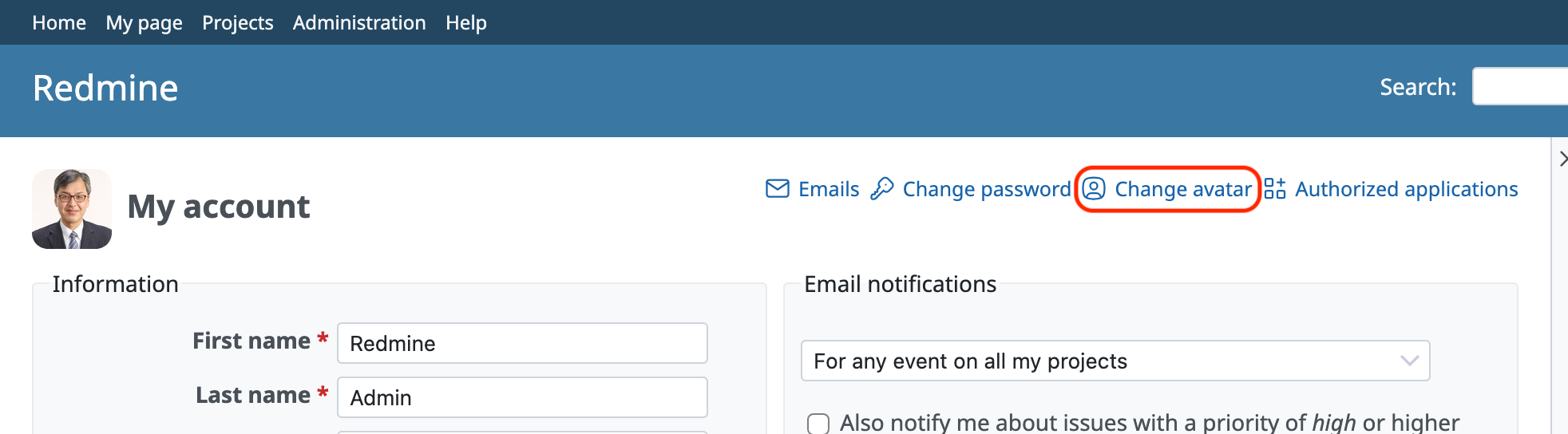
Users change their avatar on the new page /my/avatar, which is linked from the my account page. Administrators can change the avatar of any user on /users/:user_id/avatar, which is linked from the user edit page. This allows administrators to remove an inappropriate image, and to set an image for accounts that never log in. The page shows the current avatar, explains whether it is the uploaded image, the image from the avatar server or the initials, and allows the uploaded image to be replaced, downloaded or deleted.
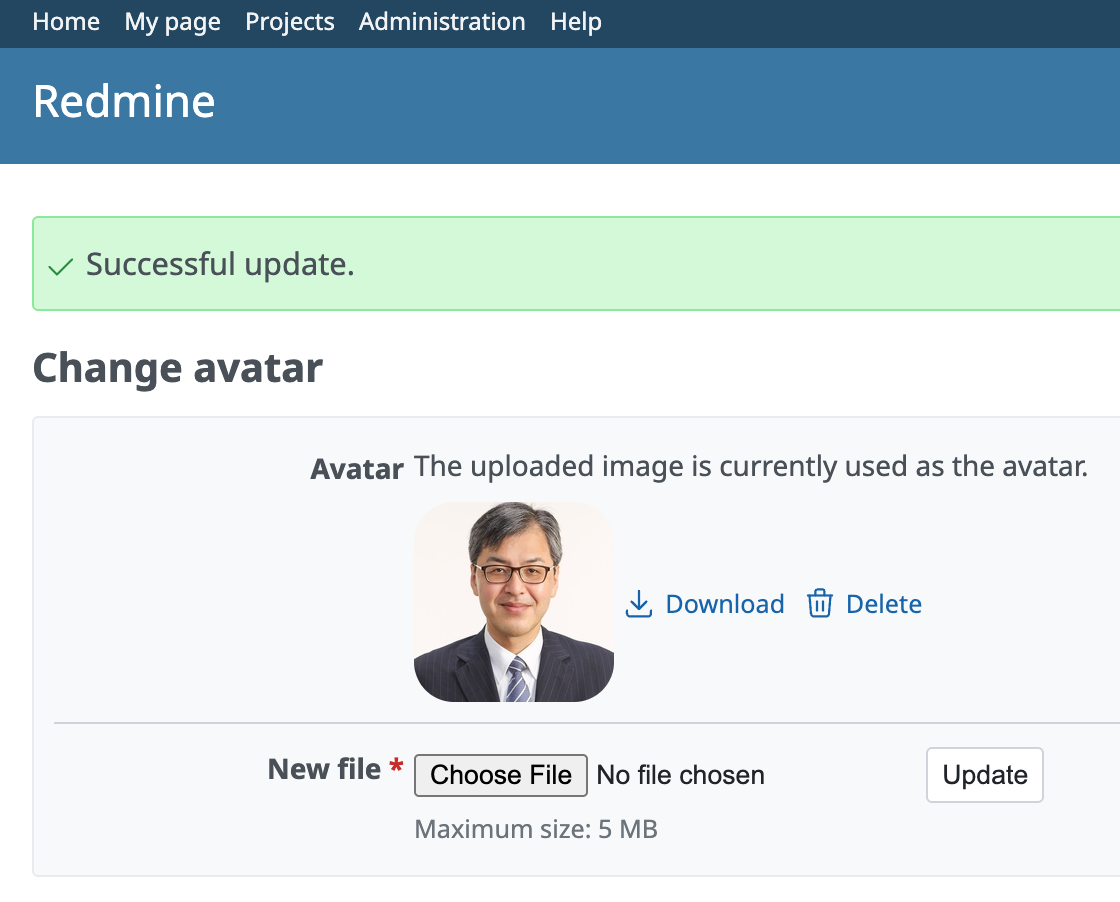
The image is stored as an attachment whose container is the user, and is referenced by the new users.avatar_id column. Reusing attachments keeps avatars compatible with plugins that store attachments elsewhere, such as in S3, and the column allows avatars to be rendered without additional queries.
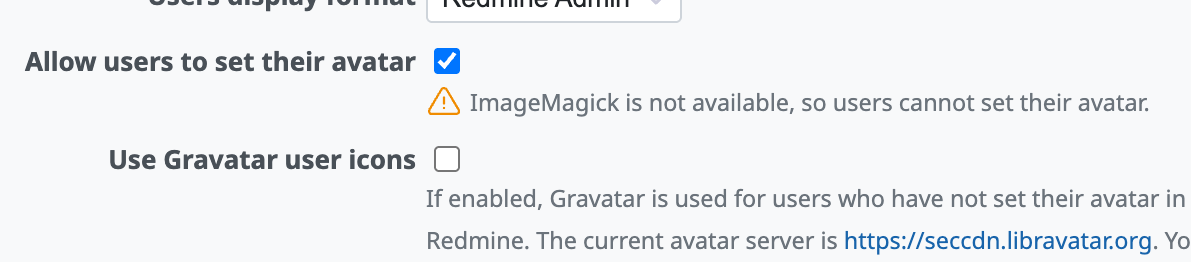
Avatars are served only as thumbnails generated by ImageMagick and cropped to a square, so that metadata in the original image, such as the location where a photo was taken, is not exposed. The feature therefore requires ImageMagick. When ImageMagick is not available, uploaded avatars are ignored, Gravatar or initials avatars are displayed instead, and the setting shows a warning:
The original image can be downloaded only by the user and administrators. Like Gravatar and initials avatars, avatars are visible to anyone who can access Redmine, subject to the "Authentication required" setting.
The patches also make the following related changes:
- The avatar_url attribute in the Users API returns the URL of the uploaded avatar when there is one.
- CSS rules that targeted
img.gravatarnow targetimg.avatar, so that they apply to all avatar images. Themes that targetimg.gravatarmay need to be updated. - The avatar in the title of the my account page now links to the new page instead of the avatar server.
- doc/INSTALL mentions that ImageMagick is required for avatars.
These patches depend on #44620, which prevents partially written thumbnails from being served.
Updated by Go MAEDA 20 days ago
- File 0001-Allow-users-to-set-their-avatar-in-Redmine.patch added
- File 0002-Add-pages-to-change-the-avatar-for-users-and-adminis.patch 0002-Add-pages-to-change-the-avatar-for-users-and-adminis.patch added
- File deleted (
0001-Allow-users-to-set-their-avatar-in-Redmine.patch) - File deleted (
0002-Add-pages-to-change-the-avatar-for-users-and-adminis.patch)
I have attached updated patches that replace the patches in #note-7. The only change is the format of the URL of avatar images, which now contains an unguessable hash instead of the attachment id.
In the previous patches, the URL of an avatar contained the user id and the attachment id, for example /users/2/avatar/16. Since both ids are sequential, anyone who can access Redmine could collect avatars by trying ids in turn, including avatars of users who never appear on any page they can see.
The hash in the new URL, for example /users/2/avatar/3f9a1c0b7e2d4a65, is an HMAC of the attachment id with a secret derived from secret_key_base, so the URL cannot be guessed from the ids. An avatar can therefore be retrieved only by those who have seen its URL on a page.
Updated by Go MAEDA 20 days ago
- Blocked by Defect #44620: Partially written thumbnails may be served during generation or after a failure added
Updated by Go MAEDA 18 days ago
- File 0001-Allow-users-to-set-their-avatar-in-Redmine.patch 0001-Allow-users-to-set-their-avatar-in-Redmine.patch added
- File deleted (
0001-Allow-users-to-set-their-avatar-in-Redmine.patch)
I have attached an updated 0001-Allow-users-to-set-their-avatar-in-Redmine.patch that replaces the one in #note-9. The patch has been rebased onto r25270, in which the deprecated _is_pdf parameter was removed from Redmine::Thumbnail.generate (#44628). The :crop option added by the patch is now the only optional parameter of the method. There are no other changes.
Updated by Go MAEDA 16 days ago
- Status changed from New to Closed
- Assignee set to Go MAEDA
- Resolution set to Fixed
Committed the patches in r25279, r25280, and r25281 for 7.1.0. Users can now upload an image to use as their avatar.
To change the avatar, open My account and click “Change avatar”. Administrators can also change the avatar of any user from the user's edit page. Users who have not set an avatar continue to see their Gravatar or initials avatar as before.
The feature is enabled by default and can be disabled with the "Allow users to set their avatar" setting in Administration > Settings > Display. It requires ImageMagick, which Redmine already uses to generate thumbnails.