Defect #1249
closed

在生成PDF文件时,中文出现乱码
Description
UTF-8是每个中文字是3个字节,而在\redmine\vendor\plugins\rfpdf\lib\rfpdf\chinese.rb文件中的第232行:i+=ascii ? 1 : 2,应该是i+=ascii ? 1 : 3
这样经过测试,问题解决。
Files
 Updated by Jean-Philippe Lang over 18 years ago
- Status changed from New to Closed
- Assignee deleted (
Nicolas Chuche) - Target version deleted (
0.7.2) - Resolution set to Invalid
Please, speak in english here.
 Updated by qing qu over 16 years ago
- Status changed from Closed to Reopened
- Assignee set to Chaoqun Zou
文件默认就是1:3,还是乱码
 Updated by arone zhang over 16 years ago
0.9.3里面redmine将语言和字符集混淆了,
只要将个人默认语言设置为“简体中文”就可以正常导出了
所以它的逻辑是有问题的,语言是用来控制界面多语言的,而pdf中内容导出不应该是和这个有关系。
 Updated by Azamat Hackimov over 16 years ago
- Status changed from Reopened to Closed
Please, speak english, or we cannot help you.
 Updated by Junyu Jiang over 14 years ago
- File language_selection.png language_selection.png added
- Status changed from Closed to Reopened
Hi, I have same problem now, and I found this issue while searching.
The problem is, while export issue to pdf, the Chinese character will be a block.
This problem will be fixed if I changed my default language selection.
While my account language is English, it is wrong, and if my language is Chinese, then the export PDF is OK.
IMO, export PDF should not relating to my language selection.
Refer to 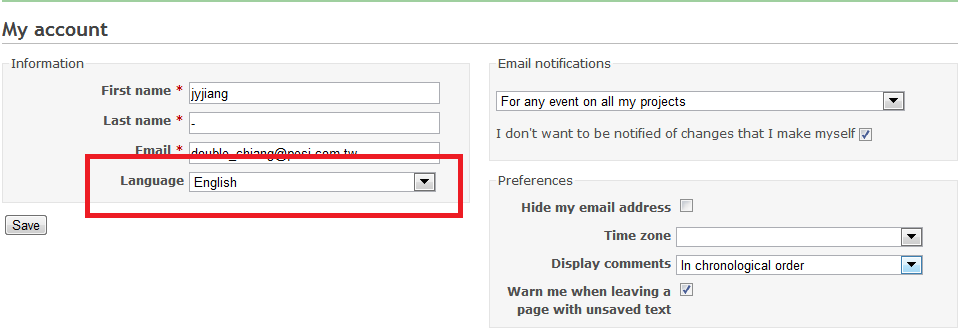
 Updated by Toshi MARUYAMA over 14 years ago
- Status changed from Reopened to Closed
- Resolution changed from Invalid to Wont fix
PDF implantation has changed on Redmine 1.2.
On non CJK locale, Redmine uses embedded fonts.
On CJK locale, Redmine uses non-embedded fonts.
Unicode has unified problem.
http://www.redmine.org/issues/61#note-95
And there is no free font of high quality CJK.
Updated by Toshi MARUYAMA over 14 years ago
- Category changed from Translations to PDF export
Updated by Junyu Jiang over 14 years ago
mmm, my question is not export Chinese problem. Please refer to the png file I attached. While I am in Chinese language, there is no problem to export pdf file. But if I was in English language mode, there IS problem.
I think user interface should not be related to pdf export result.
Updated by Toshi MARUYAMA over 14 years ago
Junyu Jiang wrote:
mmm, my question is not export Chinese problem. Please refer to the png file I attached. While I am in Chinese language, there is no problem to export pdf file. But if I was in English language mode, there IS problem.
This is design.
As I described note-6, on English locale, Redmine uses embedded font.
This font does not have Chinese characters.
I think user interface should not be related to pdf export result.
As I described note-6, Unicode has unified problem.
So, Redmine uses non-embedded fonts on CJK locales.
 Updated by Maxime Vez about 13 years ago
- File rd-274.pdf rd-274.pdf added
+1
I have the exact same problem. When user language is set to English, and exporting to PDF, the Chinese characters will be displayed as square blocks in the PDF. When user language set as Chinese, then no problem.
Is there a workaround? thanks
 Updated by Jan Niggemann (redmine.org team member) about 13 years ago
You posted to a thread that was first closed 5 years ago...
Updated by Toshi MARUYAMA about 13 years ago
- Resolution changed from Wont fix to Duplicate
Updated by Toshi MARUYAMA about 13 years ago
- Is duplicate of Defect #13781: CJK(Chinese/Japanese/Korean) characters are not shown in PDF on non CJK locales added
Updated by Toshi MARUYAMA about 13 years ago
Maxime Vez wrote:
+1
I have the exact same problem. When user language is set to English, and exporting to PDF, the Chinese characters will be displayed as square blocks in the PDF. When user language set as Chinese, then no problem.
Is there a workaround? thanks
See #13781.