Defect #13575
closed
Graphic characters not exported
Added by Ivan Cenov over 13 years ago.
Updated over 10 years ago.
Description
Here is a sample how the graphic characters are not exported well. This is a sample state machine diagram:
          ┌───────────────┐        evLowTemp, evHighTemp           ┌───────────────┐
          │  sP1_BADTEMP  ├───────────────────◄────────────────────┤ sP1_LOWVOLTAGE│
          └───────┬───────┘                (P1a4)                  └───────┬───────┘
                  ▲                                                        ▲
                  │ evLowTemp, evHighTemp                                  │ evLowVoltage
                  │       (P1a4)                                           │    (P1a5)
                  │                    ┌───────────────┐                   │
                  └────────────────────┤   sP1_IDLE    ├───────────────────┘
                                       └───────────────┘
All versions are affected. Try to export to PDF. You will see squares instead of lines and arrows in the exported PDF file.
Files
Related with #10681. Same problem with persian or chinese characters.
It seems the problem is the font that is used for rendering the content. There is a set of fonts that are used and they are in source:/trunk/lib/plugins/rfpdf/lib/fonts Probably these fonts have no defined graphic characters in them.
Font selection is made in source:/trunk/lib/redmine/export/pdf.rb#L40
I suspect that the missing characters should be added to the fonts. However I do not know how ... :(
The font (freesans) can be easily updated from http://sourceforge.net/projects/tcpdf/files/
But you will still have the problem with displaying your graphic, because pre-Tags are not considered yet and so it's not displayed in mono font.
How ever, I regret an font file update, because the font file are much bigger than before. Only an update for the main font (FreeSans) would increase the pdf file size about 220 kb. ... and not solving your problem.
I use pre tags because they preserve character width. The following is without pre-tags:
┌───────────────┐ evLowTemp, evHighTemp ┌───────────────┐
│ sP1_BADTEMP ├───────────────────◄────────────────────┤ sP1_LOWVOLTAGE│
└───────┬───────┘ (P1a4) └───────┬───────┘
The size of PDF file is not so important.
Ivan Cenov wrote:
I use pre tags because they preserve character width. The following is without pre-tags:
┌───────────────┐ evLowTemp, evHighTemp ┌───────────────┐
│ sP1_BADTEMP ├───────────────────◄────────────────────┤ sP1_LOWVOLTAGE│
└───────┬───────┘ (P1a4) └───────┬───────┘
This is like you will see it in the pdf after the font update. I think this won't satisfy you.
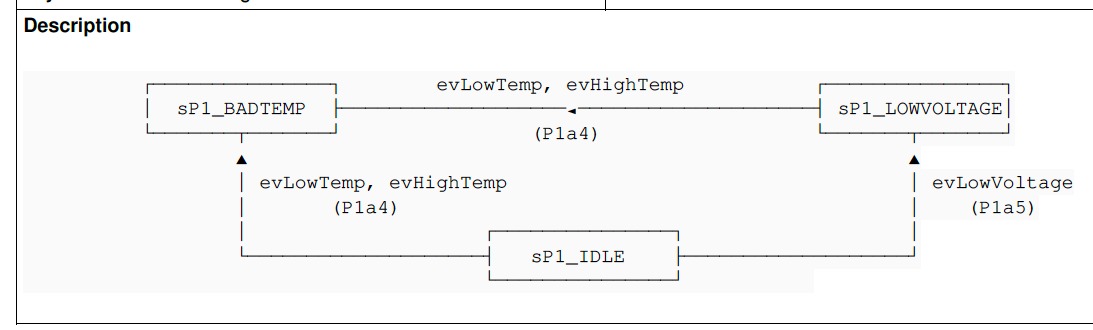
I think this problem was fixed by Redmine 3.2(rbpdf 1.19.0).
This is a sample in English locale (en.yml).
- Status changed from New to Closed
- Resolution set to Fixed
Jun NAITOH wrote:
I think this problem was fixed by Redmine 3.2(rbpdf 1.19.0).
Thank you.
Also available in: Atom
PDF

 Updated by
  Updated by
  Updated by Toshi MARUYAMA
  Updated by