Defect #31077
closed
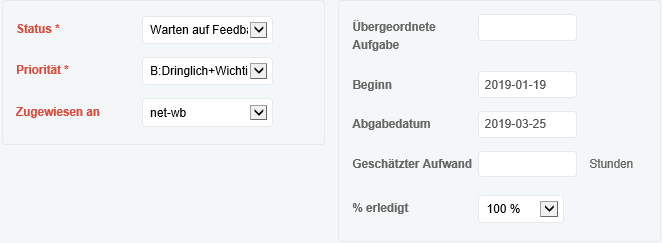
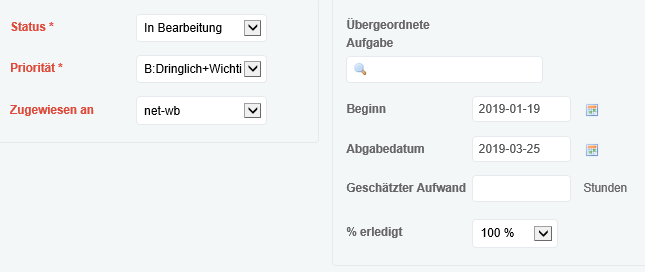
"Icon for Datepicker" does not appear after status was changed.
Description
When editing the issue, fields are displayed for modification in "Change properties" area.
In the area, "Start date" and "Due date" have string-fields and there are Icons for Datepicker right of the string-fields normally.
But, if an issue status is changed to another status the datepicker icons disappear.
I already changed the Theme for Redmine to the standard Theme but I still get the same error. When I tried another browser (for example Firefox) the Issue is not Appearing.
Redmine configuration (from "Information" of "Redmine") are as follows.
- production system: Linux based
Environment:
  Redmine version                4.0.2.stable
  Ruby version                   2.6.2-p47 (2019-03-13) [x86_64-linux]
  Rails version                  5.2.2
  Environment                    production
  Database adapter               Mysql2
  Mailer queue                   ActiveJob::QueueAdapters::AsyncAdapter
  Mailer delivery                smtp
SCM:
  Git                            2.14.1
  Filesystem
Redmine plugins:
  redmine_agile                  1.4.8
  redmine_checklists             3.1.14
  redmine_contacts               4.2.3
  redmine_contacts_helpdesk      4.0.2
  redmine_dmsf                   2.0.0
  redmine_people                 1.4.0
  redmine_zenedit                1.0.2
Could you please provide me help to fix the Issue
Files
Related issues
 Updated by Julian Lohrber over 7 years ago
- Copied from Defect #24698: "Icon for Datepicker" does not appear if the issue has a child issue (or issues). added
 Updated by Marius BĂLTEANU over 7 years ago
- Status changed from New to Needs feedback
Please see #19468 to understand when the date picker icon appears or not.
Please let me know if you still consider it a problem.
Updated by Marius BĂLTEANU over 7 years ago
- Related to Patch #19468: Replace jQuery UI Datepicker with native browser date fields when available added
Updated by Marius BĂLTEANU over 7 years ago
- Related to Feature #31300: Automatically switch between native date picker and custom date picker based on mobile or not mobile devices added
Updated by Marius BĂLTEANU over 6 years ago
- Status changed from Needs feedback to Closed
- Resolution set to Invalid