Defect #44054
closed
On the edit custom query screen it is difficult to understand the relationship between "Selected Columns" and "Default columns" due to their distance
Description
On the edit custom query screen, the checkbox of "Default columns" should be off when you want to edit "Selected Columns."
However, as the box is in the "Options", being far from items to edit, making it difficult to understand their relationship.
Apparently it would be better to place the checkbox in the "Columns" section instead of "Options."
I would appreciate your consideration.
Files
Related issues
 Updated by Taketsugu YASHIRO 4 months ago
Attached a screenshot of the screen in question for additional context.
Any question would be appreciated.
I hope the intent of this issue report is clear.
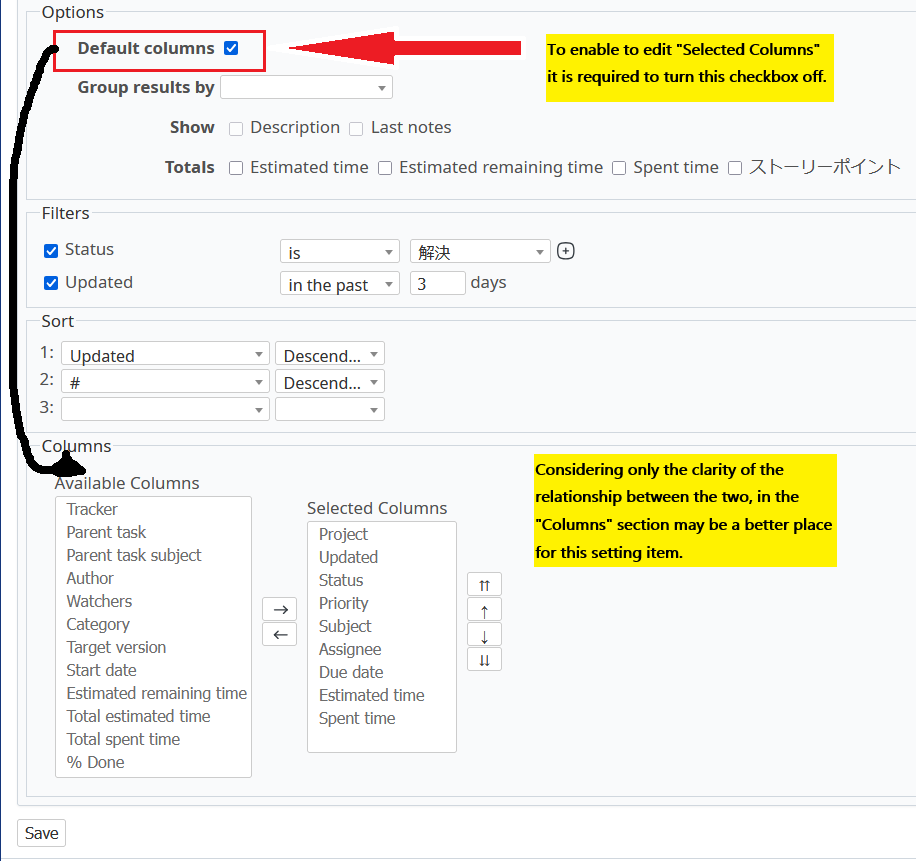
Supplementary information, including a repost of the text in the screenshot above:
To edit "Selected Columns", this checkbox must be turned off.
However, because the two elements are positioned far apart, the relationship between them is not immediately clear. Even our company's administrator needed some investigation to find it out.
From a usability and clarity perspective, it might be clearer if this checkbox were placed within the "Columns" section.
Regards,
 Updated by Go MAEDA 4 months ago
- Is duplicate of Feature #30471: Move "Default columns" checkbox on the query edit page from "Options" to "Columns" fieldset added