Defect #44376
closed

Cannot deselect current user in multi-select user custom field without also deselecting "<< me >>"
Description
In a user format custom field with multiple values enabled, the select box shows both "<< me >>" option introduced in #31444 and the current user's name as separate options with the same value (the user's id). When the current user is among the stored values, both options appear selected. Deselecting only one has no effect because the other remains selected, so users must ctrl/cmd-click both to actually remove themselves.
Steps to reproduce:
1. Create an issue custom field: format "User", multiple values enabled
2. Set the current user as a value of the field on an issue
3. Open the issue edit form and try to remove yourself by ctrl-clicking your name
After submitting the form, the current user is still saved as a value because the "<< me >>" option remains selected.
Files
Related issues
 Updated by Go MAEDA 2 months ago
- Related to Feature #31444: Add "<< me >>" option to user format issue custom fields added
Updated by Go MAEDA 2 months ago
- File clipboard-202608261213-iba3r.png clipboard-202608261213-iba3r.png added
- File 0001-Cannot-deselect-current-user-in-multi-select-user-cu.patch 0001-Cannot-deselect-current-user-in-multi-select-user-cu.patch added
- Target version set to Candidate for next major release
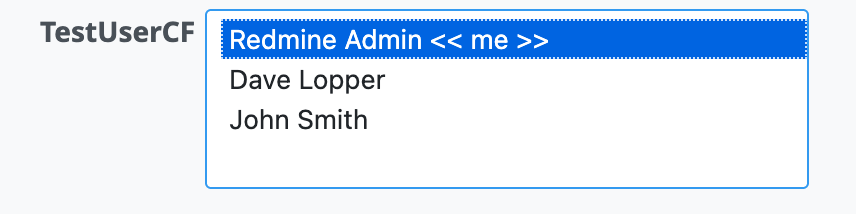
The attached patch changes UserFormat#possible_values_options as follows, only when the custom field has multiple values enabled:
- The current user's regular
[name, id]entry is removed from the list, so the current user appears only once and can be selected/deselected with a single click - The "<< me >>" entry is displayed as "John Smith << me >>" so the current user's name remains visible
Single-value fields are unchanged and keep showing both "<< me >>" and the user's name, consistent with the assignee field.
Updated by Go MAEDA about 2 months ago
- File 0001-Cannot-deselect-current-user-in-multi-select-user-cu.patch 0001-Cannot-deselect-current-user-in-multi-select-user-cu.patch added
- Target version changed from 7.0.2 to 7.1.0
Attached is an updated patch that takes a different approach.
The previous patch kept the current user at the top of the list as "John Smith << me >>", which broke the alphabetical order of the other names and also introduced a new label format not used anywhere else in Redmine.
The new patch removes the "<< me >>" option for multiple-value user custom fields, so each user appears exactly once in alphabetical order and can be deselected with a single click. This just restores the behavior of Redmine 4.0.x and earlier for multiple-value fields; single-value fields still show "<< me >>" as they do now.
Updated by Go MAEDA about 2 months ago
- Status changed from New to Resolved
- Assignee set to Go MAEDA
- Resolution set to Fixed
Committed the fix in r25063.