Feature #44448
closed
Apply the user mention highlighting to email notifications
Added by Go MAEDA 28 days ago.
Updated 25 days ago.
Category:
Email notifications
Description
Since r25030, user mentions in the web UI are displayed in three different ways as described in #39528#note-12. A mention of yourself has an orange background, a mention of another user who can view the object has a blue background, and a mention of a user who cannot view it and will not be notified has no background. This patch applies the same highlighting to email notifications.
Currently, mentions in email notifications are shown as plain links with no background color. The HTML emails already have the "user-current" and "user-mentionable" CSS classes, but the email layout has no styles for them. The patch adds the same styles as the web UI to the email layout, making mentions in email notifications consistent with the web UI.
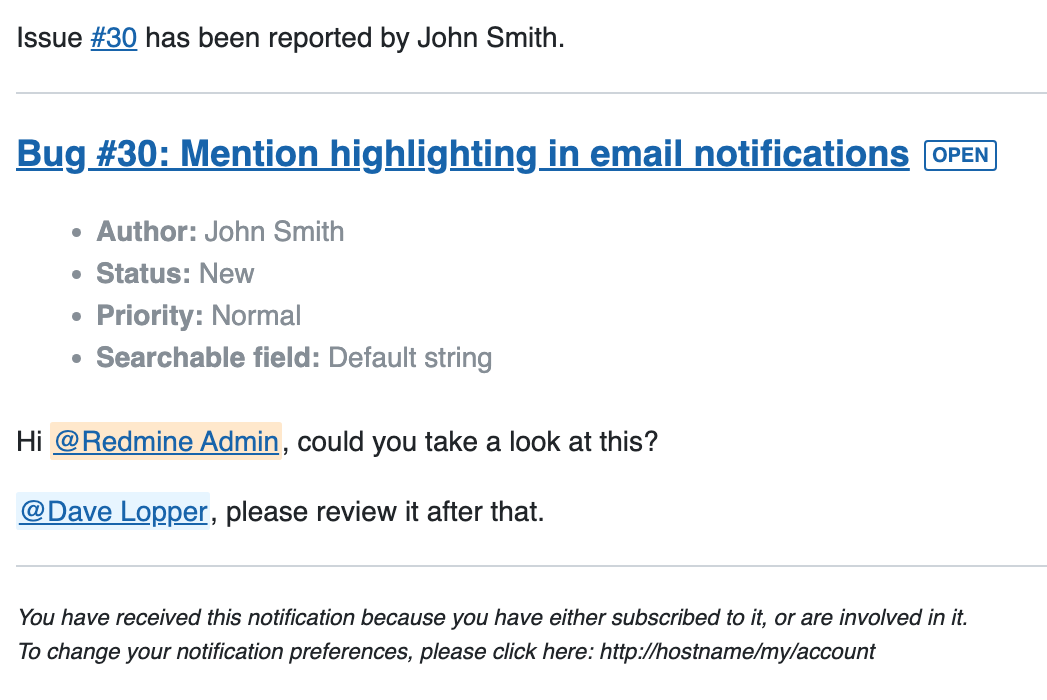
Files
- Related to Feature #39528: Change mention link color for users without access to view issues added
- Target version changed from Candidate for next major release to 7.1.0
Setting the target version to 7.1.0.
- Status changed from New to Closed
- Assignee set to Go MAEDA
- Resolution set to Fixed
Committed the patch in r25108.
Is the chosen color also suitable for email clients in dark mode?
pasquale [:dedalus] wrote in #note-4:
Is the chosen color also suitable for email clients in dark mode?
The email template already uses fixed light-mode colors for body text, links, pre blocks and badges, so it currently does not support dark mode. The background colors for user mentions added by this patch follow the same approach and do not introduce a new problem in dark mode.
I think dark mode support for email notifications would be better handled as a separate issue, since it requires changes across the template.
Also available in: Atom
PDF


 Updated by
  Updated by