Feature #44567
closed

Modernize Gantt chart HTML structure
Description
This patch modernizes the Gantt chart HTML structure as part of step 3 of #43397. It replaces the legacy table-based layout with a clearer structure that should make the chart easier to understand and extend.
It also adds row highlighting as an initial feature built on the new structure, making wide Gantt charts easier to read.
Changes
Refactor and modernize the Gantt chart layout
- Replace the table-based layout with a flex-and-pane layout.
- Replace
.gantt_hdrby splitting its multiple responsibilities—headers, borders, timeline periods, grid lines, and non-working-day backgrounds—into dedicated structural elements. - Introduce consistent logical rows across the chart.
- Move layout calculations out of the ERB template, making the overall HTML structure easier to see and understand.
Organize the Gantt chart DOM structure and semantics
- Clarify the roles of classes and
data-*attributes. - Use consistent class names and remove obsolete markup.
Highlight corresponding Gantt rows
- Highlight the corresponding row across the Gantt chart.
- Make wide charts easier to read and discuss during screen sharing.
Verification
Visual regression testing
No visual regressions were found through automated checks and manual review.
- 365 before-and-after image comparisons across 42 scenarios in 20 test groups.
- Coverage includes hierarchies, zoom levels, date ranges, display options, interactions, Arabic RTL rendering, printing, and PDF and PNG exports.
Results: https://redmine-gantt-comparison.hidakatsuya.chatgpt.site/
Performance
No performance regression was observed in a heavy test with 400 issues over 12 months at maximum zoom, three additional columns, 80 relations, and the progress line enabled.
| Metric | Before | After |
|---|---|---|
| Page ready time | 1,397.5 ms | 1,361.9 ms (-2.5%) |
| Ruby allocated memory per request | 108.98 MiB | 106.56 MiB (-2.22%) |
| Ruby retained memory per request | 14.96 MiB | 15.04 MiB (+0.53%) |
Manual browser testing
- Chrome, Firefox, and Safari on macOS.
- Chrome on Windows 11.
Next steps
I plan to continue focusing on making the Gantt chart easier to use for reviewing schedules and understanding project status.
- Remembering column widths, adding a sticky timeline header, and adopting the OpenColor palette.
- Improving the internal structure and logic: refactoring view data handling, simplifying absolute positioning calculations, and organizing the Stimulus controllers.
Appendix: DOM structure before and after
| Before | After |
|---|---|
table.gantt-table
└─ tr
   ├─ td.gantt_subjects_column
   │  └─ div.gantt_subjects_container
   │     ├─ div.gantt_hdr
   │     │  absolute header background
   │     ├─ div.gantt_hdr
   │     │  absolute full-height overlay
   │     └─ div.gantt_subjects
   │        └─ form
   │           ├─ div.project-name
   │           │  individually positioned
   │           ├─ div.version-name
   │           │  individually positioned
   │           └─ div.issue-subject × N
   │              individually positioned
   │
   ├─ td.gantt_selected_column × N
   │  └─ div.gantt_selected_column_container
   │     ├─ div.gantt_hdr
   │     │  absolute full-height overlay
   │     ├─ div.gantt_hdr
   │     │  absolute column title
   │     └─ div.gantt_selected_column_content
   │        └─ div × N
   │           individually positioned
   │
   └─ td
      └─ div#gantt_area
         ├─ div.gantt_hdr
         │  absolute header background
         ├─ div.gantt_hdr × months
         │  absolute month cells
         ├─ div.gantt_hdr × weeks
         │  absolute week cells
         ├─ div.gantt_hdr × days
         │  absolute day cells and body grid
         ├─ form
         │  ├─ div.task × N
         │  │  individually positioned bars
         │  ├─ div.task.label × N
         │  │  individually positioned labels
         │  └─ span.tooltip × N
         ├─ div#today_line
         │  absolute
         └─ div#gantt_draw_area
            absolute
|
div.gantt-chart
├─ div.gantt-column
│  [data-gantt-column="subjects"]
│  └─ section.gantt-pane
│     ├─ header
│     └─ div.gantt-pane-body
│        └─ form
│           └─ div.gantt-row × N
│
├─ div.gantt-column
│  [data-gantt-column="status"]
│  └─ section.gantt-pane
│     ├─ header
│     └─ div.gantt-pane-body
│        └─ div.gantt-row × N
│
└─ div.gantt-timeline
   └─ div.gantt-timeline-canvas
      ├─ header
      │  └─ div.gantt-header-row
      │     └─ div.gantt-period × N
      └─ div.gantt-timeline-body
         ├─ form
         │  └─ div.gantt-row × N
         ├─ div.gantt-today
         └─ div.gantt-relations
|
The new structure removes the layout table and the generic .gantt_hdr, separates headers from body content, and introduces consistent pane and row structures across the chart.
Files
Related issues
 Updated by Katsuya HIDAKA 21 days ago
You can also review the changes on GitHub: https://github.com/hidakatsuya/redmine/pull/57
To apply the patch locally, run the following from the Redmine source directory:
curl -L https://patch-diff.githubusercontent.com/raw/hidakatsuya/redmine/pull/57.patch | git am
Updated by Katsuya HIDAKA 21 days ago
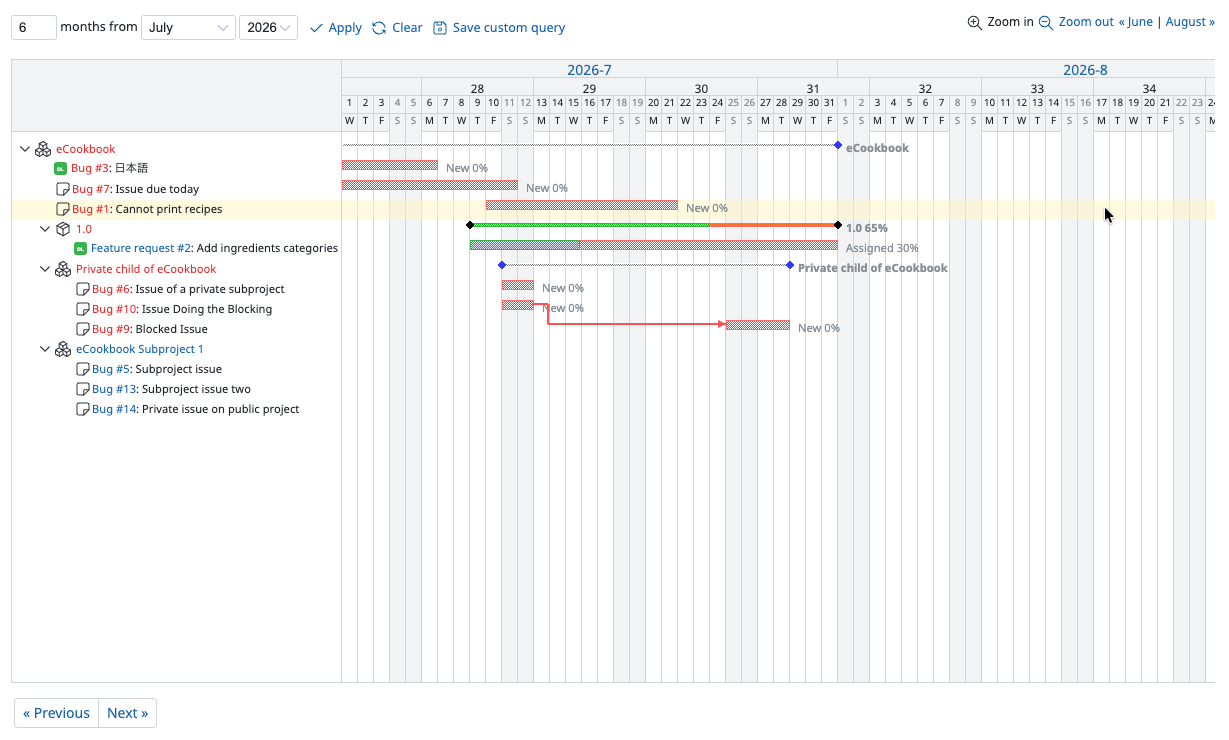
Here is a screenshot of the updated Gantt chart. There are no visual changes except for the row highlighting.
 Updated by Go MAEDA 21 days ago
Thank you for this patch.
Although the description does not mention it, I found that this patch also makes the Gantt chart render faster.
I tested it with a project that has 2,000 issues in my test environment. Rendering the Gantt tab became faster, and the improvement is far greater when collapsing and expanding a project.
| Operation | Before | After |
|---|---|---|
| Rendering the Gantt tab | 1,406 ms | 1,235 ms |
| Collapsing a project | 15,270 ms | 528 ms |
| Expanding a project | 19,061 ms | 1,507 ms |
Each figure is the average of three runs. The rendering time is the sum of the "Rendering" and "Scripting" times reported by the Performance panel of Chrome DevTools.
Updated by Go MAEDA 21 days ago
In addition to my previous comment, I found that resizing a column also became much faster.
With a project that has 2,000 issues, I dragged the right edge of the subject column and measured the time taken to process each mouse movement. It decreased from 6,746 ms to 90 ms. Before the patch, the chart froze for several seconds on every movement. After the patch, the column follows the mouse pointer smoothly.
| Operation | Before | After |
|---|---|---|
| Resizing the subject column (per mouse movement) | 6,746 ms | 90 ms |
Each figure is the median of three runs, measured with headless Chrome.
Updated by Go MAEDA 21 days ago
- Related to Feature #43397: Organize Gantt chart code by separating it into views and Stimulus controllers added
Updated by Katsuya HIDAKA 21 days ago
Thank you for testing the patch and for the detailed performance measurements.
These improvements are benefits of the structural refactoring. In particular, collapsing and expanding now use gantt-parent-row-key to identify the hierarchy instead of inferring it from indentation. Improving performance here was also part of the intent.
Updated by Katsuya HIDAKA 21 days ago
- File 0001-Refactor-and-modernize-Gantt-chart-layout.patch 0001-Refactor-and-modernize-Gantt-chart-layout.patch added
I am replacing 0001-Refactor-and-modernize-Gantt-chart-layout with an updated version that:
- Adds tests for the
ChartLayouthelper class. - Refactors its layout calculations to make them easier to understand.
You can review the changes in this GitHub comparison.
If you want to apply the full updated patch series, you can follow the instructions in #note-1.
Updated by Go MAEDA 16 days ago
- Status changed from New to Resolved
- Assignee set to Go MAEDA
Committed the first two patches in r25209 and r25210. Thank you for your contribution.
I made one small adjustment when committing. The first patch changed the selectors in test/system/gantts_test.rb to .gantt-relations path, but that class is introduced by the second patch. As a result, two system tests failed when only the first patch was applied. I moved that change to the second commit so that the tests pass at each revision. The code after both commits is identical to the result of your patches.
I will commit the third patch (row highlighting) in a separate issue. It is a valuable feature for users, and I would like it to have its own entry in the changelog so that it gets the attention it deserves.
Updated by Go MAEDA 16 days ago
- Related to Feature #44580: Highlight the entire hovered row in the Gantt chart added
Updated by Go MAEDA 16 days ago
- Status changed from Resolved to Closed
Go MAEDA wrote in #note-10:
I will commit the third patch (row highlighting) in a separate issue. It is a valuable feature for users, and I would like it to have its own entry in the changelog so that it gets the attention it deserves.
I committed the third patch (0003 Highlight corresponding Gantt rows) in #44580.
Updated by Katsuya HIDAKA 14 days ago
Thank you for committing the patches and for taking care of reorganizing the commits.
Splitting the row highlighting into a separate issue for the changelog makes sense to me. Thanks for handling that too.
Updated by Katsuya HIDAKA 14 days ago
- File before-fix.png before-fix.png added
- File after-fix.png after-fix.png added
- File 0001-Fix-Gantt-parent-row-keys-across-hidden-projects.patch 0001-Fix-Gantt-parent-row-keys-across-hidden-projects.patch added
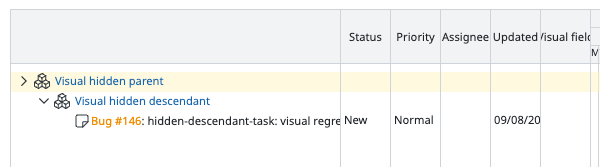
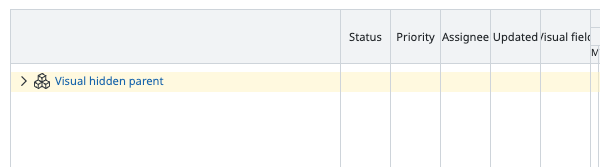
I found an issue with collapsing projects. When an intermediate project is not visible, some descendant projects and their issues remain visible after their displayed parent project is collapsed.
I am attaching a patch that fixes this by linking each project row to its nearest displayed ancestor.
The screenshots show the chart after collapsing the parent project. Before the fix, the descendant project and its issue remain visible; after the fix, only the parent project remains visible.
Before the fix:
After the fix:
No meaningful change in performance was observed using the same 400-issue benchmark:
| Metric (median) | Before | After | Change |
| Page ready time | 1,426.7 ms | 1,440.3 ms | +0.96% |
| Ruby allocated memory per request | 106.99 MiB | 106.79 MiB | −0.19% |
| Ruby retained memory per request | 15.04 MiB | 14.96 MiB | −0.52% |
I have confirmed this in Chrome, Safari, and Firefox. Visual regression testing found no unintended changes: all 365 images across the existing 42 scenarios matched exactly.
Updated by Katsuya HIDAKA 13 days ago
I’ve submitted a small fix in #44590. Going forward, I’ll create separate issues for any further fixes related to this change.
Updated by Go MAEDA 12 days ago
- Related to Defect #44590: Gantt navigation buttons shift when the horizontal scrollbar appears added
Updated by Go MAEDA 4 days ago
- Related to Defect #44639: Gantt project collapse leaves descendants visible when an intermediate project is not visible added