Feature #15296
open
Include image thumbnails with PDF export
Description
I have a page with a thumbnail of an attached image. In the wiki it shows correctly:
When I export this as a PDF it looks like this:
Project_Report_JN_0925_1025_2013.pdf
The HTML export does it wrong too (it adds a link to a file with absolute path and the attached file is not downloaded!)
Files
 Updated by Johannes Neubauer about 13 years ago
My image link seems to be wrong above. So here again: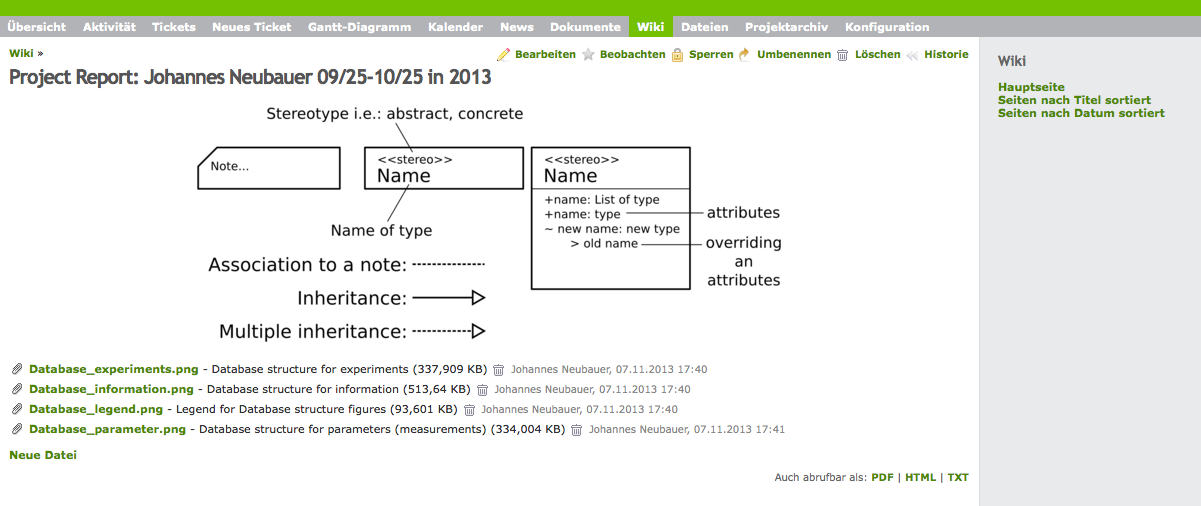
Updated by Johannes Neubauer about 13 years ago
Even if I don't use the thumbnail macro like this (works in the wiki-view):
It does not work:
Project_Report_JN_0925_1025_2013-3.pdf
Updated by Johannes Neubauer about 13 years ago
- File Project_Report_JN_0925_1025_2013_safari_export.pdf Project_Report_JN_0925_1025_2013_safari_export.pdf added
Even the standard export of Safari looks "better" (has the image):
Project_Report_JN_0925_1025_2013_safari_export.pdf
 Updated by Mischa The Evil about 13 years ago
- Tracker changed from Defect to Feature
- Subject changed from PDF export of Wiki-Sites does not contain thumbnails to Include image thumbnails with PDF export
- Description updated (diff)
I have fixed the description. You were using a reference to image "Database_legend.png" while you've uploaded "Project_Report_JN_0925_1025_2013.png". You can see that when using the correct filename it's possible to make use of the thumbnail macro here on redmine.org.
Are you able to edit your note-1 to remove the duplication of the image?
Also, this not only applies to wiki page pdf export but also to other pdf exports, esp. like issue pdf export. So I've changed the subject to be more generic.
I'll change the tracker too. This hasn't been part of any (public) design or whatsoever for the implemented pdf export features as far as I know.
Updated by Johannes Neubauer about 13 years ago
I couldn't edit my post, I knew that I did something wrong with the name of the file (that's why I posted it again). But using the thumbnail feature seems not to work in the tracker: during a 'save' it says that the macro is not available, but with !! and the {width=600px} css it worked. But this would be another bug, wouldn't it?
 Updated by henk jansen over 10 years ago
Johannes Neubauer wrote:
I couldn't edit my post, I knew that I did something wrong with the name of the file (that's why I posted it again). But using the thumbnail feature seems not to work in the tracker: during a 'save' it says that the macro is not available, but with !! and the {width=600px} css it worked. But this would be another bug, wouldn't it?
Is there any update on this i have the same issue.
 Updated by Toshi MARUYAMA about 10 years ago
- Has duplicate Defect #23463: Inline images with custom CSS style are not displayed in exported PDF added
 Updated by Zer Guz almost 10 years ago
+1
 Updated by Eric Prandovszky over 8 years ago
Is there any solution to this?
 Updated by Tomasz Sawicki over 8 years ago
+1