Plugins Directory » Redmine Quick Date
|
|
Author: | ablida dev |
|---|---|---|
| Website: | https://github.com/ablida/redmine_quick_date | |
| Code repository: | https://github.com/ablida/redmine_quick_date | |
| Registered on: | 2026-10-22 (1 day ago) | |
| Current version: | 0.0.1 | |
| Compatible with: | Redmine 7.1.x, 7.0.x, 6.1.x, 6.0.x | |
| User ratings: |
Redmine Quick Date
A small Redmine plugin that adds a quick-pick menu to the Start date and Due date fields of the issue form.
Introduction
Redmine offers almost everything we need out of the box. We only had to extend it a little for our internal needs, and this plugin was the result.
Features
A small icon appears next to the Start date and Due date fields when creating or editing an issue. Hovering over it opens a menu, styled like Redmine's context menu, with these options:
| Option | Sets the date to |
|---|---|
| Today | today |
| Tomorrow | today + 1 day |
| In 2 days | today + 2 days |
| Next week | the next Monday that is not a holiday |
| In 7 days | today + 7 days |
| In 14 days | today + 14 days |
| In 30 days | today + 30 days |
| none | clears the field |
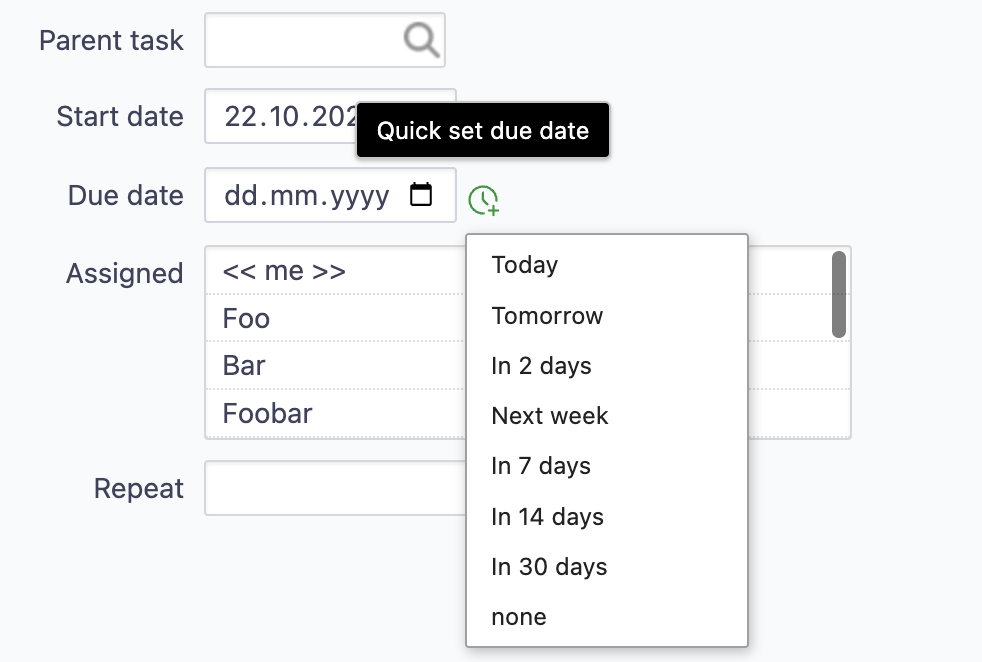
- On touch devices, the menu opens with a tap on the icon instead of on hover.
- The icon also works in fields that Redmine reloads while editing, e.g. after changing the tracker or status.
- The menu entries are available in English and German.
The plugin only fills in the form field. The issue is saved as usual with the Submit button.
Requirements
- Redmine 6.0 or higher
Installation
- Clone the plugin into the
pluginsdirectory of your Redmine installation. The directory name must beredmine_quick_date, as it has to match the plugin ID. - In production, publish the plugin assets from your Redmine directory.
- Restart Redmine.
cd /path/to/redmine/plugins
git clone https://github.com/ablida/redmine_quick_date.git
cd ..
bundle exec rake redmine:plugins:assets_precompile RAILS_ENV=production
Alternatively, download the repository as a ZIP and extract it to plugins/redmine_quick_date.
No database migrations, permissions or settings are required. More information on installing Redmine plugins: Redmine Plugins
Customization
All options are set in assets/javascripts/quick_date.js:
- Menu options: edit the
optionList()function. - Translations: add locale files under
config/locales/with the same keys asen.yml.
Uninstallation
Remove the plugins/redmine_quick_date directory and restart Redmine.
License
This plugin is licensed under the GNU General Public License v2.0, unless otherwise stated.
About
Copyright (c) 2026 ablida
Changelog
0.0.1 (2026-10-22)
Compatible with Redmine 7.1.x, 7.0.x, 6.1.x, 6.0.x.