Plugins Directory » Secure Async Export
|
|
Author: | Ondrej Svejkovsky |
|---|---|---|
| Website: | https://www.redmine-x.com/secure-asynchronous-export | |
| Code repository: | - | |
| Registered on: | 2026-08-28 (about 2 months ago) | |
| Current version: | 1.0.0 | |
| Compatible with: | Redmine 6.1.x | |
| User ratings: |
A secure Redmine export plugin that prevents large issue exports from taking your Redmine down
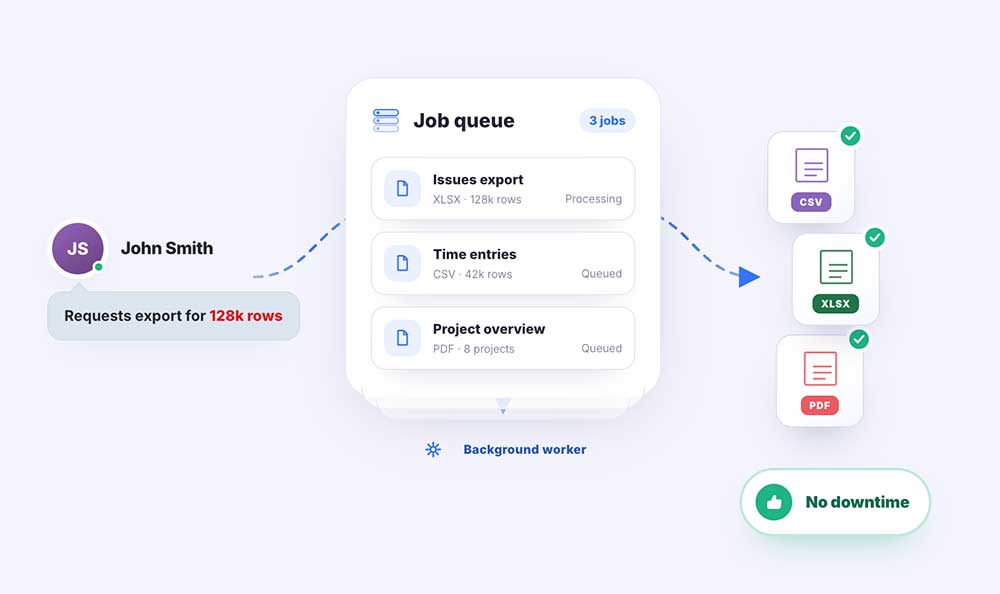
This plugin moves demanding Redmine exports into the background, so users can export large datasets without blocking Redmine or causing a performance incident. It adds XLSX & PDF exports and refines the existing Atom & CSV, granular export controls and administrator-defined limits while keeping the entire workflow inside Redmine.
If you need to test the plugin in your own Redmine environment, just contact Redmine X for an on-premise evaluation version.
Key Features of the RedmineX Secure Async Export plugin
- Large exports processed asynchronously in the background
- It essentially removes a Redmine kill switch accessible to all users in enterprise Redmines
- Redmine stays responsive while export files are generated
- XLSX, CSV & PDF export
- Export Issues, Projects, Users, Time Entries and Time Entry Reports
- Export selected columns or all available columns
- Include Description and Last notes
- Custom export file names
- PDF page size, orientation and column-fit controls
- CSV character encoding controls
- Completed exports available directly from the Redmine sidebar
- Optional e-mail notification when an export is ready
- Limit the number of saved exports per user
- Configurable export refresh intervals
- Heavy exports can be routed to a dedicated job queue
--> see all features at https://www.redmine-x.com/secure-asynchronous-export
Users Appreciate
- Redmine stays responsive during large exports
- users can continue working while files are generated
- large datasets can be exported without creating a performance incident
- XLSX, CSV & PDF support
- administrators stay in control of export workload
A single export of a large dataset can put unnecessary load on Redmine and affect every user on the system. Secure Async Export moves that work into the background, allowing users to generate the files they need while Redmine remains available for everyone else.
Explore All Premium RedmineX Plugins
Explore FREE RedmineX Plugins
Explore RedmineX Services
Installation notes
Follow standard Redmine installation:
- unzip the archive and copy it to redmine_root/plugins or copy the archive in the same location and perform the unzip command in the console
- from redmine_root run bundle install
- [CONFIRM WHETHER PLUGIN MIGRATION IS REQUIRED]
- restart Redmine
Changelog
1.0.0 (2026-08-27)
Compatible with Redmine 6.1.x.