Feature #1459
closed

Allow holidays to be registered as non-working days
Description
A global Holidays calendar should be desirable in order to plan a project.
Files
Related issues
 Updated by Maxim Krušina over 18 years ago
Hi Andrés, please, can you be more specific?
I cannot imagine what is exactly "Global Holidays..."
 Updated by Andrés Escudero Apesteguía over 18 years ago
A place where one organization can set those days which are Festive and must not be taken into account where you plan a project
 Updated by David Gillard about 18 years ago
These should be downloadable for a particular country from a central server with the ability to then add your own detail. For example we close between Christmas and New Year.
 Updated by Toshi MARUYAMA
 Updated by Terence Mill over 15 years ago
+1
Would be great also to import "read only" via ical web urls to show this dates in redmine calendar, e.g sundays and work free days .. etc
Updated by Terence Mill over 15 years ago
This is a plugin which adds an ICS feed link to the calendar view
 Updated by Dotan Cohen over 2 years ago
Global holidays should ideally schedule Precedes and Follows relations around the holiday, as a non-workday. That is described in this Feature Request:
https://www.redmine.org/issues/40277
 Updated by Go MAEDA 16 days ago
- Related to Feature #40277: Set day as non-working for purposes of Precedes and Following relationships added
Updated by Go MAEDA 16 days ago
- File clipboard-202610071404-7vksa.png clipboard-202610071404-7vksa.png added
- File clipboard-202610071408-sok8i.png clipboard-202610071408-sok8i.png added
- File clipboard-202610071412-fucfh.png clipboard-202610071412-fucfh.png added
- File clipboard-202610071414-s82ao.png clipboard-202610071414-s82ao.png added
- File 0001-Allow-non-working-dates-such-as-holidays-to-be-regis.patch added
- File 0002-Import-non-working-dates-from-a-CSV-file.patch added
- File 0003-Show-the-names-of-non-working-dates-in-the-calendar.patch added
- File 0004-Distinguish-days-outside-the-current-month-from-non-.patch 0004-Distinguish-days-outside-the-current-month-from-non-.patch added
- Category changed from Calendar to Issues planning
I have written a series of patches that allows administrators to register specific dates, such as public holidays or company holidays, as non-working days as well.
The patches make the following changes:
- Administrators can add, edit, and delete non-working dates. Each entry consists of a date and an optional name. The list is displayed one year at a time and supports bulk delete. The page is available from a link below the "Non-working days" setting in Administration > Settings > Issue tracking.
- Non-working dates can be imported from a CSV file. As with the existing CSV imports, the columns to read and the date format can be specified, so CSV files from various sources can be imported, for example those provided by HolidayDates.net and OpenWorkdays.
- Registered dates are taken into account when Redmine reschedules following issues, in the same way as non-working days of the week.
- Registered dates are displayed as non-working days in the calendar and in the Gantt chart, including the PNG and PDF exports of the Gantt chart.
- The calendar shows the name of each non-working date, so that users can see why the day is a non-working day.
- In the calendar, days outside the current month now have a lighter background color. Without this change, those days and non-working days have the same color, and it is difficult to tell them apart once non-working dates appear in the middle of a week.
Please note that the patches do not calculate substitute holidays or holidays that recur according to a rule, such as "every year on January 1". Each of these dates needs to be registered individually.
Link to "Non-working dates" page:
"Non working dates" page: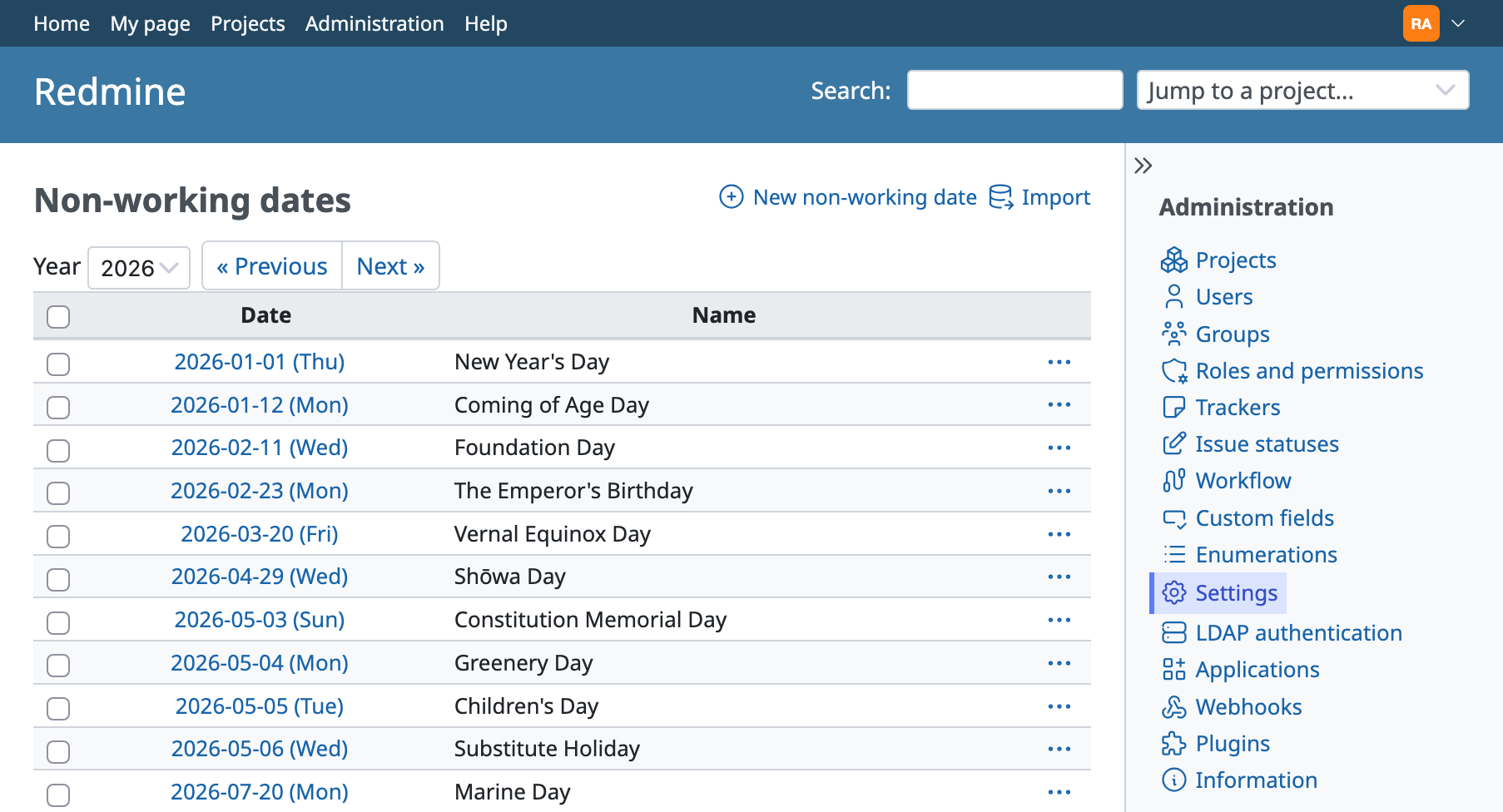
"Importing holidays from a CSV file: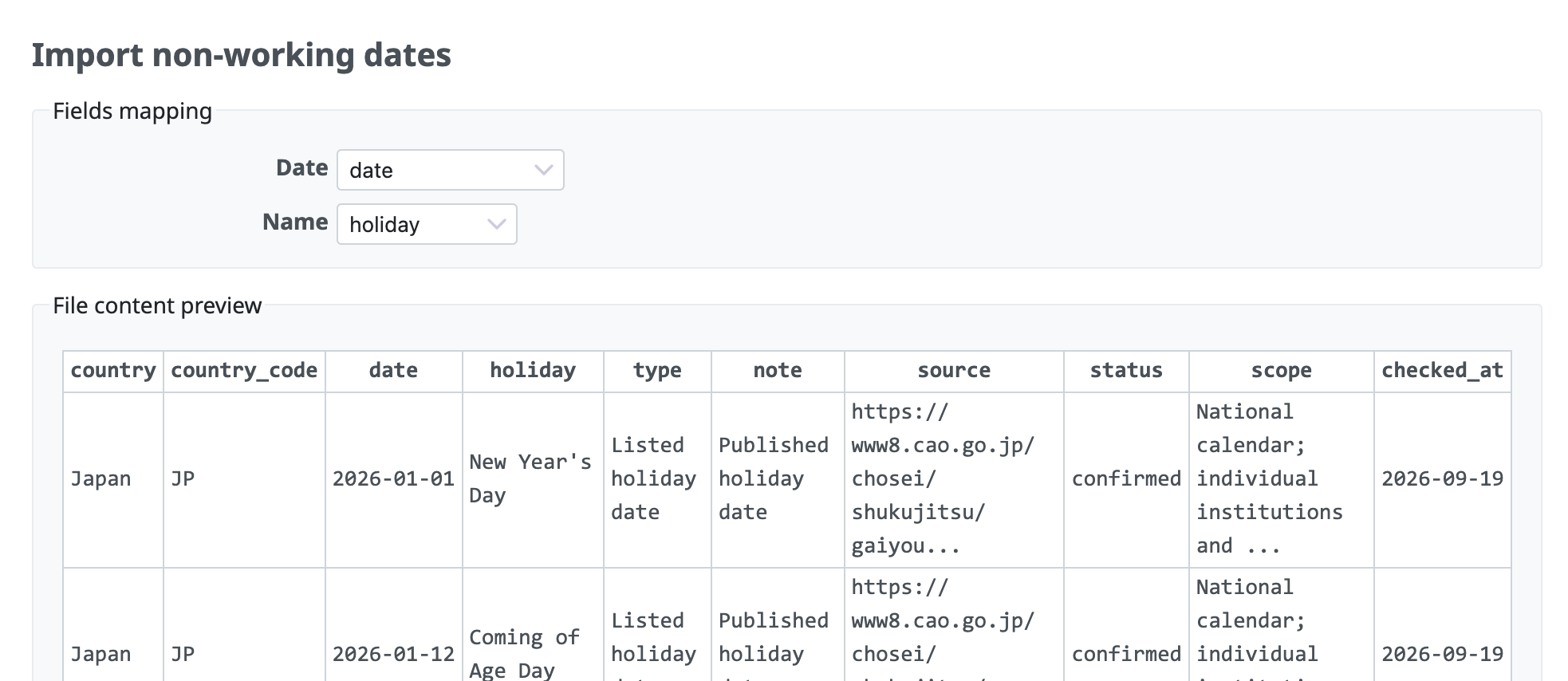
Calendar shows the name of each holiday: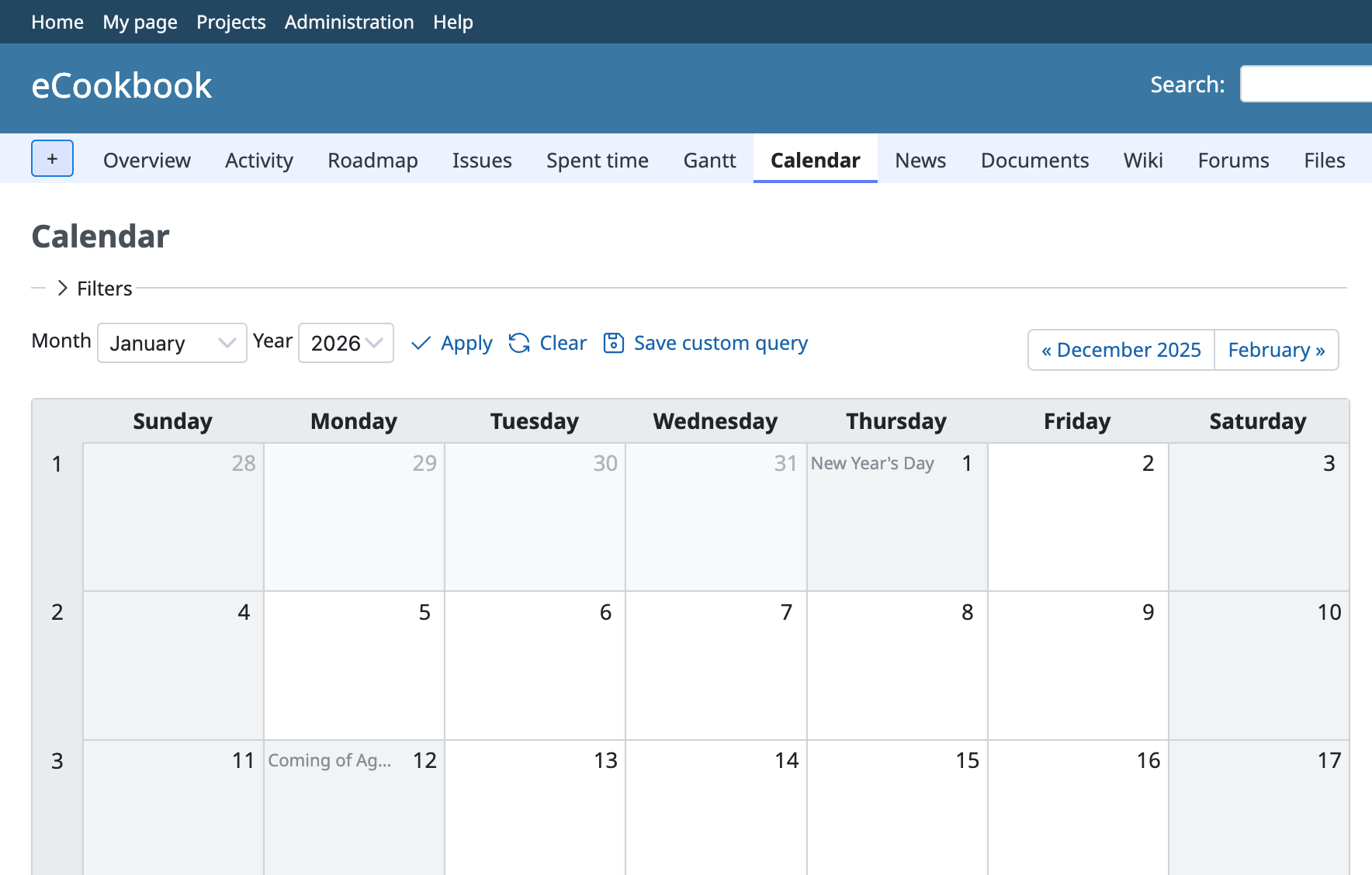
Updated by Go MAEDA 16 days ago
- File 0001-Allow-non-working-dates-such-as-holidays-to-be-regis.patch added
- File 0003-Show-the-names-of-non-working-dates-in-the-calendar.patch 0003-Show-the-names-of-non-working-dates-in-the-calendar.patch added
- File deleted (
0001-Allow-non-working-dates-such-as-holidays-to-be-regis.patch) - File deleted (
0003-Show-the-names-of-non-working-dates-in-the-calendar.patch)
I have updated the first and third patches.
The tests in the previous versions used the dates and names of Japanese public holidays, which may be unclear to people outside Japan. I have replaced them with the holidays of a fictional company. The second and fourth patches are unchanged.
Updated by Go MAEDA 15 days ago
- File 0001-Allow-non-working-dates-such-as-holidays-to-be-regis.patch added
- File 0002-Import-and-export-non-working-dates-as-CSV-files.patch added
- File deleted (
0002-Import-non-working-dates-from-a-CSV-file.patch) - File deleted (
0001-Allow-non-working-dates-such-as-holidays-to-be-regis.patch)
I have updated the first and second patches. The third and fourth patches are unchanged.
The main changes are as follows:
- Non-working dates can now be exported to a CSV file. The exported file contains the dates of all years, so it can be used to copy the dates to another Redmine instance with the CSV import.
- The form for adding a non-working date now has a "Create and continue" button, so that several dates can be added in a row.
- The list of non-working dates now shows the number of dates in the selected year and the total number of registered dates below the table, for example "(18/35)".
- In the list of non-working dates, "Previous" and "Next" are no longer links when there are no dates registered in earlier or later years.
Updated by Go MAEDA 14 days ago
- File 0001-Allow-non-working-dates-such-as-holidays-to-be-regis.patch 0001-Allow-non-working-dates-such-as-holidays-to-be-regis.patch added
- File 0002-Import-and-export-non-working-dates-as-CSV-files.patch 0002-Import-and-export-non-working-dates-as-CSV-files.patch added
- File deleted (
0001-Allow-non-working-dates-such-as-holidays-to-be-regis.patch) - File deleted (
0002-Import-and-export-non-working-dates-as-CSV-files.patch)
I have made small UI adjustments.
Updated by Go MAEDA 9 days ago
- Status changed from New to Closed
- Assignee set to Go MAEDA
- Resolution set to Fixed
Committed the patches in r25243, r25244, r25245 and r25246. Thank you to everyone who has waited patiently for this feature for so many years.
Administrators can now register specific dates, such as public holidays and company holidays, as non-working days in addition to days of the week.
- Non-working dates can be added, edited, and deleted on a new page. The page is available from a link below the "Non-working days" setting in Administration > Settings > Issue tracking. Each entry consists of a date and an optional name.
- In addition to entering dates one by one, non-working dates can be imported from a CSV file, which is convenient for registering many dates at once. They can also be exported to a CSV file.
- Registered dates are taken into account when Redmine reschedules following issues, in the same way as non-working days of the week.
- Registered dates are displayed as non-working days in the calendar and in the Gantt chart, including the PNG and PDF exports of the Gantt chart. The calendar also shows the name of each date.
Please note that substitute holidays and holidays that recur according to a rule, such as "every year on January 1", are not calculated automatically. Each date needs to be registered individually.
If you find any problems or have ideas for further improvements, please open a new issue.