Feature #8959
closed

Preview support for Microsoft Office and LibreOffice Writer files
Description
It would be very usefull to have a office document preview, so being able to read word documents in document, files or attachment area.
This coiukld be done by using on the fly conversion which can be done by openoffice server. There is a simple an easy web service called Jodconverter for converting office to many other formats like pdf or html.
Files

Related issues
 Updated by Go MAEDA 8 months ago
- File clipboard-202602270715-xhmcc.png clipboard-202602270715-xhmcc.png added
- File clipboard-202602270717-tcvli.png clipboard-202602270717-tcvli.png added
- File 0001-Add-Microsoft-Office-documents-preview-via-MarkItDow.patch 0001-Add-Microsoft-Office-documents-preview-via-MarkItDow.patch added
- Subject changed from Office Document in Browser Preview to Microsoft Office Document in Browser Preview
- Category changed from Documents to Attachments
- Target version set to Candidate for next major release
I wrote a patch to add a simple preview for Microsoft Office documents (such as Word, Excel, and PowerPoint) on AttachmentsController#show page. The patch uses Microsoft's MarkItDown command to convert supported Office files into Markdown and renders that Markdown in Redmine. Because the preview is generated from Markdown, original layout is not preserved and non-text contents will be lost, but it enables quick content inspection without downloading the file.
This MS Office documents preview is available only when MarkItDown is installed. It is an optional dependency, so Redmine continues to work without it; only this preview feature is unavailable. To install MarkItDown, run: pip install 'markitdown[all]'.
When a user opens `AttachmentsController#show` page for a supported MS Office attachment, Redmine calls the `markitdown` command and converts the file to Markdown, which may take a few seconds. Redmine then renders the converted Markdown as the preview. Generated Markdown is cached in tmp/markdownized_previews, so subsequent accesses are much faster. Preview content is truncated to a fixed size limit of 100 KB. This caching approach follows the same pattern already used by thumbnails, which are generated via ImageMagick convert and stored in tmp/thumbnails.
Currently, for Microsoft Office attachments, Redmine does not show document content on the attachment page; users must download the file and open it locally to inspect it. This patch adds a practical inline preview that helps users quickly understand what the document contains and can reduce download/open steps in daily workflows.
Preview for a MS Word document: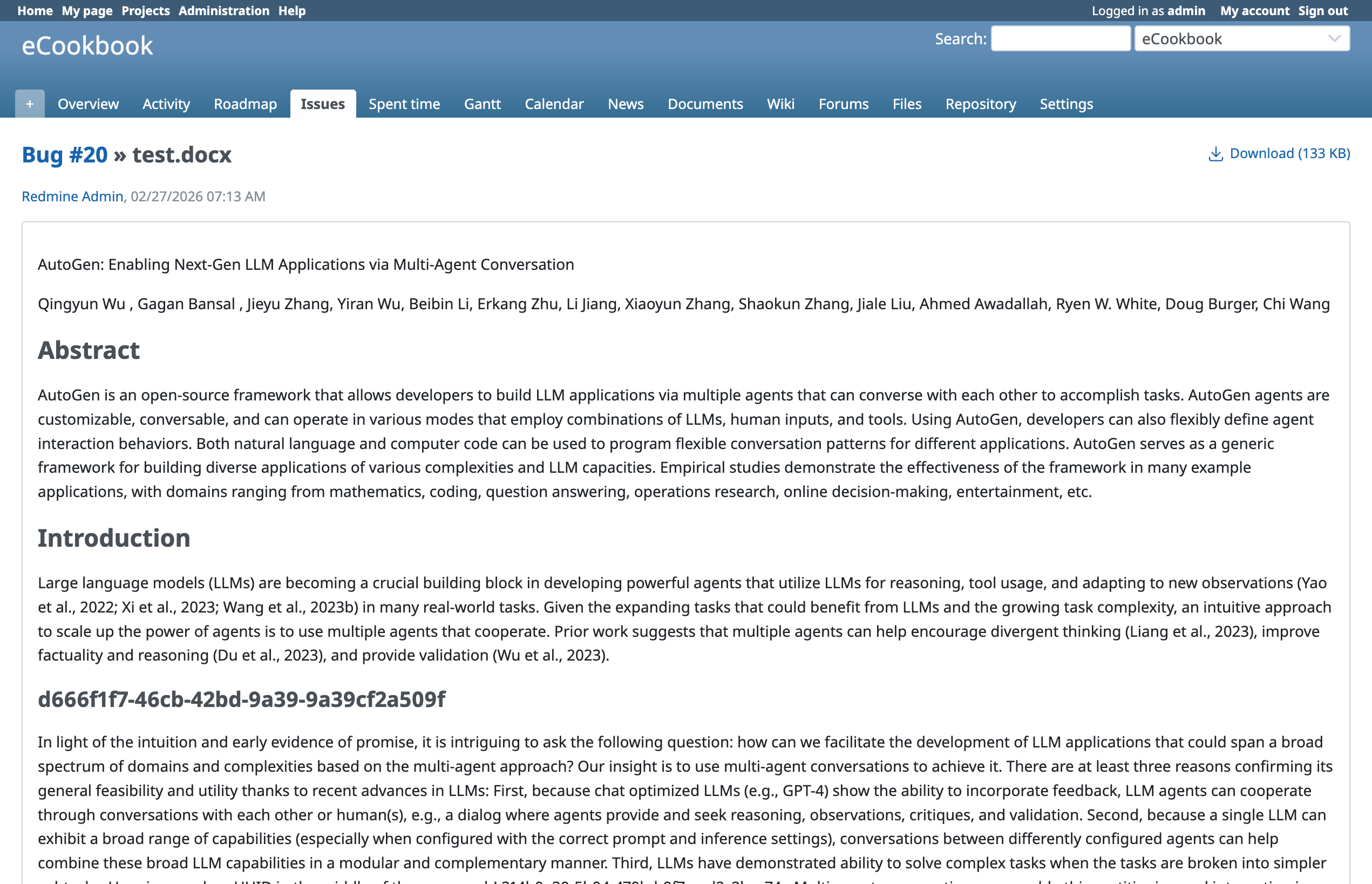
Original MS Word document: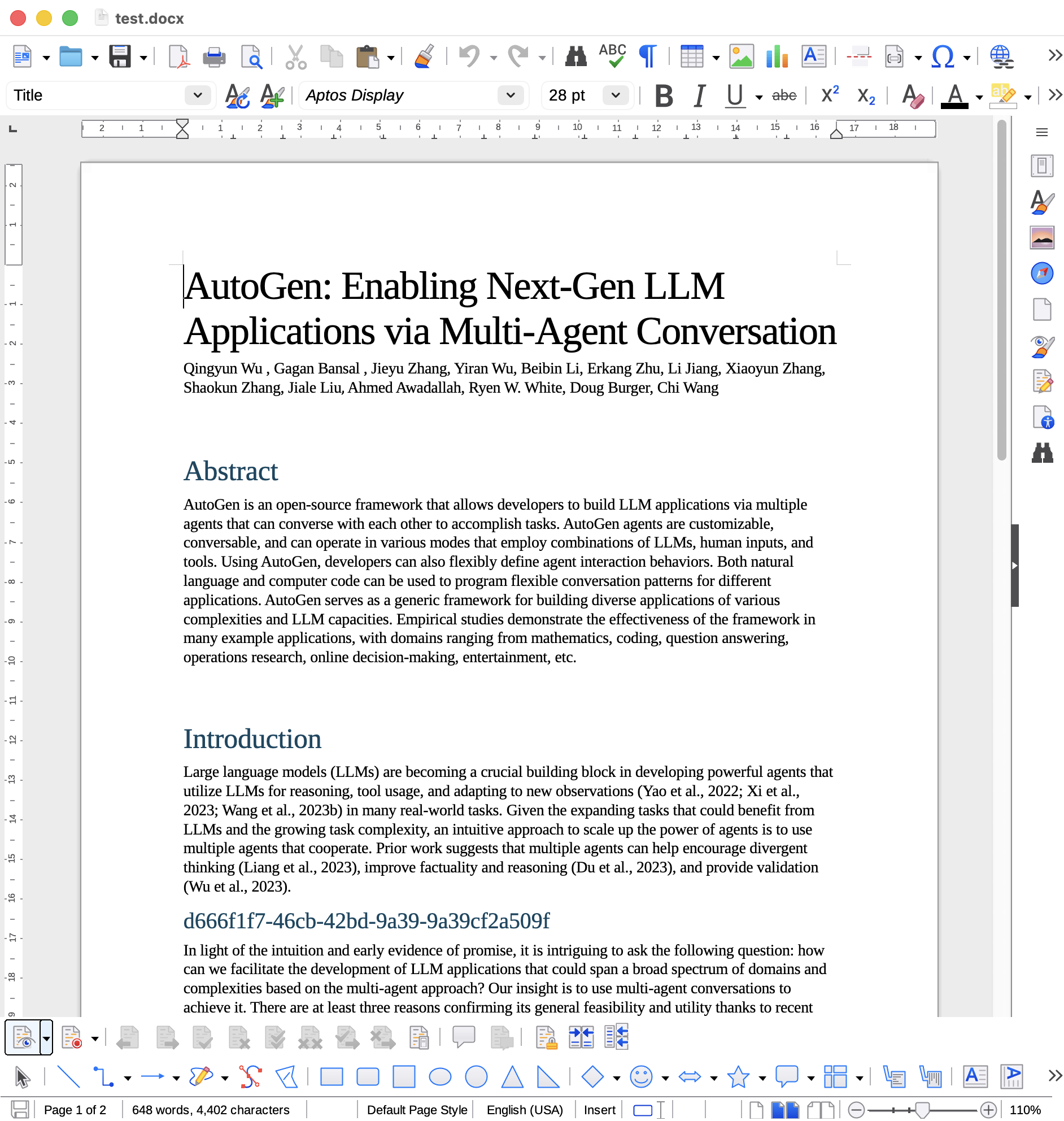
Updated by Go MAEDA 8 months ago
- File 0001-Add-Microsoft-Office-and-LibreOffice-documents-previ.patch 0001-Add-Microsoft-Office-and-LibreOffice-documents-previ.patch added
I have updated the patch.
This version uses Pandoc instead of MarkItDown to convert documents to Markdown. In my testing, Pandoc converts documents to Markdown much faster than MarkItDown. Switching to Pandoc also enables preview support for LibreOffice documents in addition to Microsoft Office documents.
Additionally, Pandoc is available from package managers on many Linux distributions, so admins can install and manage it in the same way as other Redmine dependencies, such as the database server and ImageMagick. MarkItDown usually requires Python's pip.
 Updated by Florian Walchshofer 8 months ago
- File 0001-Add-Microsoft-Office-and-LibreOffice-documents-previ-B.patch 0001-Add-Microsoft-Office-and-LibreOffice-documents-previ-B.patch added
thanks for this Go MAEDA, i like the .md convert for a preview
This additional patch provides some improvements to the initial Pandoc integration 0001-Add-Microsoft-Office-and-LibreOffice-documents-previ.patch
first i install pandoc, via apt install pandoc often provides version 3.1, which I found to be insufficient. In version 3.1, .xlsx conversion is not yet available/stable, leading to infinite loops where the process never finishes. Reliable support for .xlsx requires at least version 3.2, while .pptx is fully supported since version 3.8.3.
then i install pandoc 3.9 via .db file and the .xlsx convert runs
On my system, the timeout mechanism failed to terminate the Pandoc process.
The process continued to run until completion regardless of the timeout. I have refactored the execution to use Process.spawn with proper arguments and added Process.detach(pid).
hope you can reproduce the same behavior.
changes in the patch:- Process.spawn with
argsand, Process.detach in the end
the PID is correctly tracked and terminated when the timeout threshold is exceeded. - pandoc version >= 3.9 in the
Markownizer.available? - set default extensions to
.docx .xlsx .pptx .odt
old office formats are not supported, and only .odt for libre office - set extensions via config
pandoc_extensions
- create the prev file asynchron
- Create a timeout file to skip future conversion attempts for files that previously failed
I also evaluated MarkItDown. Although it supports outlook .msg files and the old office extensions, its processing time for small .docx files was over 20x slower than Pandoc. Consequently, I prioritized Pandoc for its performance.
With large .xlsx files (5,000+ rows). In those specific cases, MarkItDown was actually twice as fast as Pandoc. However, for our primary use case—providing a quick preview for standard office documents—this performance gain on large files is not relevant.
 Updated by Marius BĂLTEANU 8 months ago
I recently observed a plugin what works with some recent Redmine versions that adds more previews to Redmine, maybe it worth taking a look: https://www.redmine.org/plugins/redmine_more_previews.
Updated by Go MAEDA 8 months ago
Marius BĂLTEANU wrote in #note-5:
I recently observed a plugin what works with some recent Redmine versions that adds more previews to Redmine, maybe it worth taking a look: https://www.redmine.org/plugins/redmine_more_previews.
Thank you for letting me know about the Redmine More Previews plugin. I checked the plugin's code.
This plugin supports previewing a very wide range of file types by using multiple internal "converters." A preview is generated by converting the target file into a displayable format such as HTML, plain text, PDF, or an image, and then showing that converted output in the preview page. The available output formats depend on the converter, and users can choose their preferred output format.
To preview Microsoft Office and LibreOffice files, enable the Libre converter. The Libre converter runs LibreOffice in headless mode to perform the conversion. By default, the output format for the Libre converter is HTML, and you can also choose plain text, PDF, PNG, or JPEG. If you select PDF, PNG, or JPEG, you can see a layout-preserving preview.
I believe the approach in my patch, using Pandoc to convert files to Markdown and then rendering them, offers two advantages compared with the Redmine More Previews plugin approach.
First, using Pandoc instead of running LibreOffice in headless mode is generally faster and uses less memory.
Second, the converted Markdown is rendered through Redmine's existing Markdown rendering path, so it benefits from Redmine's standard sanitizing policy. This allows us to display output produced by an external conversion command in a safer way.
Although this approach does not provide precise layout reproduction, it is still very useful for the main preview use case of quickly understanding a file's content.
Updated by Go MAEDA 8 months ago
Florian Walchshofer wrote in #note-4:
first i install pandoc, via apt install pandoc often provides version 3.1, which I found to be insufficient. In version 3.1, .xlsx conversion is not yet available/stable, leading to infinite loops where the process never finishes. Reliable support for .xlsx requires at least version 3.2, while .pptx is fully supported since version 3.8.3.
then i install pandoc 3.9 via .db file and the .xlsx convert runs
Thank you for pointing out the Pandoc versions and supported formats. I checked the Pandoc release notes and found the following:
- docx and odt readers: These have been supported for a long time. The docx reader was introduced in Pandoc 1.13 (released in 2014), and the odt reader has been supported since at least Pandoc 1.18 (released in 2016).
- xlsx reader: Supported starting with Pandoc 3.8.3, released in December 2025.
- pptx reader: Supported starting with Pandoc 3.8.3, released in December 2025.
Since docx and odt have been supported for many years, they can be processed by Pandoc in most environments. In contrast, support for xlsx and pptx was added only three months ago in Pandoc 3.8.3.
Based on this, in Markdownizer it would make sense to process docx, xlsx, pptx, and odt only when the Pandoc version is 3.8.3 or later. Otherwise, it should process only docx and odt. I will update the patch accordingly.
Updated by Marius BĂLTEANU 8 months ago
Go MAEDA, indeed, it sounds much better and safer the Pandoc based solution, thanks for the analyze.
Updated by Go MAEDA 8 months ago
- File 0001-Add-preview-support-for-Microsoft-Office-and-LibreOf.patch 0001-Add-preview-support-for-Microsoft-Office-and-LibreOf.patch added
Florian Walchshofer, thank you for reviewing the patch and giving feedback in #note-4. I have updated the patch.
- The Pandoc version is now checked before performing previews. When Pandoc 3.8.3 or later is installed, previews are supported for
.docxand.odt, and additionally for.xlsxand.pptx. TheSUPPORTED_EXTENSIONSconstant has been removed. Instead, the newmarkdownizable_extensionsmethod returns the list of convertible file extensions based on the detected Pandoc version. - I have also incorporated the timeout handling that you suggested in #note-4` with slight changes. In your patch,
Process.detachwas placed inside theensureblock. In this patch, I moved it to immediately afterProcess.killto preventProcess.detachfrom being called again on the success path after the PID has already been collected withProcess.wait2.
The below is the diff from the previous patch: Show
Updated by Go MAEDA 8 months ago
- File 0001-Add-preview-support-for-Microsoft-Office-and-LibreOf.patch 0001-Add-preview-support-for-Microsoft-Office-and-LibreOf.patch added
I updated the patch to move markdownized_previews_storage_path under Attachment.storage_path. This changes the default location for markdownized preview files from tmp/markdownized_previews to files/markdownized_previews.
This change is for security. Markdownized preview files can contain sensitive information from attachments, and storing them in tmp may increase exposure risk in some environments. The files directory is generally expected to be managed by server administrators with appropriate restrictive permissions, so storing previews there may be safer than storing them under tmp.
Changes from the previous patch: Show
Updated by Florian Walchshofer 8 months ago
I have verified the latest patch.
Converts were successful using Pandoc 3.8.3 (xlsx, pptx, docx, odt) and
Pandoc 2.0 (docx, odt). The -t gfm GitHub-flavored output format functioned correctly across both versions.
thanks Go MAEDA
Updated by Go MAEDA 7 months ago
- File clipboard-202603101359-gjue4.png clipboard-202603101359-gjue4.png added
- Subject changed from Microsoft Office Document in Browser Preview to Preview support for Microsoft Office and LibreOffice Writer files
- Status changed from New to Resolved
- Assignee set to Go MAEDA
- Resolution set to Fixed
I have committed the patch in r24485.
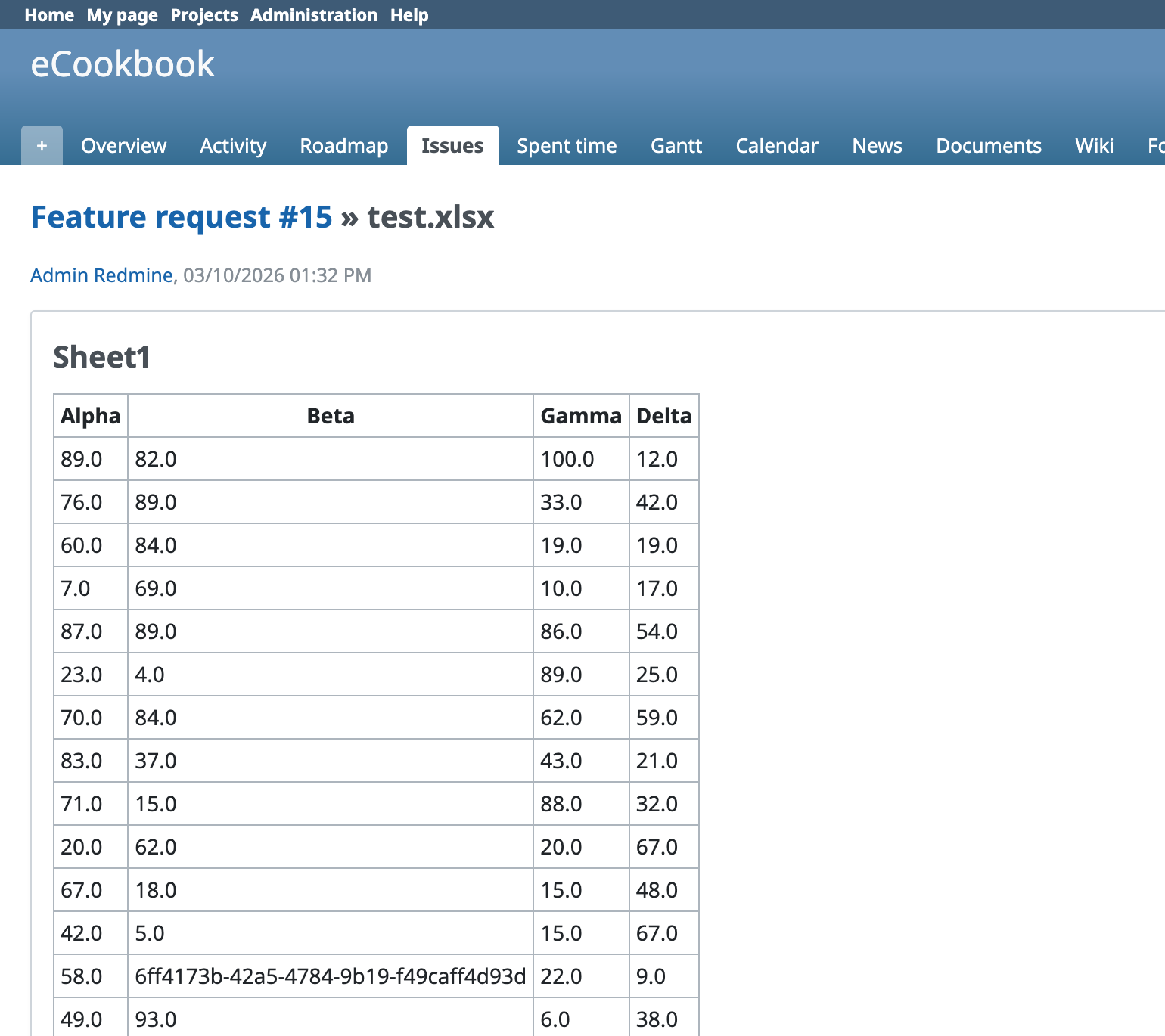
The attachment preview now supports Microsoft Office (.docx, .xlsx, .pptx) and LibreOffice Writer (.odt) files. These files can be previewed directly on the attachment page without downloading them first.
- The preview is generated by converting supported files to Markdown with Pandoc and rendering the result in Redmine.
- The generated preview is a simplified text-based view, so the original layout and some non-text content are not preserved.
- Pandoc 3.8.3 or later is required to support Microsoft Excel (
.xlsx) and PowerPoint (.pptx) files. With older Pandoc versions, only Microsoft Word (.docx) and LibreOffice Writer (.odt) files are supported. - Many Linux distribution package managers provide older versions of Pandoc. For example, Ubuntu 24.04 provides Pandoc 3.1.3. To enable preview for
.xlsxand.pptxfiles, I recommend installing the latest Pandoc using the installers available at https://github.com/jgm/pandoc/releases.
 Updated by Ivan Cenov 7 months ago
Does these previews to Markdown work if Redmine is configured to use textile format?
Updated by Go MAEDA 7 months ago
This additional patch makes the Pandoc preview limits configurable in config/configuration.yml instead of defining in markdownizer.rb, so server administrators can adjust them more easily. It adds markdownized_preview_max_source_size and markdownized_preview_max_output_size. Also, the default maximum source size is reduced from 20 MB to 10 MB, and the default maximum output size is reduced from 512 KB to 100 KB.
It also stops reusing thumbnails_generation_timeout for Pandoc-based preview generation and introduces a dedicated setting, markdownized_preview_generation_timeout.
Updated by Go MAEDA 6 months ago
- File 0001-Change-markdownized-preview-cache-path-from-files-ma.patch 0001-Change-markdownized-preview-cache-path-from-files-ma.patch added
- Status changed from Closed to Reopened
The attached patch changes the cache location for attachment previews from files/markdownized_previews to files/derived_cache/markdownized_previews.
This change has two main benefits. First, the new path makes it clear that these files are cache data, not original attachments, and can be safely deleted and regenerated on demand. Second, it establishes a cleaner structure for future use: if Redmine later needs to store other cache files derived from files under files, they can be grouped under files/derived_cache/ instead of creating multiple directories directly under files.
 Updated by gl aun 2 months ago
Go MAEDA wrote in #note-18:
Go MAEDA wrote in #note-17:
The attached patch changes the cache location for attachment previews from
files/markdownized_previewstofiles/derived_cache/markdownized_previews.Committed the change in r24592.
Hi there,
i updated my local redmine to 7.0.0 and installed pandoc to get the previews going. It's kind of working. In my .docx is an image, that doesnt get rendered. Is this configurable or completley intended to not preview images?
Updated by Go MAEDA 2 months ago
gl aun wrote in #note-19:
i updated my local redmine to 7.0.0 and installed pandoc to get the previews going. It's kind of working. In my .docx is an image, that doesnt get rendered. Is this configurable or completley intended to not preview images?
This is the expected behavior. This feature generates the preview by converting an MS Office document to Markdown using Pandoc, so it only supports text. Objects such as images are not rendered.
Supporting images would be difficult with the current implementation, and there are currently no plans to do so.
Updated by gl aun 2 months ago
Go MAEDA wrote in #note-20:
gl aun wrote in #note-19:
i updated my local redmine to 7.0.0 and installed pandoc to get the previews going. It's kind of working. In my .docx is an image, that doesnt get rendered. Is this configurable or completley intended to not preview images?
This is the expected behavior. This feature generates the preview by converting an MS Office document to Markdown using Pandoc, so it only supports text. Objects such as images are not rendered.
Supporting images would be difficult with the current implementation, and there are currently no plans to do so.
Understood. However, the current behavior leaves the preview looking broken because the missing images display as 404 broken image icons.
Pandoc actually supports extracting media from .docx files using the --extract-media flag. Wouldn't it be possible to extract those images to a temporary directory or attach them during conversion so Redmine can render them properly instead of generating broken image links?
Updated by gl aun about 2 months ago
Go MAEDA wrote in #note-20:
gl aun wrote in #note-19:
i updated my local redmine to 7.0.0 and installed pandoc to get the previews going. It's kind of working. In my .docx is an image, that doesnt get rendered. Is this configurable or completley intended to not preview images?
This is the expected behavior. This feature generates the preview by converting an MS Office document to Markdown using Pandoc, so it only supports text. Objects such as images are not rendered.
Supporting images would be difficult with the current implementation, and there are currently no plans to do so.
As a temporary workaround, I’ve implemented a simple CSS rule for now. While it’s definitely not ideal, it’s better than displaying corrupted images in the previews.
.filecontent.wiki img {
  display: none !important;
}
Updated by Florian Walchshofer about 2 months ago
Could you please take a look at issue #44358 ?
It deals with this topic/problem. If possible, it would be great if you could also test the patches provided there.
Thanks!
Updated by Go MAEDA about 1 month ago
Please do not add comments to closed issues. For new feature requests, please open a new issue.
Updated by Go MAEDA about 1 month ago
- Related to Feature #44435: Preview Rich Text Format (.rtf) files added