Feature #22090
closed

Make project settings more accessible
Added by Jan from Planio www.plan.io over 10 years ago. Updated about 7 years ago.
Description
Currently, users have to find the Settings tab and within the settings section the respective tab to change settings for a certain aspect of their project. This is not always intuitive and users at Planio are asking frequently, e.g. how to create a new repository.
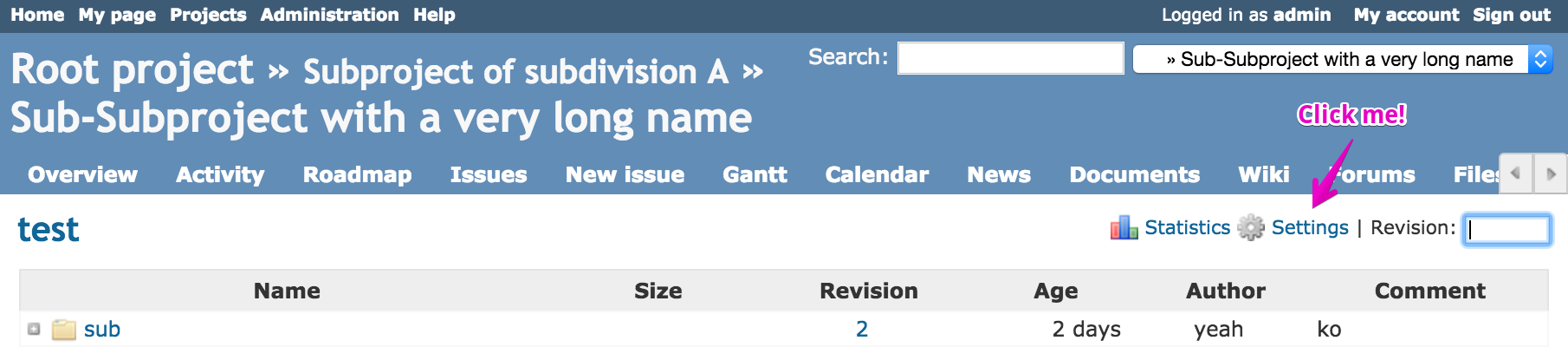
Therefore, this patch adds a handy  Settings icon in each project module where appropriate that links directly to the respective tab in settings.
So, if you're currently within Repositories, changing the repo settings is just one click away.
Files
| - Repository - Sub-Subproject with a very long name - Redmine 2016-02-19 14-47-56.png (123 KB) - Repository - Sub-Subproject with a very long name - Redmine 2016-02-19 14-47-56.png | Jan from Planio www.plan.io, 2016-02-19 08:48 | ||
| 0001-Adds-Settings-icon-to-contextual-area-for-project-vi.patch (9.38 KB) 0001-Adds-Settings-icon-to-contextual-area-for-project-vi.patch | Jan from Planio www.plan.io, 2016-02-19 13:06 | ||
| 22090-v2.patch (5.77 KB) 22090-v2.patch | Go MAEDA, 2019-05-06 11:36 |
Related issues
 Updated by Jan from Planio www.plan.io over 10 years ago
- Description updated (diff)
Updated by Jan from Planio www.plan.io over 10 years ago
- File 0001-Adds-Settings-icon-to-contextual-area-for-project-vi.patch 0001-Adds-Settings-icon-to-contextual-area-for-project-vi.patch added
Updating patch to properly check required permissions
Updated by Jan from Planio www.plan.io over 10 years ago
- File deleted (
0001-Adds-Settings-icon-to-contextual-area-for-project-vi.patch)
 Updated by Go MAEDA over 10 years ago
I think this is a good idea.
However in order to implement this feature I think it is necessary to refactor part of the Settings screen. For example, the Issues Categories tab is linked from the Issues screen button, but that is not the only setting related to issues. The Information tab's Trackers and Custom Fields are also settings related to issues. I think we should remove the Issue Categories tab, create a new tab that organizes all the settings related to issues, and link to that.
Updated by Jan from Planio www.plan.io over 10 years ago
Go MAEDA wrote:
I think this is a good idea.
Thank you for your feedback.
However in order to implement this feature I think it is necessary to refactor part of the Settings screen. For example, the Issues Categories tab is linked from the Issues screen button, but that is not the only setting related to issues. The Information tab's Trackers and Custom Fields are also settings related to issues. I think we should remove the Issue Categories tab, create a new tab that organizes all the settings related to issues, and link to that.
I agree that this would be an improvement to the settings screen, but in the spirit of keeping patches small and self-contained, I would not make this a requirement for this issue, rather than a separate new issue that can be discussed on, implemented and released individually.
 Updated by Mischa The Evil over 9 years ago
I agree with Go MAEDA that this is a good idea to make the settings views more accessible.
Some feedback based on a visual review of the patch:- I miss a similar settings link in the versions/show view.
- I agree with Go MAEDA again regarding the settings views in relation to the settings link in the issues views, but I also agree with Jan's response given in note-5 (it shouldn't be a blocking issue).
Another approach (which drastically cuts down the amount of views to be modified) to achieve a similar goal could be to add sub-menu items on the settings project menu item for these links, although such is less obvious than the proposed approach which provides a specialized settings link for most of the project modules views individually. What do you think?
 Updated by Toshi MARUYAMA about 9 years ago
- Related to Feature #26488: Project settings : Move issue tracking settings to their own tab added
Updated by Go MAEDA over 8 years ago
- Related to Patch #5068: add link to Users on Member page. added
Updated by Go MAEDA over 7 years ago
- Related to Patch #30203: Add links to administration pages in project settings added
Updated by Go MAEDA over 7 years ago
- File 22090-v2.patch 22090-v2.patch added
- Target version changed from Candidate for next minor release to Candidate for next major release
I have updated the patch to be applicable to the latest trunk.
- Changed link destination of the button in issues/index page from Categories tab to Issue tracking tab which was added in Redmine 4.0
- Removed Settings button in Wiki because Wiki tab in the setting page was removed
- Removed Settings button in timelog/new page because no other "new" page has the button
Updated by Go MAEDA over 7 years ago
- Target version changed from Candidate for next major release to 4.1.0
Setting the target version to 4.1.0. It would be even nicer if this feature is delivered along with #30203.
 Updated by Jean-Philippe Lang over 7 years ago
- Status changed from New to Closed
- Assignee set to Jean-Philippe Lang
- Resolution set to Fixed
Committed, thanks.
Updated by Go MAEDA about 7 years ago
- Category changed from UI to Project settings
Updated by Go MAEDA about 5 years ago
- Related to Defect #35090: Permission check of the setting button on the issues page mismatches button semantics added