Plugins Directory » Gantt Chart Plugin by Redmineflux
|
|
Author: | Zehntech Technologies Inc |
|---|---|---|
| Website: | https://www.redmineflux.com/product/redmine-plugins/gantt-chart/ | |
| Code repository: | - | |
| Registered on: | 2026-05-19 (5 months ago) | |
| Current version: | 6.4.0 | |
| Compatible with: | Redmine 6.1.x, 6.0.x, 5.1.x, 5.0.x | |
| User ratings: |
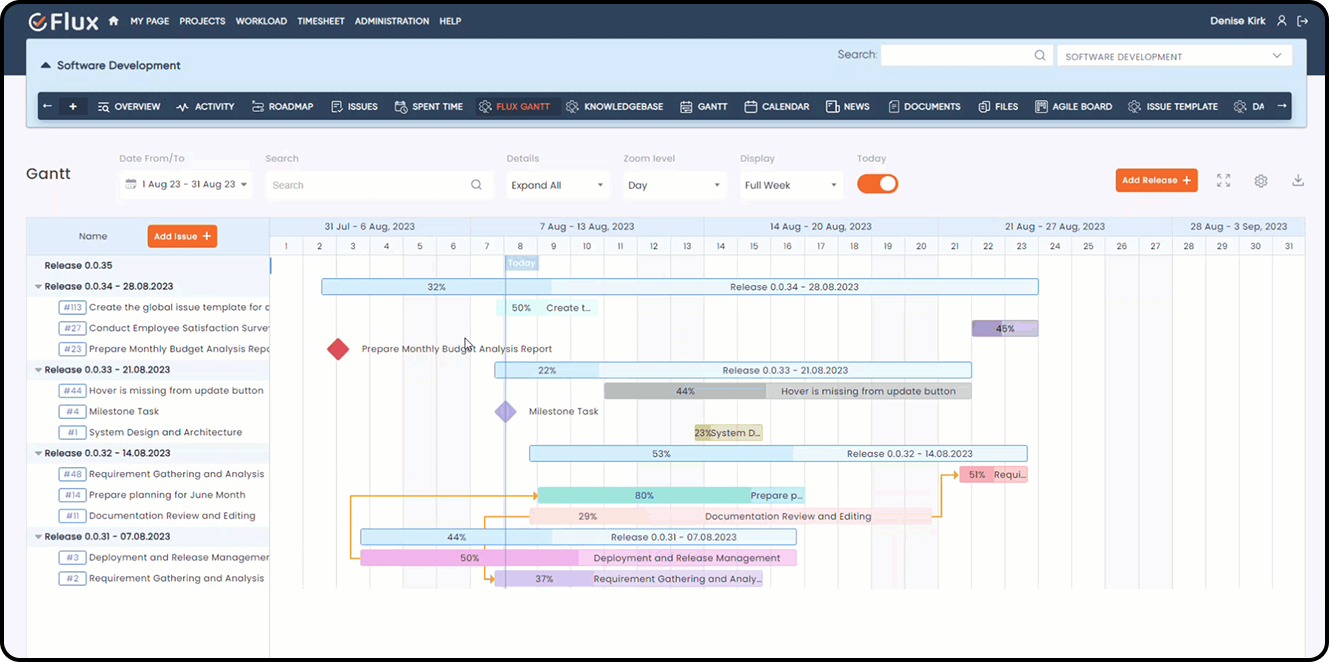
The Gantt Chart Plugin for Redmine helps teams plan projects, manage timelines, and track task progress visually using interactive Gantt charts. It allows users to create releases, schedule tasks, manage dependencies, compare baselines, and update timelines directly from the Gantt view. Users can easily drag and drop tasks, resize task bars, and monitor project schedules across single or multiple projects from within Redmine.
Key Features of Redmineflux Gantt Chart Plugin
- Visualize project timelines and task schedules using interactive Gantt charts.
- Create, edit, and delete tasks and releases directly from the Gantt view.
- Move tasks between releases easily using drag-and-drop functionality.
- Resize task bars directly on the timeline to update schedules quickly.
- Create and manage task dependencies for better project planning.
- Search and filter tasks or releases quickly using IDs, names, or subjects.
- Expand and collapse task hierarchies for improved project visibility.
- Customize columns and task bar colors for better tracking and organization.
- View project timelines with multiple zoom levels including hour, day, week, and month.
- Support hourly-level scheduling with accurate task time alignment.
- Create milestone tasks to track important project deliverables.
- Export Gantt charts in PDF, PNG, and Excel formats.
- Manage project baselines to compare planned and actual schedules.
- Compare multiple baselines to analyze timeline changes effectively.
- View and manage projects across Project Gantt and Global Gantt views.
- Display custom fields for tasks and releases directly in the Gantt view.
- View closed projects in Global Gantt for reporting and historical tracking.
- Improve planning and tracking with optimized performance and lazy loading for large datasets.
Installation notes
Follow below steps for installation:
- Make sure you have a working installation of Redmine.
- unzip the plugin and copy it to redmine_root/plugins or copy the archive in the same location and perform the unzip command in the console
- Run the following command from the Redmine root directory to install the plugin dependencies:
bundle install
- Run migrate command for database migration:
RAILS_ENV=production bundle exec rake redmine:plugins:migrate
- Run the below two rake command to create dependencies:
RAILS_ENV=production bundle exec rake colors:update_issue_colors
RAILS_ENV=production bundle exec rake updatedates:update
- Login as a administrator.
- Navigate to Administration tab from top menu.
- Click on Settings and find the API tab and enable the rest API
- Restart Redmine
- To access the Gantt Chart plugin in your Redmine instance, log in and select your preferred project. Then, enable the Redmineflux Gantt module and save the changes. You can now access the Gantt Chart either within the project or through the multi-project view in the top menu.
Explore All Premium Redmineflux Plugins
Redmineflux Helpdesk Plugin
Redmineflux Knowledge Base
Redmineflux Timesheet
Redmineflux Time Tracker Desktop App
Redmineflux Agile Board
Redmineflux Checklist
Redmineflux Fluxshot Chrome Extension
Redmineflux Workload
Redmineflux Issue Template
Redmineflux Custom Dashboard
Redmineflux Notification
Redmineflux Testcase Management Plugin
Explore All FREE Redmineflux Plugins
Redmineflux Mentions Plugin
Redmineflux Tags Plugin
Redmineflux Inline Editor Plugin
Explore All Premium Redmineflux Themes
Changelog
6.4.0 (2026-05-19)
Compatible with Redmine 6.1.x, 6.0.x, 5.1.x, 5.0.x.