Plugins Directory » Redmineflux MCP
|
|
Author: | Zehntech Technologies Inc |
|---|---|---|
| Website: | https://www.redmineflux.com/mcp/ | |
| Code repository: | - | |
| Registered on: | 2026-10-21 (3 days ago) | |
| Current version: | 1.0.0 | |
| Compatible with: | Redmine 7.1.x, 7.0.x, 6.1.x, 6.0.x, 5.1.x, 5.0.x | |
| User ratings: |
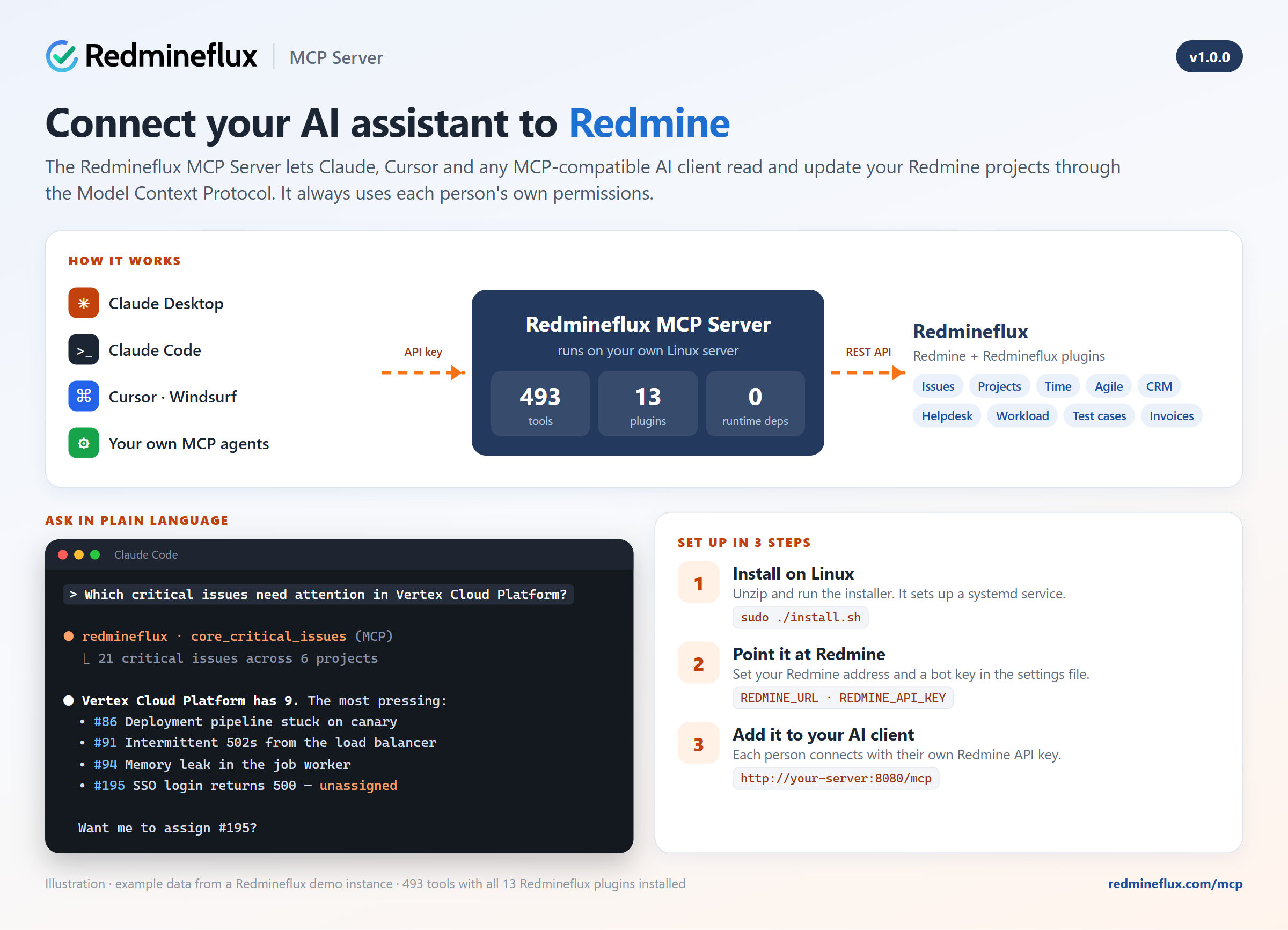
The Redmineflux MCP Server connects AI assistants to Redmine through the Model Context Protocol (MCP), the open standard supported by Claude Desktop, Claude Code, Cursor, Windsurf and other MCP-compatible clients. Ask your assistant about issues, projects, time, CRM deals or helpdesk tickets, and it answers from your live Redmine data. It can also update that data, within your own permissions.
Key Features of Redmineflux MCP Server
- Works with your AI assistant: Claude Desktop, Claude Code, Cursor, Windsurf, and any agent built with an MCP SDK.
- Up to 493 tools: Redmine core (issues, projects, versions, time entries, users, groups, wiki, news, documents, files and more) plus 13 Redmineflux plugins:
- Helpdesk, Workload, Test Case Management, Timesheet, Agile Board, CRM and Invoices
- Checklist, Knowledge Base, Tags, Gantt Chart, Issue Templates and Budget Audit
- Works with plain Redmine too: 93 Redmine core tools need no extra plugin.
- Plugin-aware: the server detects which Redmineflux plugins are installed and loads only their tools. Add a Redmineflux plugin later and its tools appear after a service restart.
- Your permissions, always: each person connects with their own Redmine API key, and every tool call runs with that user's roles and project access.
- Read-only mode: one setting blocks every create, update and delete, so you can start safely and allow changes when you're ready.
- Convenience tools: project summary, project statistics, my workload and critical issues give ready-made overviews in one call.
- Audit log: every tool call is recorded with the user, duration and result. Sensitive parameters are redacted.
- Rate limits: per-session limits protect your Redmine server.
- Streamable HTTP: one server for the whole team, reachable from every AI client on your network.
- Self-hosted:
- a single compiled Linux service with a systemd installer
- runs directly on 64-bit (x86_64) Linux with no Python or Docker required: CentOS / RHEL 7 or newer, Rocky Linux, Ubuntu 20.04 or newer and Debian 9 or newer; it also runs inside a Docker container if you prefer
- your data stays on your infrastructure
How it works
- Install the MCP Server on a Linux server that can reach your Redmine.
- Each user copies their API key from My account → API access key.
- Add the server to your AI assistant (Claude Code example below).
- Ask in plain language, for example: "Which critical issues need attention in my project?", "Log 2 hours on issue 123 for code review" or "Give me an overview of our CRM pipeline."
claude mcp add --transport http redmineflux http://your-server:8080/mcp --header "X-Redmine-API-Key: YOUR_KEY"
Installation notes
To install Redmineflux MCP Server follow these steps
- Make sure you have a working Redmine installation with the REST API enabled: Administration → Settings → API → Enable REST web service.
- Copy
redmineflux-mcp.zipto your Linux server, unzip it and open the folder:unzip redmineflux-mcp.zip && cd redmineflux-mcp - Run the installer:
sudo ./install.sh. It installs the server to/opt/redmineflux-mcpas a systemd service with its own unprivileged user. - Edit
/opt/redmineflux-mcp/.envand setREDMINE_URLandREDMINE_API_KEY. Use a low-privilege bot user's key; it is used only for start-up checks. - Start the service:
sudo systemctl enable --now redmineflux-mcp - Connect your AI assistant to
http://your-server:8080/mcpwith your own Redmine API key.
After you install a new Redmineflux plugin, restart the service so its tools are loaded: sudo systemctl restart redmineflux-mcp
Explore All Premium Redmineflux Plugins
- Redmineflux Helpdesk Plugin
- Redmineflux Time Tracker App
- Redmineflux Knowledge Base
- Redmineflux Gantt Chart
- Redmineflux Timesheet
- Redmineflux Agile Board
- Redmineflux Checklist
- Redmineflux Fluxshot Chrome Extension
- Redmineflux Workload
- Redmineflux Issue Template
- Redmineflux Notification
- Redmineflux Testcase Management Plugin
- Redmineflux Custom Dashboard
- Redmineflux CRM
- Redmineflux Invoice
Explore All FREE Redmineflux Plugins
Explore All Premium Redmineflux Themes
Changelog
1.0.0 (2026-10-21)
Compatible with Redmine 7.1.x, 7.0.x, 6.1.x, 6.0.x, 5.1.x, 5.0.x.