Plugins Directory » Helpdesk Plugin by Redmineflux
|
|
Author: | Zehntech Technologies Inc |
|---|---|---|
| Website: | https://www.redmineflux.com/product/redmine-plugins/helpdesk/ | |
| Code repository: | - | |
| Registered on: | 2026-05-12 (5 months ago) | |
| Current version: | 6.0.0 | |
| Compatible with: | Redmine 6.0.x, 5.1.x, 5.0.x, 4.2.x | |
| User ratings: |
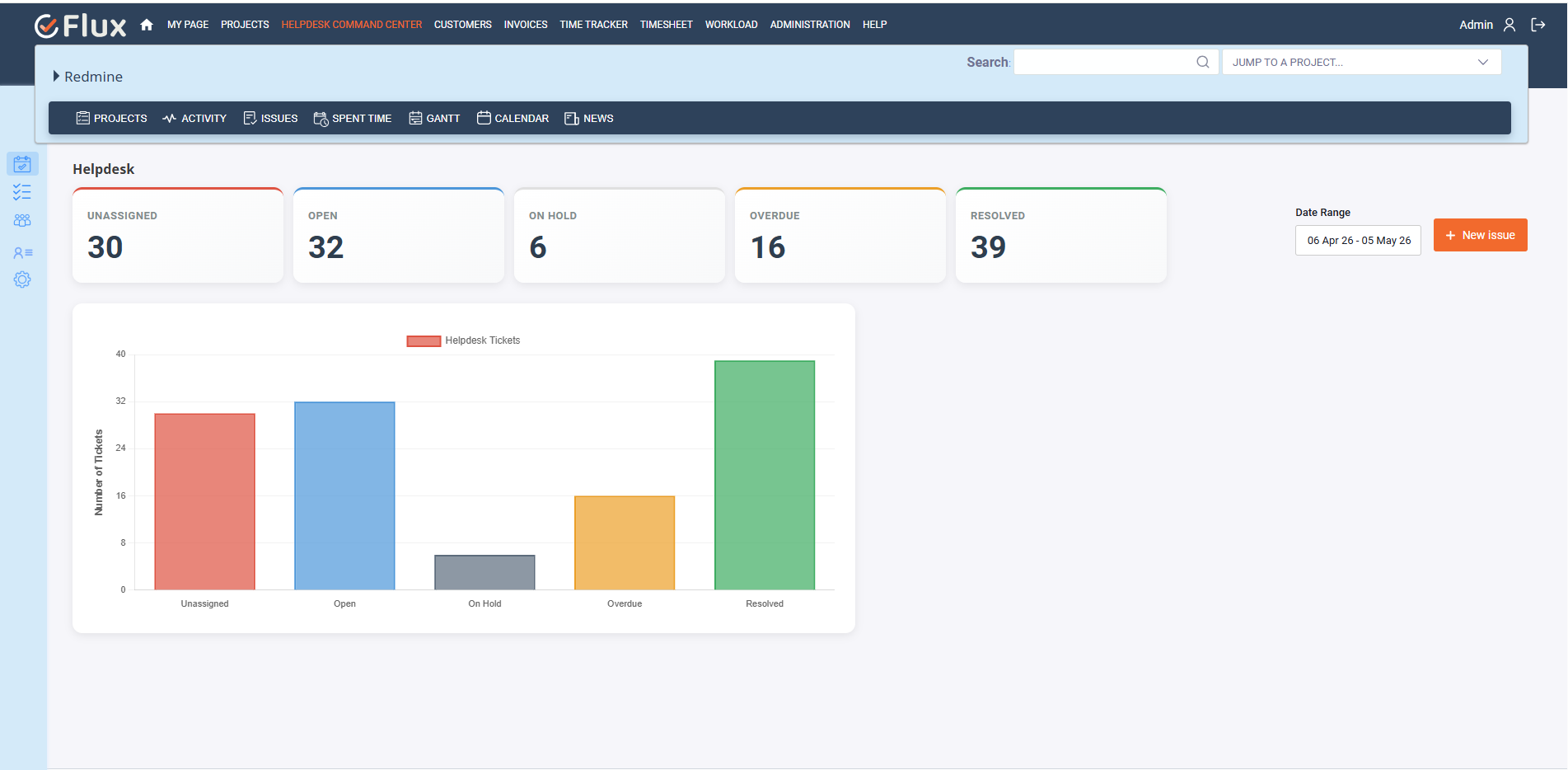
The Helpdesk Plugin for Redmine simplifies customer support management by helping teams create, manage, and resolve support tickets efficiently. It allows users to convert emails into tickets automatically, track SLA timelines, manage customer communication, and organize support workflows from a centralized helpdesk system. Users can easily assign tickets, send replies, and monitor ticket progress directly from Redmine.
Key Features of Redmineflux Helpdesk Plugin
- Convert incoming emails into tickets automatically with email-to-ticket integration.
- Manage all customer support requests efficiently through a centralized Helpdesk Control Center.
- Create, track, and resolve tickets with a structured workflow.
- Configure SLA rules to define response and resolution times.
- Automate ticket escalation across multiple support levels (L1, L2, L3).
- Track ticket status with real-time dashboard insights (Open, Unassigned, Overdue, etc.).
- Filter and analyze tickets using custom date ranges for better reporting.
- Enable project-wise email configuration (IMAP/POP3 & SMTP) for seamless communication.
- Send automated acknowledgments and notifications to customers.
- Manage organizations and map customers across multiple projects.
- Register and manage customers with role-based access.
- Assign tickets to support agents or teams for faster resolution.
- Use canned responses to reply quickly with predefined templates.
- Maintain complete email history and conversation tracking for each ticket.
- Attach files and screenshots to tickets for better issue clarity.
- Configure support trackers to standardize ticket creation.
- Categorize tickets using products and issue categories for better organization.
- Auto-close resolved tickets after a defined duration.
- Exclude holidays and non-working days from SLA calculations.
- Define working hours and business days for accurate SLA tracking.
- Enable multi-project helpdesk management from a single interface.
- Provide role-based permissions for admins, support agents, and customers.
- Monitor SLA breaches and trigger alerts for critical tickets.
- Create tickets manually or automatically via email.
- Customize ticket settings such as subject prefix and identifier keywords.
- Ensure seamless communication with customers via email replies from Redmine.
Installation notes
Follow the below steps for installation:
- Make sure you have a working installation of Redmine.
- unzip the plugin and copy it to redmine_root/plugins or copy the archive in the same location and perform the unzip command in the console
- Run the following command from the Redmine root directory to install the plugin dependencies:
bundle install
- Run migrate command for database migration:
RAILS_ENV=production bundle exec rake redmine:plugins:migrate
- Install Redis (if not already installed)
- On Ubuntu/Debian
sudo apt update
sudo apt install redis-server
- On macOS (using Homebrew)
brew install redis
- On Ubuntu/Debian
- Start Redis
sudo service redis-server start
- Start Sidekiq for Background Jobs Sidekiq is required to process background jobs for the plugin. Start Sidekiq using
bundle exec sidekiq
- Start Sidekiq for Background Jobs
Rails s
- Login as an administrator.
- Navigate to the Administration tab from the top menu.
- Click on Settings and find the API tab and enable the rest API
- Restart Redmine
- To access the Testcase Plugin in your Redmine instance, log in and select your preferred project. Then, enable the Testcase Management module and save the changes. You can also access the multi-project Testcase Management from the application menu.
3. Explore All Premium Redmineflux Plugins
- Redmineflux Knowledge Base
- Redmineflux Gantt Chart
- Redmineflux Timesheet
- Redmineflux Time Tracker Desktop App
- Redmineflux Agile Board
- Redmineflux Checklist
- Redmineflux Fluxshot Chrome Extension
- Redmineflux Issue Template
- Redmineflux Custom Dashboard
- Redmineflux Workload
- Redmineflux Notification
Explore All FREE Redmineflux Plugins
Explore All Premium Redmineflux Themes
Changelog
6.0.0 (2026-05-12)
Compatible with Redmine 6.0.x, 5.1.x, 5.0.x, 4.2.x.