Plugins Directory » CRM Plugin by Redmineflux
|
|
Author: | Zehntech Technologies Inc |
|---|---|---|
| Website: | https://www.redmineflux.com/product/redmine-plugins/crm/ | |
| Code repository: | - | |
| Registered on: | 2026-11-26 (1 day ago) | |
| Current version: | 7.0.0 | |
| Compatible with: | Redmine 7.1.x, 7.0.x, 6.1.x, 6.0.x, 5.1.x, 5.0.x | |
| User ratings: |
Keep your sales and your delivery work in one place. The CRM Plugin for Redmine adds contacts, companies, deals and leads to Redmine, with a drag-and-drop sales pipeline and a two-way link to your issues. Your sales team tracks every deal, your delivery team sees the account behind every ticket, and nobody needs a spreadsheet or a separate CRM tool.
Key Features of Redmineflux CRM Plugin
- Contacts and companies: keep full contact records with company links, avatars and job titles, and see each company's contacts and deals on one page.
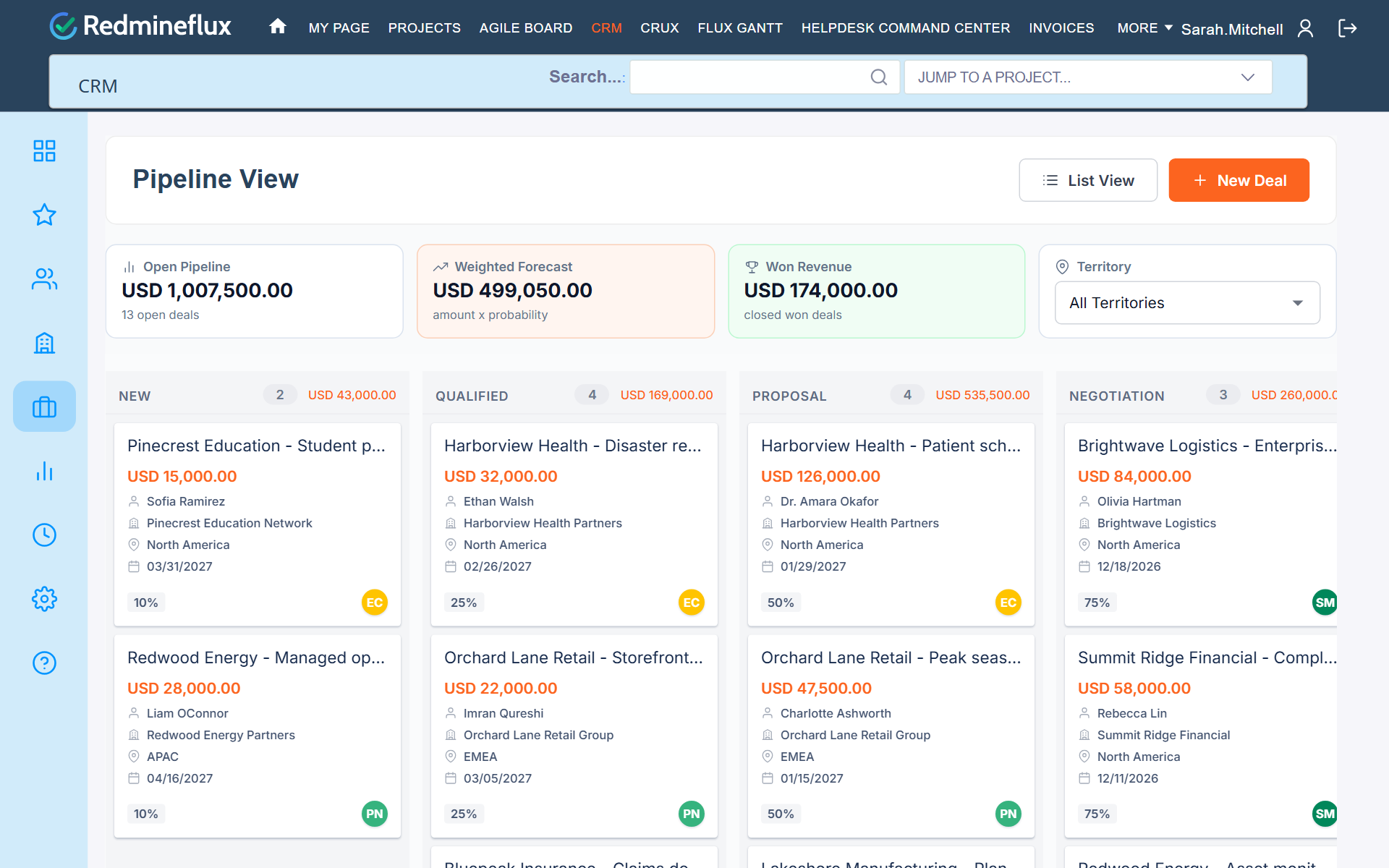
- Sales pipeline: move deals between stages on a drag-and-drop Kanban board. See the deal count and value of every stage, a weighted forecast and the win rate, and filter by territory.
- Deals: track the amount, currency, probability and territory of each deal, and record won and lost deals with their closed date.
- Leads with one-click conversion: track leads by status and source, and convert a qualified lead into a contact and a deal in a single action.
- Activity timeline: log notes, calls, meetings, e-mails and tasks against any contact, company, deal or lead, and read them in one chronological feed.
- Issue integration: link contacts and deals to Redmine issues from the issue page, so your delivery team sees the account context without leaving the ticket.
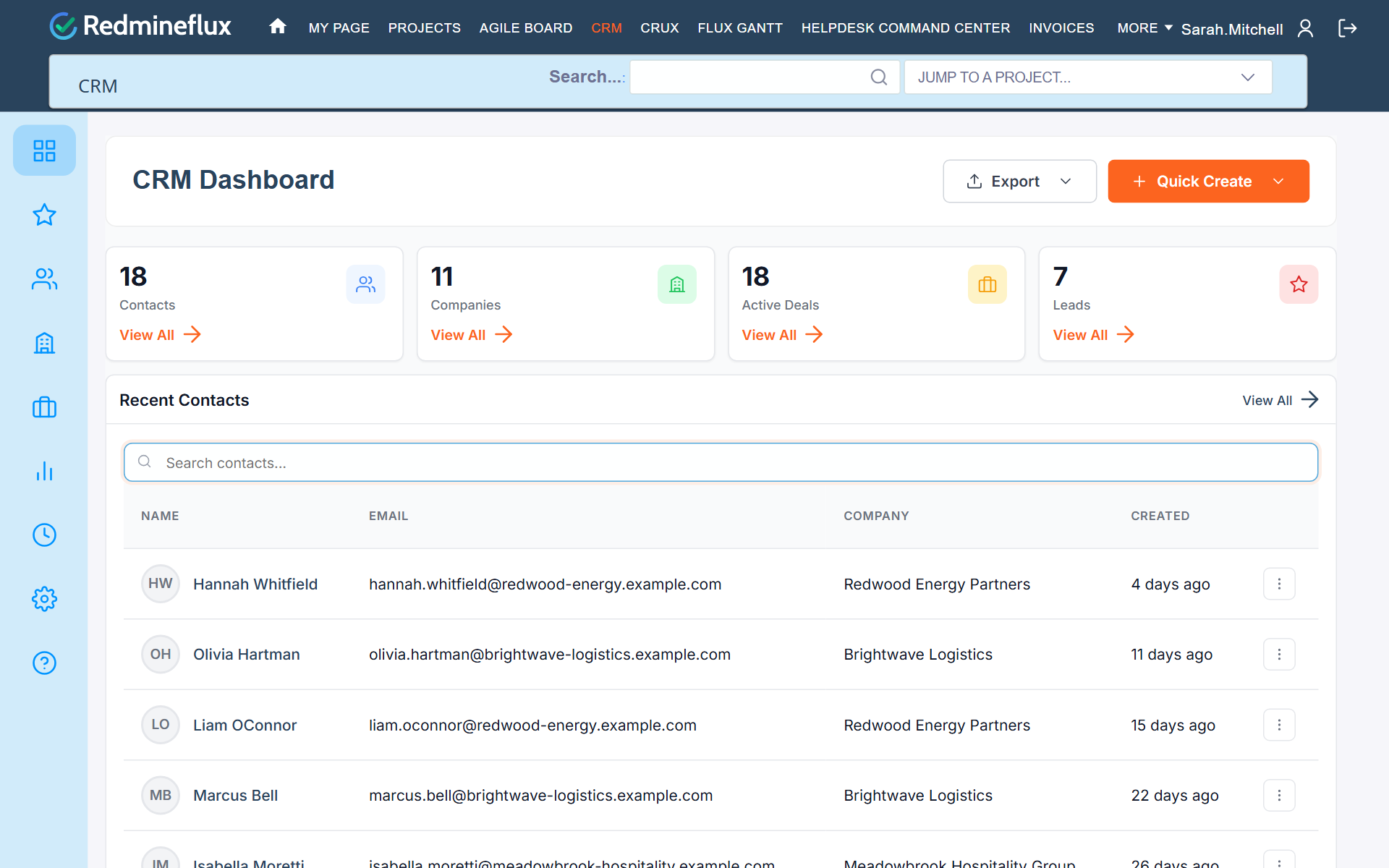
- Dashboard: see summary cards, recent contacts, upcoming deals and a pipeline summary at a glance, and create records from the Quick Create menu.
- Analytics and reports: view the pipeline by stage, the deal momentum trend, the win and loss mix, contact coverage and the top deal owners. Export reports as CSV or PDF.
- Audit log: see who changed what in your CRM data, for accountability on shared accounts.
- Custom fields: extend contacts, companies, deals and leads with Redmine's own custom field types.
- CSV import and export: load and export contacts, companies, deals and leads in bulk.
- Your own pipeline setup: edit the deal stages, lead statuses, lead sources, territories and default currency from the plugin's Settings page, without changing any code.
- Tags (optional): tag contacts, companies, deals and leads when the Redmineflux Tags plugin is installed. The CRM works the same without it.
- Helpdesk panels (optional): when the Redmineflux Helpdesk plugin is installed, a contact page shows the contact's support tickets and purchased products.
- REST API: use the REST API to read and manage contacts, companies, deals, leads and activities, to move deals between stages, to convert leads and to link records to issues.
- Role-based permissions: control who can view, manage, import, export and delete each type of record, who can see the pipeline and the audit log, and who can link records to issues.
- Works across all projects: CRM data is global, so there is no project module to enable. A CRM entry appears in the top menu for every user who has permission.
Installation notes
Follow the steps below for installation:
- Make sure you have a working installation of Redmine (7.0.x, 6.1.x or 6.0.x). The plugin needs the Ruby version that your Redmine version requires.
- Unzip the plugin and copy it to
redmine_root/plugins. You can also copy the archive to the same location and run the unzip command in the console. The folder name must beredmineflux_crm. Redmine does not load the plugin if the name is different. - Run the following command from the Redmine root directory to install the dependencies:
bundle install. The plugin needs no extra gems. - Run the migrate command for the database migration:
RAILS_ENV=production bundle exec rake redmine:plugins:migrate NAME=redmineflux_crm - Restart Redmine.
The plugin needs no Redis, no Sidekiq and no external service.
After the installation:
- Log in as an administrator.
- Go to Administration > Roles and permissions and give the Redmineflux CRM permissions to your roles: View CRM, Manage contacts, Manage companies, Manage deals, View pipeline, Manage leads, Manage CRM activities, View audit log, Delete CRM data and Link CRM to issues. All CRM permissions are global, so there is no project module to enable.
- The CRM entry now appears in the top menu for the users who have the View CRM permission.
- Open CRM > Settings (administrators only), and set the default currency, the deal stages, the lead statuses, the lead sources and the territories. You can drag each list to reorder it. The same settings are also available under Administration > Plugins > Redmineflux CRM Plugin > Configure.
- To use the REST API, go to Administration > Settings > API, select Enable REST web service and restart Redmine.
Good to know:
- CRM data is global. Contacts, companies, deals and leads are not limited to a project.
- Deleting a company does not delete its contacts and deals. It only clears their company.
- The Redmineflux Tags plugin and the Redmineflux Helpdesk plugin are optional. The CRM detects them automatically.
- To uninstall, run
RAILS_ENV=production bundle exec rake redmine:plugins:migrate NAME=redmineflux_crm VERSION=0. This deletes all CRM data.
Explore All Premium Redmineflux Plugins
- Redmineflux Testcase Management Plugin
- Redmineflux Helpdesk Plugin
- Redmineflux Crux Chat
- Redmineflux Crux Agents
- Redmineflux AI MCP Server
- Redmineflux Gantt Chart
- Redmineflux Agile Board
- Redmineflux Custom Dashboard
- Redmineflux Checklist
- Redmineflux Knowledge Base
- Redmineflux Timesheet
- Redmineflux Time Tracker
- Redmineflux Workload
- Redmineflux Invoice
- Redmineflux Issue Template
- Redmineflux Notification
- Redmineflux Fluxshot Chrome Extension
Explore All FREE Redmineflux Plugins
Explore All Premium Redmineflux Themes
Changelog
7.0.0 (2026-11-26)
Compatible with Redmine 7.1.x, 7.0.x, 6.1.x, 6.0.x, 5.1.x, 5.0.x.